After I installed Codex CLI, the first problem I ran into wasn’t an approval prompt. It was npm install.
Files were being edited just fine, but the dependency install kept stalling. For a long while I took it for a problem with npm itself.
Here’s the short version. Don’t force your way through with sudo.
And approval and sandbox are two completely different axes. If you can’t tell them apart, you’ll keep running into the same confusion: “I clearly allowed this, so why won’t it run?”
Why does Codex CLI npm install fail in workspace-write mode?
workspace-write lets Codex write files, but network access is a separate setting. So a command that needs the network, like npm install, can be blocked even while file edits work normally.
At first I just thought npm was acting up. Code files were still being edited normally, after all.
Once setup was done and I ran real work, code changes went through fine. Only the dependency install step kept getting stuck.
For a while I suspected my npm config. The real cause was the sandbox’s network access setting.
Since then, I treat “can it write files?” and “can it use the network?” as two entirely separate permissions.
According to the official docs, workspace-write handles filesystem writes and network access as different boundaries (OpenAI docs: Sandbox).
I couldn’t confirm the exact config key name in the docs, though. So in this post I’ll only go as far as “network access is controlled by a separate setting.”
Should you use sudo when a global npm install hits EACCES?
I don’t: sudo gets the package installed for now, but the permission setup gets more tangled afterward. What fixed it was cleaning up the Node install path and reinstalling from a user-level Node environment.
This was a separate problem, early in the installation. A system Node and a Node version manager I’d installed separately were mixed on the same machine.
Installing a global npm package ran into a permission error.
My first reaction was sudo npm install -g .... I stopped there, because I’d already been through this before.
Cleaning up the Node install path and reinstalling from the user-level Node environment made the problem go away.
What I took from that trial and error: an EACCES error doesn’t automatically mean you should use sudo.
Approval vs sandbox in Codex CLI: what’s actually different?
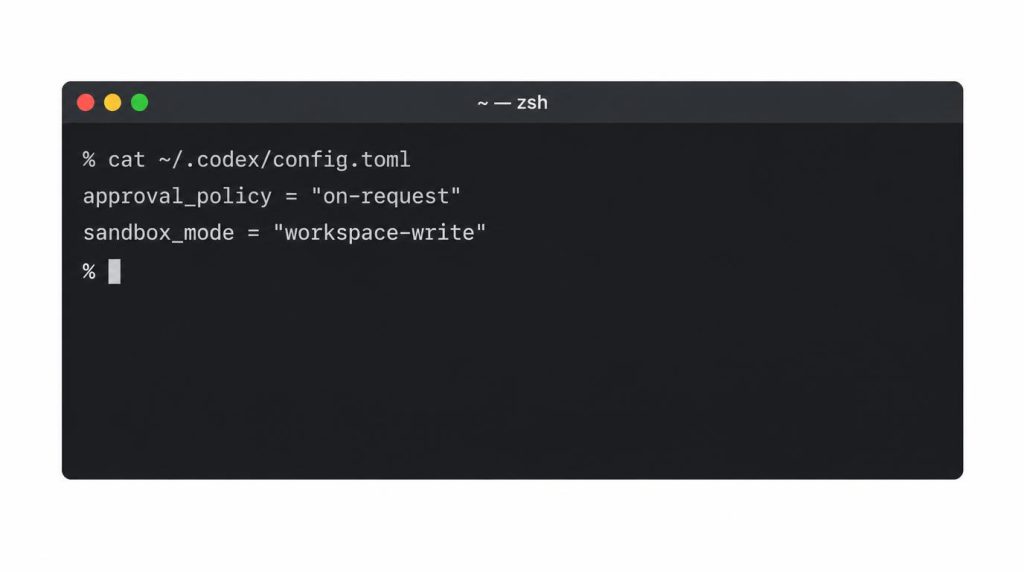
approval_policy decides when to ask a human, and sandbox_mode decides how far things can run without asking. They’re independent axes, which is why a permissive approval setting doesn’t lift the sandbox.
I didn’t know this distinction from the start.
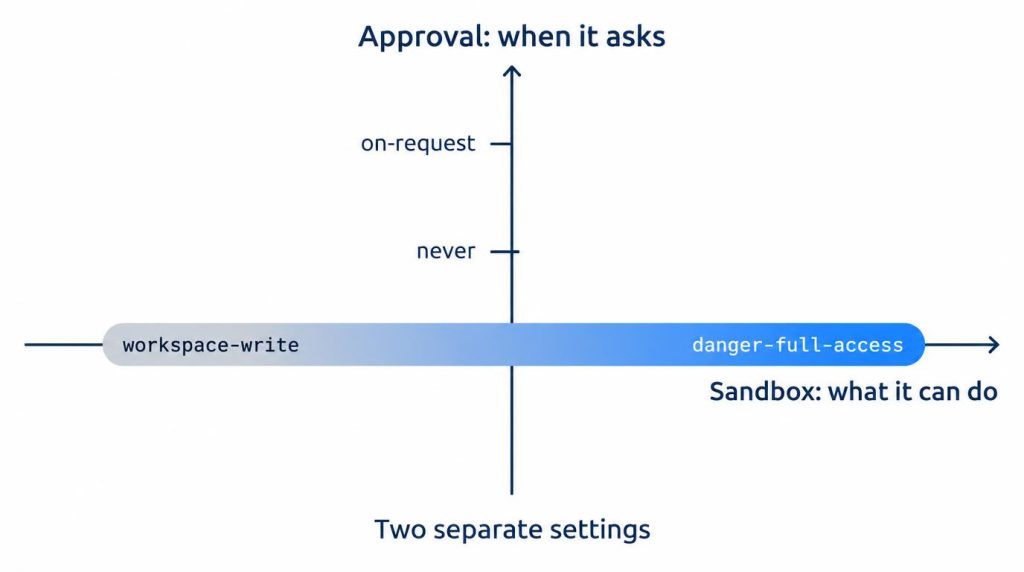
Why I misread never as “allow everything”
When I saw approval_policy = "never", my first thought was simple: “So now everything gets allowed automatically.”
That’s not how it worked. Even with never, actions outside the sandbox were still restricted.
The official docs say the same thing. --ask-for-approval never is designed to work with every --sandbox mode.
So the sandbox restrictions stay in place no matter what the approval setting is (OpenAI docs: Agent approvals & security).
What to watch for as of September 2026
Everything in this post was checked as of September 2026. Codex CLI has a history of changing flag names and config values from release to release.
If you copy option names from an older tutorial, they may not match the latest version.
For example, approval_policy = "untrusted" was retired by a PR merged in August 2026. On 0.149.0 and later, reading a config file that still has this value stops Codex from even starting, with an error (openai/codex PR #39630).
The approval_policy values the official docs list are on-request, never, and the finer-grained granular. I couldn’t confirm a value called “unless-trusted,” even though it gets mentioned a lot.
So whenever I touch config.toml again, I find it safer to reopen the CLI help and the official config reference first.
workspace-write vs danger-full-access: how much time do approvals cost?
I ran the same refactoring task 5 times in a personal/POC repository on macOS Apple Silicon. workspace-write + on-request took 14–16 minutes; danger-full-access in an isolated environment took 11–13 minutes (my own measurement, not a general performance figure).
I changed only two conditions.
| Condition | Time (5-run average range) | Approval interventions |
|---|---|---|
| workspace-write + on-request | 14–16 min | 2–4 |
| danger-full-access (isolated environment) | 11–13 min | None (no approval prompts) |
Where did the 2–4 approvals come from?
With workspace-write + on-request, each run usually had about 2–4 permission interventions. Edits to files inside the workspace and ordinary tests mostly went straight through.
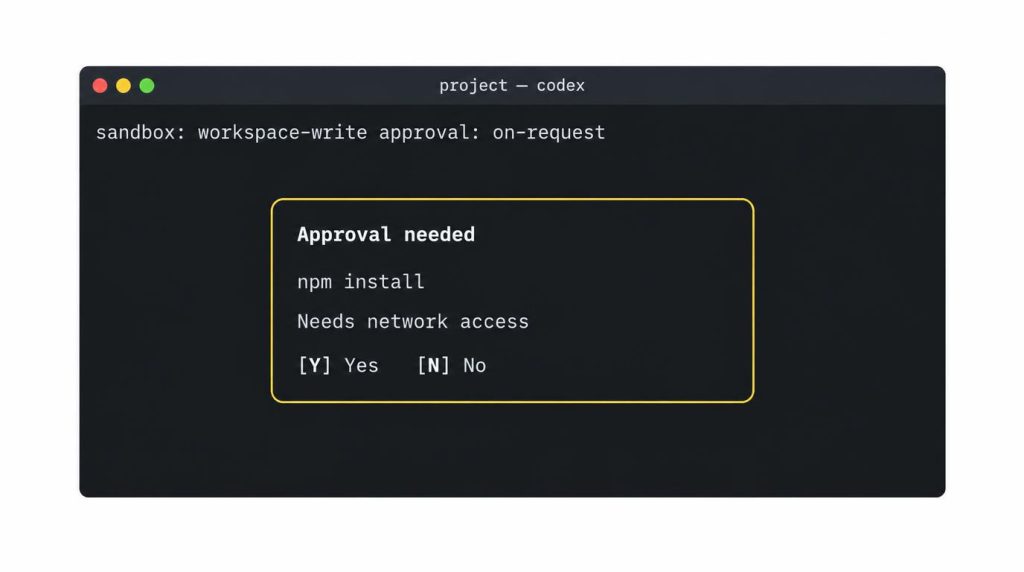
Where it stopped was mostly the same kind of moment: something needed network access, or needed to touch a file outside the workspace.
14–16 min vs 11–13 min, and why I don’t generalize it
Running the same task with danger-full-access in an isolated environment almost removes the time spent stopped for approvals (see the table above).
I won’t turn this into “danger-full-access is 20% faster” as a general performance number. The actual gap depended heavily on how much access outside the sandbox the task needed.
I didn’t measure with precise timestamps, either. It’s five personal runs, nothing more.
When is danger-full-access safe to use?
My rule is to use danger-full-access only in environments you can throw away whole, like Docker, a disposable VM, or a separate worktree. read-only, the most conservative mode, blocks writing in the first place, so it isn’t part of this comparison.
The official docs describe danger-full-access as a mode that removes the filesystem and network boundaries completely (OpenAI docs: Sandbox). --dangerously-bypass-approvals-and-sandbox (alias --yolo) isn’t labeled “EXTREMELY DANGEROUS” in the docs.
It’s shown as [Elevated Risk] No sandbox; no approvals (not recommended), with a warning to use it with care (OpenAI docs: Agent approvals & security).
--sandbox/-s and --profile are in the docs. I couldn’t find support for --worktree or --approve-for-me flags within what I checked, so I don’t cover them here.
Personal repo, POC at work, automation experiments: my baseline for each
In practice I split things into three environments. For personal repositories, it’s workspace-write + on-request on the macOS host.
For a POC at work, I stay mostly on workspace-write in a development repository. I keep credentials and production access in entirely separate tools and environments.
Only low-risk automation experiments get broader permissions, in Docker or a disposable worktree.
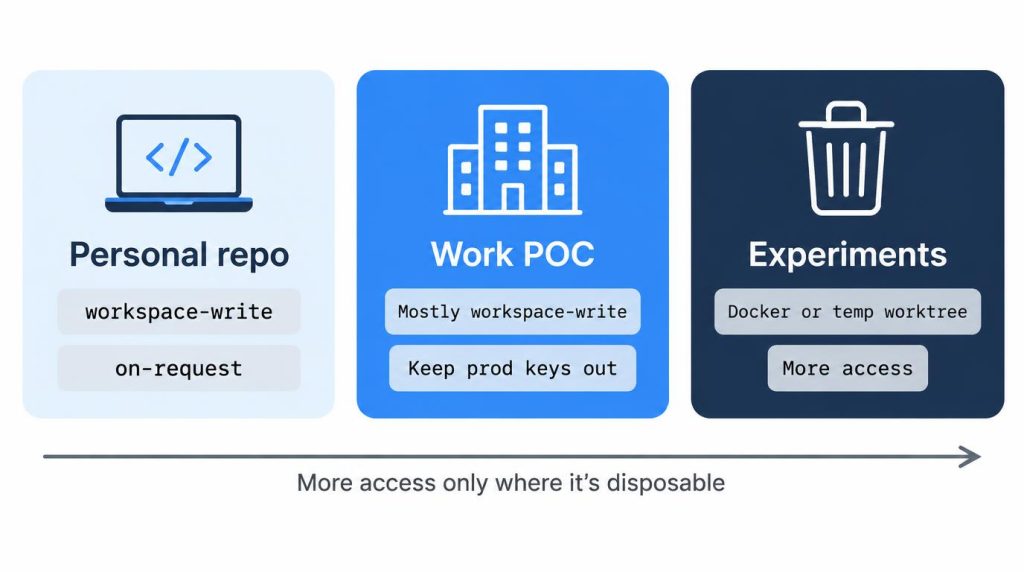
My default is always workspace-write.
The question I decide by isn’t speed. It’s “If this agent runs something wrong, is it OK for the damage to reach outside the workspace?” Most of the time the answer is no.
In my everyday development repositories on the host, I don’t make a bypass option the default just because it’s convenient.
Keep profiles to a minimum
I don’t create a lot of profiles. I keep the default config conservative and maintain roughly one separate profile for isolated environments.
Codex CLI vs Antigravity CLI: which needed fewer approvals?
On the same task, Antigravity took about 18 minutes in approval mode and about 12 minutes on auto-proceed. Codex’s workspace-write + on-request felt like it needed fewer interventions (a personal comparison that can vary by tool and timing).
| Tool / mode | Time | Approvals | Blocked |
|---|---|---|---|
| Antigravity CLI, approval mode | ~18 min | 6–7 | 4 |
| Antigravity CLI, auto-proceed | ~12 min | – | – |
| Codex workspace-write + on-request | 14–16 min | 2–4 | – |
Compared with my Antigravity runs, Codex’s workspace-write + on-request felt less like approving every normal command inside the workspace one by one.
For everyday coding agent use, this combination was more comfortable. In both cases, I judged by the same criteria: blast radius and reversibility.
One thing was the same, though. If you can’t tell sandbox and approval apart, any tool gets confusing in the same way.
Exactly which Codex combination corresponds to Claude Code’s --dangerously-skip-permissions has already been covered by other posts. So I won’t go deep into it here.
For me, the sandbox isn’t about distrusting the agent
However good models get, failure paths that have nothing to do with model reasoning remain. The ones I mean are shell commands, package scripts, a wrong path, an unexpected test cleanup. My default is to keep one mistake’s blast radius inside the workspace, not to save a few approval clicks.
References
- OpenAI docs: Sandbox: source for how sandbox modes split filesystem and network boundaries, and for danger-full-access removing those boundaries
- OpenAI docs: Agent approvals & security: source for approval_policy and sandbox_mode being independent, the bypass flag’s warning label, and the CLI flags
- openai/codex PR #39630: Retire the untrusted approval policy: source for
approval_policy = "untrusted"being retired and the startup error on 0.149.0
This article was localized from the Korean original: https://jjeongil.tistory.com/3566.