Pick your country from the list first, then type your number without the country code. Wait a couple of minutes before you resend. If nothing arrives, look in your phone’s filtered or spam messages before you press resend again.
This guide mixes two cases I sat through, Kakao’s Korean help pages (checked October 30, 2026), and what Korean users report on Naver.
On this page
- What does “cannot be sent to this number” mean on KakaoTalk?
- What should you check first, and when should you stop retrying?
- Where does the code hide on iPhone and Samsung, and can your carrier block it?
- What do “verification is still in progress” and “message failed to send” mean?
- Can you verify by email, by call, or without a phone number?
- How do you contact Kakao support if the code never arrives?
- After it works, what do Koreans see and what still needs a Korean number?
- FAQ
What does “cannot be sent to this number” mean on KakaoTalk?
KakaoTalk won’t send a code to the number as you typed it, or to a line it thinks can’t take one. Kakao’s help center lists the cases where a code can’t be received: calls are forwarded, the line can’t roam abroad, the phone has no active service line, or the line is suspended or cancelled. A wrong country picks the wrong number entirely.
If you arrived on a data-only eSIM, make sure your home line is still switched on. I compared those setups in my Korea eSIM guide.
The wording is the same on iPhone, Samsung, and other Android phones, so the fix doesn’t depend on the device.
Kakao’s help center (Korean) puts it bluntly: if the number can’t receive the code, you can’t use KakaoTalk.
| Message on screen | Likely meaning | Where to look |
|---|---|---|
| Cannot be sent to this number | Number rejected as entered | Next section |
| Code sent, nothing arrives | Text filtered or delayed | iPhone and Samsung section |
| Still in progress / failed to send | Alternate route stuck | Send-a-text section |
What should you check first, and when should you stop retrying?
If the code is not received, check the country, then the number, then turn off call forwarding. After that, my rule is three requests at most, about two minutes apart. If nothing shows up five minutes after the third, I stop pressing and go looking for where the text went.
I’ve watched this go wrong once with a foreign number. A visiting engineer from a partner company needed to join our team group chat on his first evening, and I installed KakaoTalk on his phone with him.
He picked his home country and typed the number correctly. The code still didn’t come, and we burned the first three or four minutes rechecking digits that were already right.
He was roaming on his home number. We pressed resend once, and a code landed within about two minutes. The whole thing took roughly five to eight minutes.
I can’t say whether the resend worked or the first text was just late. Since then, I don’t press resend two or three times in a row.
Country code and leading zero
Kakao’s help page (Korean) says to enter your mobile number without the country code, and to switch the country if the default one is wrong. On my phone the country field starts on South Korea +82, with a search box at the top of the list.
Kakao doesn’t tell you to drop a leading zero. Its own example on another help page (Korean) is a Korean number written 010-0000-0000, zero included. So the usual mistake is typing +44 or +1 in front, not the zero.
Is there a resend limit or a 24-hour lock?
Kakao’s help center doesn’t list one. Some online guides say too many requests lock the number for 24 hours, but nothing on Kakao’s help center says so. Only 2 of 71 Korean posts mention a request limit at all.
What Kakao does say is that codes can take a while in some countries because of the carrier, and to contact support if nothing arrives within a day.
Where does the code hide on iPhone and Samsung, and can your carrier block it?
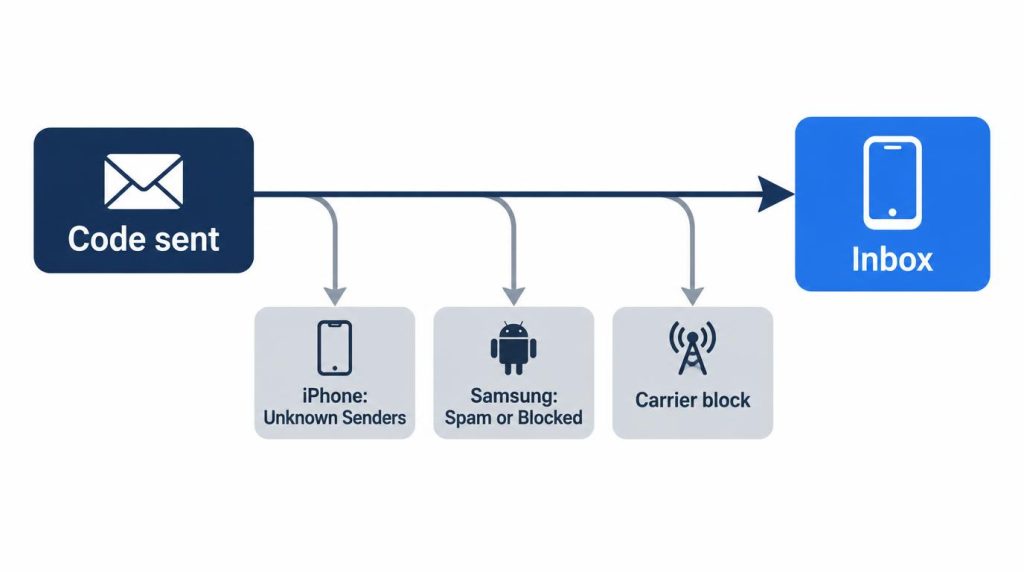
This one caught me in September 2026. I moved from an iPhone 17 Pro to an 18 Pro and kept my number. KakaoTalk asked for a code, and no text showed up.
My old phone was still getting normal texts on the same number. I don’t use an international-call block or a spam app, so those weren’t it.
The cause was Filter Unknown Senders in iPhone’s Messages settings. The codes went quietly into the unknown senders list, and when I opened it, three texts were already waiting.
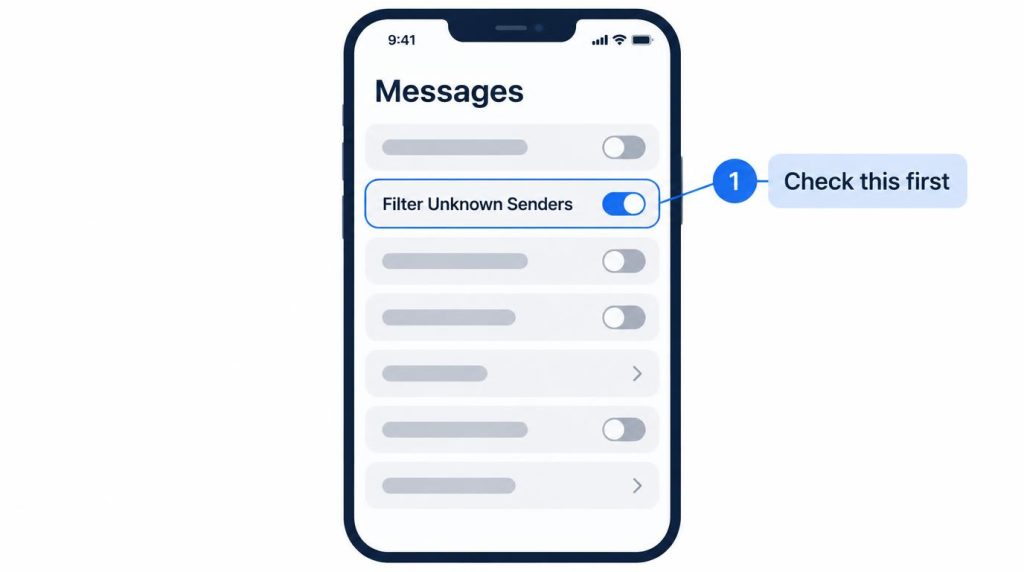
It took 10 to 15 minutes, most of it spent waiting for texts that had already arrived. That’s longer than my three-tries rule allows, because I was watching the wrong inbox. Now I check message filtering first whenever I set up a new phone.
On Samsung, the equivalent places are the spam and blocked folders in Messages.
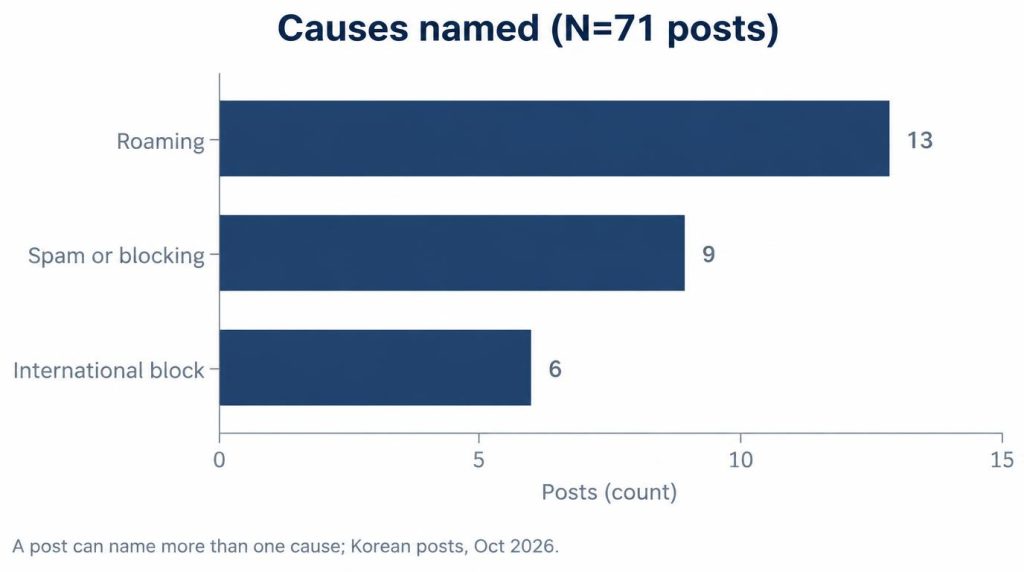
Korean posts point the same way. In 71 Naver posts about codes not arriving on overseas numbers, 13 blamed roaming and 9 blamed spam or blocking. Another 6 named an international-number block, like one post’s “a 007 international number was on the block list” (Naver blog, Korean).
Carriers can block these texts too. On a UK carrier’s community forum, the carrier was stopping overseas verification texts for a different app.
With the home line switched off on a data-only eSIM, nothing will come at all.
What do “verification is still in progress” and “message failed to send” mean?
Kakao’s help center doesn’t explain either message. Korean posts link them to a route where you send a text to Kakao instead of receiving one.
Kakao’s help center describes only two ways in: receiving a text or receiving a call. As of October 2026, my own change-number screen (Korean UI) shows a single button under the number field, “receive verification text.” I see no call option and no send-a-text option there.
In 100 Naver posts on KakaoTalk text verification, 17 mention sending a message yourself. One says, “If you’re on the send-a-text screen, check your sending limits” (Naver blog, Korean).
If you see “failed to send,” check that your plan can send an international text before you retry.
Can you verify by email, by call, or without a phone number?
Not by email, and not without a number. Kakao says verification needs a phone that can receive SMS or calls, and that it offers no email route and no way to skip the step.
Kakao’s help center mentions a verification call, but my screen doesn’t offer one.
Email matters only later. If you set an emergency email for Kakao Account two-step verification, Kakao’s help page (Korean) says you can log in with it after losing your phone or changing numbers. It doesn’t replace the phone number at signup.
Virtual-number services advertise workarounds. I don’t recommend them. You don’t control that number, so you may not be able to verify again when you change phones.
How do you contact Kakao support if the code never arrives?
Kakao’s help pages say to contact support once a full day has passed without a code. The help center offers three routes:
- The “Kakao Customer Center” channel inside KakaoTalk: a chatbot around the clock, and human chat on weekdays 10:00 to 18:30 Korean time.
- The email inquiry form at the bottom of each help page, answered by email.
- A paid phone line, 1577-3754.
The first one needs a working KakaoTalk, which is exactly what you don’t have yet. For a guest with a foreign number, I’d use the email form and write down the full number, the phone model, and the exact message on screen.
After it works, what do Koreans see and what still needs a Korean number?
Korean contacts may see an orange globe on your profile, and some Kakao services still want a Korean number.
The globe is Kakao’s Globe Signal. Kakao’s help page (Korean) says it marks accounts registered with an overseas number that aren’t in the viewer’s friends list, a warning added after messenger phishing rose. Opening a chat with such an account shows a warning with the account’s country. Once the viewer adds you as a friend, the globe and the warnings go away.
That matched what I saw. When the engineer joined our group chat, his profile showed the globe. I added him as a friend right away, because I had to send him his hotel location and the next day’s plan. The globe was replaced by his own profile picture.
I knew who he was, so the globe meant nothing to me. A stranger with a globe asking about money or links is different, and I don’t reply to those.
Kakao’s help center (Korean) also says Talk Cloud backup is restricted for users who aren’t Korean KakaoTalk users.
Kakao T, the taxi app, is another snag. In 100 Naver posts on Kakao T with a foreign number, 16 discussed it. One said, “With a KakaoTalk account linked to an overseas number…” (Naver blog, Korean). I covered sign-up and foreign cards in my Kakao T guide.
For a two- or three-day visitor, I don’t push KakaoTalk at all. I use WhatsApp or whatever the guest already has, then email or text. I only install KakaoTalk when someone has to be in our team chat.
I skip it entirely when the phone can’t receive texts on its home number, such as a data-only eSIM or roaming turned off.
FAQ
Can foreigners use KakaoTalk?
Yes. Kakao only requires a phone number that can receive SMS or calls, so a foreign number works if it gets texts.
Does it matter whether I’m on iPhone or Android?
Not for the error itself. It matters for where a delivered code hides: the unknown senders list on iPhone, the spam or blocked folder on Samsung.
Sources
- Can KakaoTalk login be verified only by SMS or call? (Korean), Kakao Help Center, checked 2026-10-30: a number that can receive SMS or calls is required; no email or skip; cases that can’t receive a code (call forwarding, no roaming abroad, phone without an active line, suspended or cancelled line); support channel hours and 1577-3754
- Using KakaoTalk with a non-Korean country code (Korean), Kakao Help Center, checked 2026-10-30: enter the number without the country code; select the country if the default differs
- Verification text not arriving (Korean), Kakao Help Center, checked 2026-10-30: example number 010-0000-0000; carrier delays in some countries; contact support after a day
- Orange globe on profiles (Korean), Kakao Help Center, checked 2026-10-30: Globe Signal, chat warning with country name, removed once added as a friend
- Talk Cloud outside Korea (Korean), Kakao Help Center, checked 2026-10-30: Talk Cloud restricted for non-Korean KakaoTalk users
Show 3 more sources
- Logging in after losing or changing your phone (Korean), Kakao Help Center, checked 2026-10-30: two-step verification login via a preset emergency email
- Cannot receive verification codes, EE Community forum: carrier blocking overseas verification texts (different app)
- Naver searches (2026-10-24; queries: “카카오톡 해외번호 인증번호 안옴”, “외국인 카카오톡 가입 인증”, “외국 번호 카카오T 본인인증”, “카카오톡 인증번호 문자 보내기 인증”): Korean post tallies cited in the text