iOS 27.1 is a Duo-only update: Apple released it on October 23, 2026, for the iPhone Duo and no other model. If your iPhone isn’t a Duo, your drain comes from iOS 27.0.1 or iOS 27.2, not 27.1. The usual cause is two days of post-update indexing. Wait it out on the charger, then check Settings > Battery.
My main phone is an iPhone 18 Pro, and 27.1 never showed up on it. The Korean posts I quote below are other people’s reports, which I counted on Naver.
Is iOS 27.1 really draining your battery?
Probably not, unless you own a Duo. Here is what Apple’s security releases page lists for iOS 27, as of October 30, 2026 (Apple security releases):
- iOS 27.0.1: September 28, 2026, iPhone 11 and later.
- iOS 27.1: October 23, 2026, iPhone Duo only.
- iOS 27.2: October 26, 2026, iPhone 11 and later. In Korea it arrived on October 27, local time.
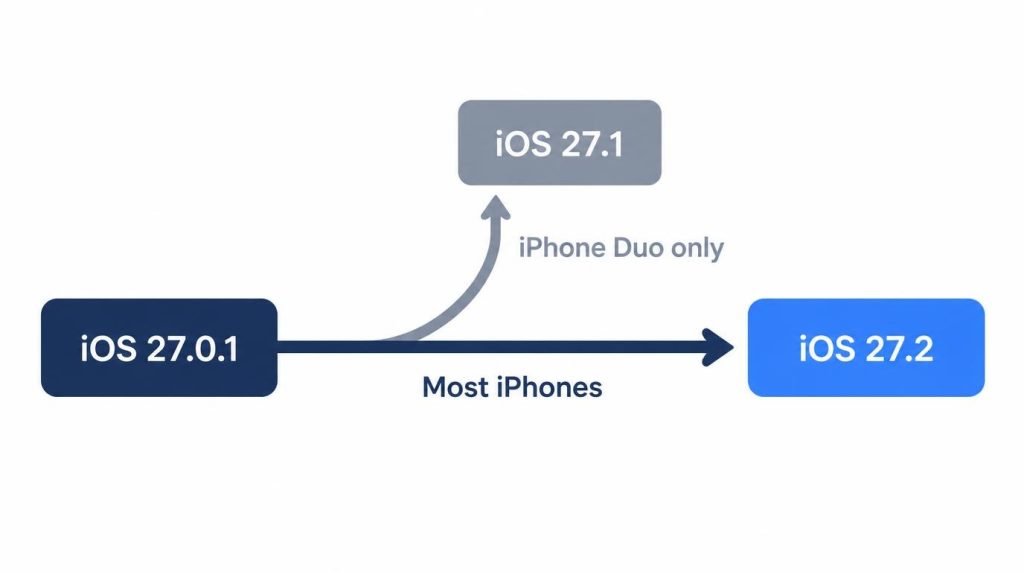
To see what you’re running, open Settings > General > About and read the iOS Version line. On my 18 Pro, Software Update jumped from 27.0.1 straight to 27.2.
Korean searchers have already moved on. On Naver’s keyword tool on October 30, “iOS 27.2” drew about 28,000 monthly searches (PC plus mobile), against about 2,100 for “iOS 27.1.”
What Korean iPhone owners report
I counted 9 relevant Naver posts on October 29, two days after 27.2 reached Korea.
| Topic | Posts |
|---|---|
| No issue or better | 3 |
| Version confusion or hesitation | 3 |
| Drain | 2 |
| Heat | 1 |
Only one of the two drain posts is clearly from 27.1. A Duo owner titled the post “Duo battery draining fast.” For the hinge side of the Duo, see what Korean owners reported about the iPhone Duo crease.
The other drain post says “after 27.1,” but the writer’s phone was about a month old, and the Duo had not launched a month earlier. That was almost certainly 27.0.1. Their battery drained a bit faster, then went back to normal a few days later.
On October 30 I searched again for posts written after 27.2 went public. Five new ones turned up, and none reported drain:
- Two said battery lasts longer on 27.2, one on a public build and one from an iPhone 17 Pro owner.
- Three were asking whether to update, including a 15 Pro Max owner who thought they were on 27.1, which that model can’t install.
That’s 14 posts in total, and one Duo report. I’d treat “the Duo drains on 27.1” as unproven either way.
My iPhone 18 Pro after iOS 27.0.1
I updated on September 28, the day 27.0.1 came out. For two days I got home with about 20% instead of my usual 30s, from memory. On day three it was normal again. I wrote up the phone’s other first-month issues in my iPhone 18 Pro problems report.
Days one and two
That first afternoon, the percentage dropped faster than usual and the back felt warm. In Settings > Battery, Photos and Settings sat at the top of the usage list.
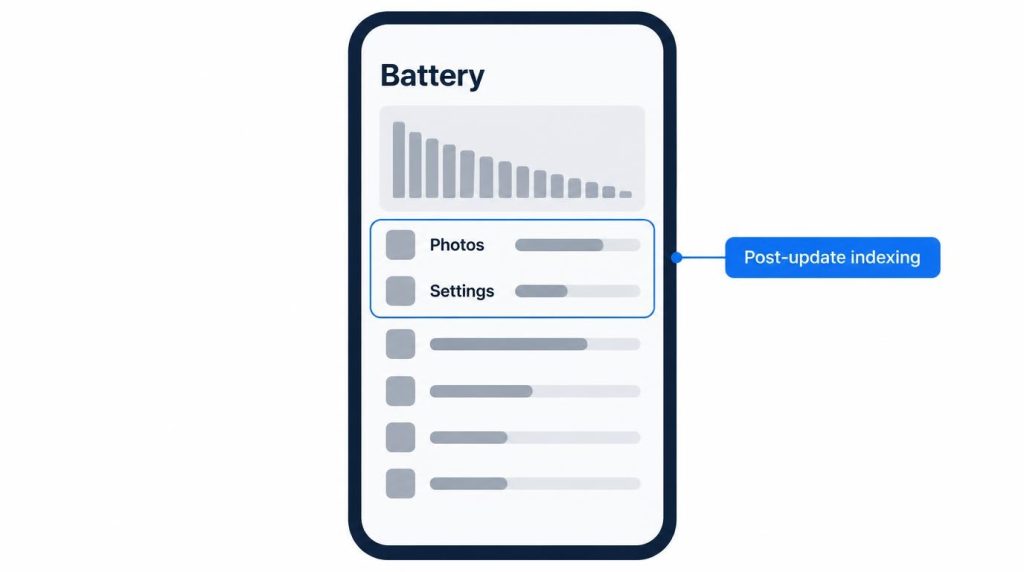
I read that as post-update photo analysis and indexing, not a broken app.
What didn’t help
I restarted the phone, which took 2–3 minutes. The drain rate didn’t change. The next morning I swiped away five or six open apps. That didn’t help either, and reopening them seemed to cost more. Altogether I lost under 10 minutes.
I left Background App Refresh on, since the heavy items were system tasks, not apps.
What fixed it
Leaving it on the charger overnight. Indexing mostly runs while the phone charges with the screen off, and by the morning of day three the drain was gone.
I also keep a spare iPhone 17 Pro on Wi-Fi only, on the same 27.0.1, to separate device problems from OS problems. I didn’t log its battery during those two days. If you compare two phones, write down the percentage at a fixed time each day.
Should you update to iOS 27.2 for battery?
For most people, yes. Four days in, 27.2 has been better than 27.0.1 on my phone. I installed it on the evening of October 27, at home on Wi-Fi with the charger plugged in. Download, install and restart took 20–30 minutes, and my data stayed intact.
What I saw at the end of each workday, from memory:
- October 28 and 29: between 30% and 36%, my usual range.
- October 30: about 34%.
- Top of the usage list: Photos on install night and the next day, then KakaoTalk and YouTube from day three.
Photos dropping off the list on day three is how I knew indexing had finished. That matches the 27.0.1 timeline.
I turned on Siri AI in Korean, which Apple added in 27.2 as a beta, the night I installed it. I use it five or six times a day, mostly to put dates from messages into Calendar. I haven’t noticed faster drain since. Siri hasn’t shown up near the top of the battery list either.
I left the spare 17 Pro on 27.0.1 on purpose. If the two phones start behaving differently, I check the OS version first.
When to wait and when to act
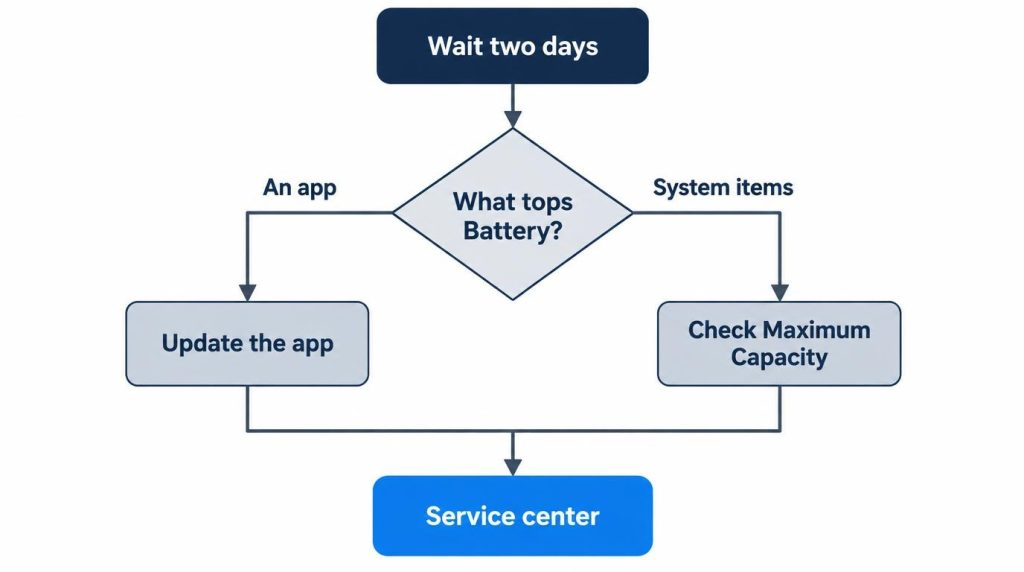
Wait two days. TechSpot’s iOS 27 report puts post-update background work at 24–48 hours, and on both of my updates it ended on day three. After that, check which item tops Settings > Battery and act on that.
My order:
- Days 1–2: watch Settings > Battery, charge overnight, skip restarts and force-closing.
- After day 2, an app stays on top: update that app, or turn off its Background App Refresh in Settings > General > Background App Refresh.
- After day 2, system items stay on top: check Maximum Capacity in Settings > Battery > Battery Health.
- About a week of the same pattern: get a diagnosis at an Apple service provider. It may be the device, not the update.
On my phones, Maximum Capacity reads 100% on the 18 Pro, which I’ve used for about a month and a half. It reads 95% on the 17 Pro, about a year old. Apple’s battery and performance page (updated June 1, 2026) says iPhone 15 and later batteries are designed to keep about 80% of their capacity after 1,000 full charge cycles. iPhone 14 and earlier are rated for 500 cycles.
I start looking at a battery replacement below 85%. My 17 Pro is on AppleCare+, and Apple Korea’s battery service page says a covered battery under 80% capacity is replaced at no extra cost (checked October 30, 2026).
Three groups shouldn’t install 27.2 today:
- People without a recent backup.
- People who need banking or company security apps working tomorrow. Give it two days and check those apps first.
- Owners of older models like an iPhone 11. An aging battery makes indexing drain more noticeable.
Sources
- Apple security releases, Apple, checked October 30, 2026: release dates and devices for iOS 27.0.1, 27.1 (iPhone Duo only), and 27.2
- iPhone Battery and Performance, Apple, updated June 1, 2026: Battery Health path and the 500 or 1,000 cycle ratings
- iPhone battery service (Korean), Apple Korea, checked October 30, 2026: battery replacement under 80% capacity with coverage
- Siri AI is available in more languages starting today, Apple Newsroom, October 2026: Korean added to Siri AI (beta) in iOS 27.2
- Apple iOS 27 is draining iPhone batteries faster, but it should be temporary, TechSpot, September 17, 2026: post-update background work and the 24–48 hour window
- Naver searches (October 29, 2026: “iOS 27.1 배터리”, “27.1 업데이트 배터리 광탈”, “27.1 발열”; October 30, 2026: “iOS 27.1 배터리”, “27.2 배터리”): the Korean post tally (N=9, then 5 more). Naver keyword tool monthly searches checked October 30, 2026