If your PC is still on Windows 11 24H2 Home or Pro, take the 26H2 update now: support for 24H2 ended on October 13, 2026. On 25H2 you can update when it suits you. I installed 26H2 on my 25H2 dev PC on October 24 through Windows Update. It took about 10 minutes and one restart, and WSL2 and Docker came back as they were.
Windows 11, version 26H2 is the Windows 11 2026 Update. On 24H2 and 25H2 PCs it installs as a small enablement package, not a full reinstall.
On this page
Should you update to Windows 11 26H2 right now?
As of October 31, 2026: yes on 24H2 Home or Pro, and “when you have a free afternoon” on 25H2. Since October 28, Microsoft lists 26H2 as available for all eligible devices.
| Your version | What to do | Why |
|---|---|---|
| 24H2 Home/Pro | Update now | No updates after Oct 13, 2026 |
| 25H2 | Update when convenient | Supported until Oct 2027 |
| Work-managed PC | Wait for IT | IT controls rollout |
From 24H2 you go straight to 26H2; there’s no need to stop at 25H2 first. Installing 26H2 also resets the support clock: Home and Pro get 24 months, which the lifecycle page lists as support until October 10, 2028.
Back up first, then pick a day when you can spare an hour to recheck your tools.
What 26H2 changes on a 24H2 or 25H2 PC
Very little under the hood. The enablement package, KB5121794, is what Microsoft calls a “master switch.” The 26H2 features already sit “in an inactive and dormant state” in the monthly updates for 24H2 and 25H2. The package turns them on and moves the build number from 26100 or 26200 to 26300.
Two things follow from that. The three versions share most bugs and fixes; the October 13, 2026 cumulative update, KB5127648, shipped as builds 26100.9711, 26200.9711 and 26300.9711. And the switch needs a recent base: KB5121794 requires the September 22, 2026 preview update (KB5124010) or a later cumulative update first.
For developers on AMD, one item in the October 28 optional update, KB5127936 (builds 26300.9818 and 26200.9818), is worth knowing. It fixes “an issue where nested virtualization might not be available in Windows Subsystem for Linux version 2 (WSL2) on devices with AMD processors.”
It’s a non-security preview, so you install it yourself under Settings > Windows Update > Advanced options > Optional updates.
Why isn’t 26H2 showing in Windows Update?
Go to Settings > Windows Update and select Check for updates. If “Windows 11, version 26H2” is listed, select Download & install. If it isn’t, the usual reasons are one of these three:
- A missing prerequisite update: install the latest cumulative update first and check again.
- A safeguard hold for a known compatibility problem on your hardware.
- An update policy set by your organization.
Microsoft’s Windows 11 download page does offer the 2026 Update through the Installation Assistant, the Media Creation Tool and an ISO. My rule is still not to use them to get around a hold. A hold means Microsoft found a problem with something on that PC.
My 26H2 install on a WSL2 and Docker dev PC
The machine is a desktop with a Ryzen 7 7800X3D and 32GB of RAM, running Windows 11 Home 25H2 on build 26200. Git, Python, Node and Docker live inside WSL2 Ubuntu; the IDE and browser run on Windows. My main machine is a Mac, so this one could have a quiet weekend.
On the night of Friday, October 23, I recorded a baseline: winver, the latest hotfixes, WSL 2.9.13 from wsl --version, the distro list, and Docker Desktop 4.94.0 with its “Use the WSL 2 based engine” setting.
winver
Get-HotFix | Sort-Object InstalledOn -Descending | Select-Object -First 3
wsl --version
wsl -l -v
At about 2 p.m. on Saturday, October 24, I selected Download & install. Download and install took a little over 4 minutes, the restart about 3, and getting from the sign-in screen to the desktop about 1. From click to a usable desktop was 9 to 10 minutes. Winver then showed version 26H2 on a 26300 build.
Everything on the check list below passed.
The one hiccup: my first docker version, about 40 seconds after sign-in, printed only the Client block and an npipe connection error for dockerDesktopLinuxEngine. Docker Desktop was still auto-starting. A second try showed the Server section on linux/amd64.
Existing containers and volumes were all there. docker compose up brought up Postgres, Redis and the app with the old database data. Ports 8080, 5432 and 6379 answered from Windows. (If your own scripts still call docker-compose with a hyphen, moving CI to docker compose is a separate job.)
I don’t benchmark games on this PC; I only play now and then. I noticed no difference, and the same Gradle build stayed in its usual time range. If your IDE’s Gradle sync fails after an update while the terminal build passes, check which JVM Gradle is using before blaming Windows.
After the restart: the WSL2 and Docker check order
I check in one fixed order: WSL first, then Docker Desktop’s engine, then existing containers, volumes and localhost ports. If a port won’t bind, I look at Windows’ excluded port ranges before hunting for a process that holds it.
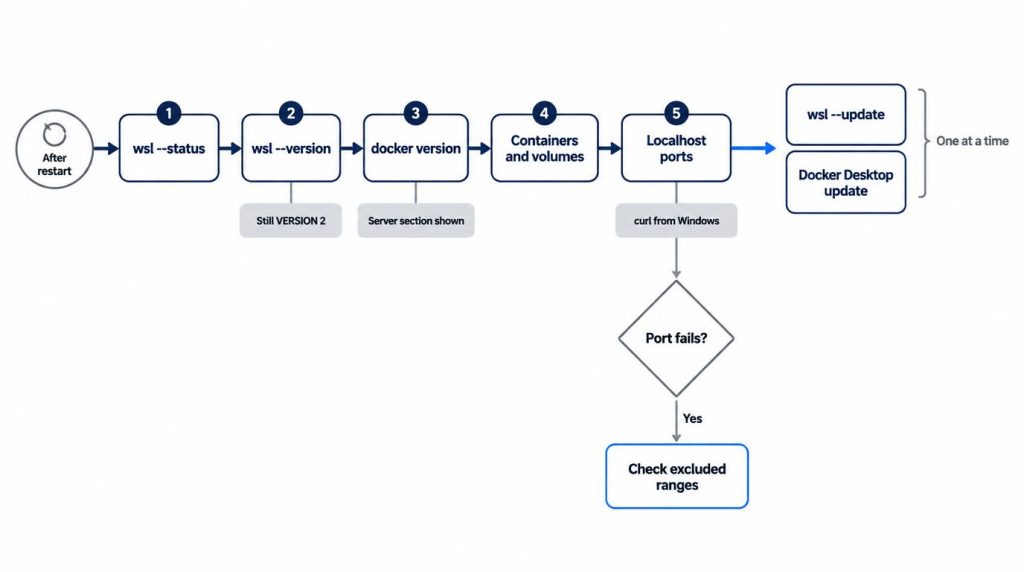
wsl --status: answers without errors. Mine still showed Ubuntu as the default, on version 2.wsl --versionandwsl -l -v: match your baseline, distro still on VERSION 2.docker version: a Server section appears, anddocker context lsmarksdesktop-linuxwith an asterisk.- An existing project:
docker compose upworks, and volumes still hold their data. - Localhost: your service ports answer from Windows, with
curlor a browser.
I trust docker version over the green “Engine running” light in Docker Desktop. The light can be on while the terminal still can’t connect. If only the Client block prints, wait 40 seconds to a minute and run it again before digging. That’s the habit I kept from October 24.
WSL and Docker Desktop get updated afterward, one at a time. On October 25 I ran wsl --update, which moved WSL from 2.9.13 to 3.0.3, the current stable release. After wsl --shutdown the containers came back normally.
The next day I updated Docker Desktop; after its restart only the Server version changed, and volumes and ports stayed put. With one change per day, I knew neither step had broken anything. I did the same for 25H2, which was also an enablement package with one restart and a clean check.
The one time a port broke
One breakage I did hit in this setup came after a monthly cumulative update, not a feature update. The morning after the reboot, docker compose up failed on port 8080:
bind: An attempt was made to access a socket in a way forbidden by its access permissions
I blamed Docker Desktop, restarted it, then ran wsl --shutdown. Nothing changed. netstat showed no process on 8080, so I finally ran this:
netsh interface ipv4 show excludedportrange protocol=tcp
The port range Windows reserves for Hyper-V and WSL had shifted on reboot and now covered 8080. Neither the update nor Docker was the cause. That took about 40 minutes the first time; now it takes under 5. On October 24 the range list did change across the 26H2 restart, but none of my ports fell inside it.
In a hurry, I change the host port. For a port I want to keep, I stop winnat briefly and reserve it (admin PowerShell; WSL and Docker networking drop while winnat is stopped):
net stop winnat
netsh interface ipv4 add excludedportrange protocol=tcp startport=8080 numberofports=1
net start winnat
Something broke: is it 26H2 or that month’s cumulative update?
Don’t blame 26H2 by default. Open Settings > Windows Update > Update history and separate the feature update (KB5121794) from the cumulative update installed the same week. Two of 26H2’s listed issues started in a monthly update, not in the enablement package.
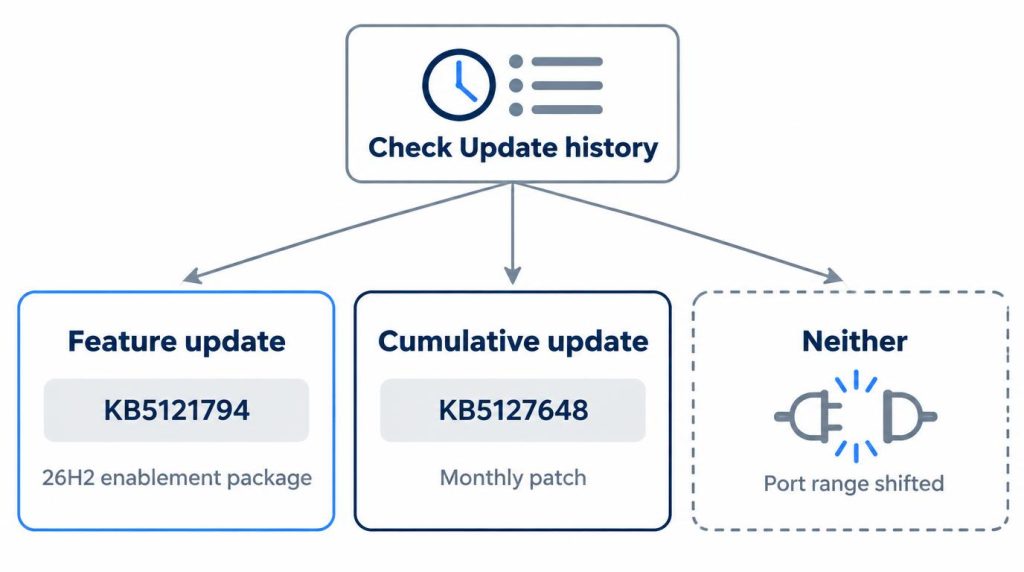
A cumulative update is the monthly patch, like KB5127648. I treat the two as different suspects, and my port story shows that sometimes neither is guilty.
As of October 31, 2026, Microsoft’s release health page (updated October 30) lists five 26H2 issues. Only one is still open, and none involve WSL, Hyper-V or Docker.
| Issue | Status (2026-10-31) | Hits a personal dev PC? |
|---|---|---|
| USB Audio Class 1.0, Code 10 | Mitigated, still open | Old USB audio only |
| RDP error 0xC000000D | Resolved, KB5127936 | Hosts with Administrator protection |
| AC-3 apps closing | Resolved, KB5127648 | Fixed in October |
| AVD/FSLogix black screen | Resolved, KB5127648 | No, virtual desktops |
| Domain trust (Machine Identity Isolation) | Resolved, KB5124010 | No, domain-joined only |
The RDP error and the AC-3 bug both started in KB5124010, the September 22, 2026 preview update (build 26300.9550). The AC-3 bug is the one gamers should know: Microsoft says affected apps “can include games” and older media players. The October 13 update fixed it.
Who should wait, and what Korean users ask
I’d tell one kind of developer to hold off: someone with a deadline or release this week, a whole dev setup inside WSL2 or Docker, and no backup or recovery image. Sorting out a shifted port range or a Hyper-V problem can eat tens of minutes to half a day. In a deadline week, I can’t afford that.
That exception doesn’t apply to 24H2. There, back up and update anyway; the unsupported version is the bigger risk. On a work-managed PC, I’d wait for IT’s rollout ring and just report whether our team’s tools ran on that build.
On Naver, Korea’s largest portal, “윈도우11 26H2 업데이트” (Windows 11 26H2 update) returned 1,250 blog posts on October 20. In a 25-post sample I read on October 20, about 8 asked “is it safe to update?” None mentioned WSL or Docker, and “26H2 WSL 도커” (26H2 WSL Docker) returned zero results that day.
One cafe question asks, “If I keep putting it off, will it just update by itself?” Microsoft’s own instruction is narrower: if Windows Update lists 26H2, select Download & install, and one restart finishes it.
Sources
- Windows 11 Home and Pro lifecycle, Microsoft Learn, updated 2026-09-29: 24H2 Home/Pro end date (October 2026), 25H2 end date (October 2027), 26H2 end date (October 10, 2028)
- Windows 11, version 26H2 known issues and notifications, Microsoft Learn, updated 2026-10-30: availability for all eligible devices (status as of October 28), the five known issues and their status
- How to get the Windows 11 2026 Update, Windows Experience Blog, 2026-09-29: enablement package for 24H2 and 25H2, support lifecycle reset (24 months for Home and Pro)
- KB5121794: Feature update to Windows 11, version 26H2 by using an enablement package, Microsoft Support: “master switch” description, KB5124010-or-later prerequisite, Download & install with one restart
- KB5127648 (OS Builds 26300.9711, 26200.9711 and 26100.9711), Microsoft Support, 2026-10-13: October cumulative update, last update for 24H2 Home/Pro
Show 8 more sources
- KB5127936 (OS Builds 26300.9818 and 26200.9818) Preview, Microsoft Support, 2026-10-28: RDP fix, WSL2 nested virtualization fix on AMD, Optional updates path
- KB5124010 (OS Builds 26300.9550, 26200.9550 and 26100.9550) Preview, Microsoft Support, 2026-09-22: the preview update where the RDP and AC-3 issues started
- KB5006965: How to check information about safeguard holds, Microsoft Support: why an update may not be offered
- Download Windows 11, Microsoft, checked 2026-10-31: Windows 11 2026 Update (26H2) through Installation Assistant, Media Creation Tool and ISO
- microsoft/WSL releases, GitHub, checked 2026-10-31: 3.0.3 stable (October 9, 2026), 2.9.13 pre-release (September 25, 2026)
- Unable to bind ports: Docker-for-Windows & Hyper-V excluding but not using important port ranges (#3171), docker/for-win on GitHub, opened 2019-01-03: excluded port ranges that block binds and shift on reboot
- Cafe question on postponing the update (Korean), Naver Cafe: the quoted Korean user question
- Naver searches (2026-10-20, queries “윈도우11 26H2 업데이트” [Windows 11 26H2 update] and “26H2 WSL 도커” [26H2 WSL Docker]): Korean post counts and the 25-post sample