Pick by the model you’ll run every day, not by speed. Up to 14B with context up to 16K, the RTX 5060 Ti 16GB is enough. From 30B on, you need 24GB, which means a card like a used RTX 3090.
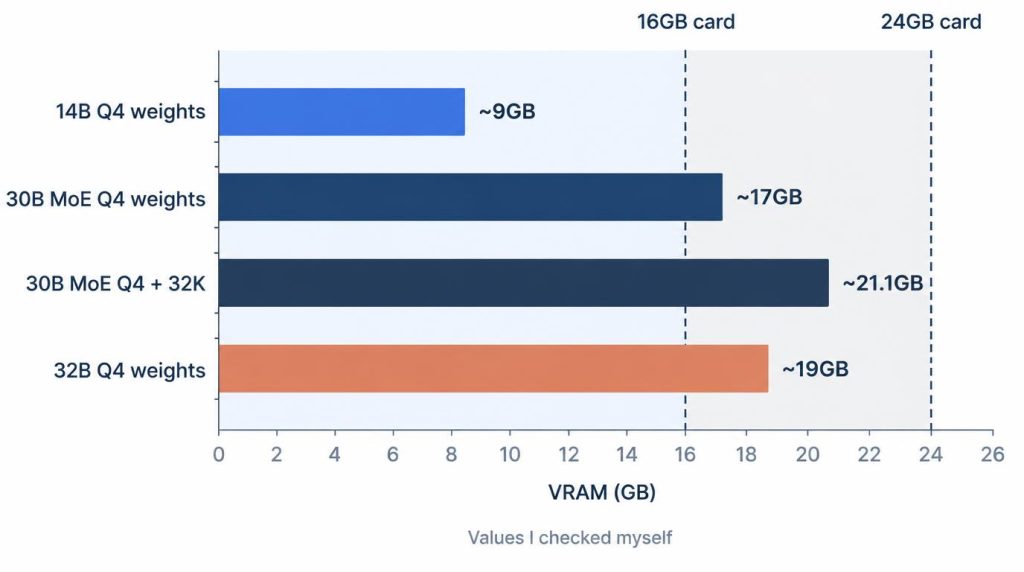
The reason is capacity. A 30B-class Q4 model measured about 17GB for the weights alone. That’s over 16GB before any context is added.
This post is about a first purchase: you have no GPU, or one with 16GB or less. If you already own a 4090 and are weighing more hardware, I covered that in DGX Spark vs RTX 4090 vs Mac mini.
On this page
The two cards, and what I actually tested
The RTX 5060 Ti 16GB is NVIDIA’s 2025 Blackwell-generation midrange card with 16GB of GDDR7. The RTX 3090 is a 2020 Ampere-generation card with 24GB of GDDR6X.
| Spec | 5060 Ti 16GB | RTX 3090 |
|---|---|---|
| VRAM | 16GB GDDR7 | 24GB GDDR6X |
| Bus, bandwidth | 128-bit, 448GB/s | 384-bit, 936GB/s |
| Card power | 180W | 350W |
| System PSU | 600W | 750W |
Card power and PSU figures are from NVIDIA’s spec pages for the RTX 5060 family and the RTX 3090, checked November 2, 2026. The bandwidth figures follow from bus width and memory speed, covered further down.
My own hands-on time is limited, so here it is up front. I spent a couple of hours on a 5060 Ti in a PC belonging to someone I know.
I’ve never had a 3090 in hand. I rented a single 24GB 3090 in the cloud for 3 hours to see whether a 30B Q4 model fit in 24GB. Everything else is extrapolated from measurements on my RTX 4090 24GB.
In this post, “fits” means the whole model sits on the GPU. Offloading part of it to system RAM is a separate case, and I note it where it comes up.
Can an RTX 5060 Ti 16GB run a 30B model?
Not fully on the GPU. A 30B-class Q4 model is about 17GB for the weights alone, so 16GB runs out before context is added. Even on 24GB, 32K context is the realistic ceiling.
VRAM use is the weights, plus the KV cache, plus runtime headroom. The KV cache is the memory that holds the conversation, and it grows with context length.
In September 2026, I loaded Qwen3-Coder 30B in LM Studio on my 4090 24GB. It’s a MoE (mixture-of-experts) model, and the Q4 file is about 17GB. Here’s what I recorded:
- 32K context: about 21.1GB
- 64K context: about 23.4GB
- 128K context: went past the GPU and spilled into RAM
That machine runs headless over SSH, so the 4090 drives no display. If your first GPU also runs your monitor, you’ll have less headroom than these numbers suggest.
Going from 32K to 64K added 2.3GB. Assuming it scales with context, 128K lands at 23.4 + 2.3 × 2 ≈ 28GB. That’s past 24GB, and it matches the spill I saw.
On paper, the model handles much more. Its model card lists 262,144 tokens of native context. Supporting 256K and being comfortable on 24GB turned out to be two different things.
With Cline set to 128K, the first response felt like it took over 10 seconds. At 32K, it came back in about 2.8 seconds.
What about squeezing a 30B MoE onto 16GB with part of it in RAM? It can run that way, but the offload can slow it down accordingly. Whether that speed is usable is something you’d have to measure.
VRAM by model size: 14B, 30B MoE, 32B dense
14B fits in 16GB up to 16K context. The split starts at 27–32B.
| Model class | Q4 weights | 16GB | 24GB |
|---|---|---|---|
| 14B | About 9GB | Checked up to 16K | Headroom |
| 27–32B | 17–19GB | Doesn’t fit | 30B MoE up to 32K |
On that 5060 Ti, I loaded a 14B Q4 model in Ollama. About 9GB of weights plus 16K of context stayed within 16GB.
A 32B Q4 model is about 19GB, so it overflowed. Part of it moved to the CPU, and it slowed down right away. I’d seen the same pattern on the 4090, just on a smaller card.
Moving to 24GB doesn’t make dense 32B comfortable. The weights alone take about 19GB, so it loads, but it felt sluggish as a coding agent.
A quantized 70B split across RAM does produce answers. It wasn’t a speed I’d use every day, though. Running and usable are two separate things.
If you’re not sure which size you need, see 8B vs 30B for local coding.
Speed once it fits: about 2.1× the bandwidth
When the same model fits on both cards, the 3090 has about 2.1 times the memory bandwidth. Its ceiling for generation speed is higher by about as much.
Token generation is mostly limited by how fast the weights can be read for each token. That’s memory bandwidth, which is bus width × memory speed ÷ 8:
- 5060 Ti (128-bit GDDR7, 28Gbps): 448GB/s
- 3090 (384-bit GDDR6X, 19.5Gbps): 936GB/s
- 4090 (21Gbps): 1,008GB/s
The memory speeds come from TechPowerUp’s 5060 Ti 16GB review and its RTX 3090 spec page.
Prefill is different. That’s the step that reads your prompt, and it leans heavily on compute, so I don’t apply the same ratio there.
On my 4090, a 14B Q4_K_M model in Ollama generated 70–80 tok/s. The 3090 has 7% less bandwidth, so I’d expect it to land around 65–75 at 14B.
For the 5060 Ti, the 448/1,008 ratio puts it around 31–36 tok/s. That conversion ignores architecture differences. Both figures are my estimates, not measurements.
The 5060 Ti’s 5th-gen Tensor Cores advertise FP4. For personal use with GGUF Q4 files, I don’t count that as a reason to buy it.
Before you buy a used 3090: power, case, card condition
A used 3090 usually gets blocked by power, case space and warranty before performance matters. NVIDIA’s listing for the Founders Edition says 350W for the card, a 750W system, two 8-pin connectors and a 3-slot width. Partner cards vary, so check the exact model.
My workstation has a 1000W PSU, and the 4090 takes close to 3.5 slots, which blocks the slot below it.
Adding a second 4090 would mean a new case first, plus a new 1500W-class PSU. So I put that on hold. The 3090 is a 3-slot-class card as well, so measure your case’s length and clearance before you buy.
I’ve never bought a used 3090. What I can share is from buying a used RTX 4070 Ti on Daangn, a Korean local secondhand app. When I met the seller, I checked two things on the spot:
- FurMark for 15 minutes: how the temperature climbs, and whether lines appear on screen
- Serial number: whether any manufacturer warranty is left
A month later, one fan on that 4070 Ti started rattling under load. Cleaning out the dust and adjusting the fan curve fixed it. The 15-minute FurMark run hadn’t caught it.
The 3090 has been out for years, so expecting any warranty is a long shot. Opinions on mining history are split, so I’d judge the card’s condition rather than its past.
What 24GB costs: Korean prices I saw
Price doesn’t change the capacity verdict. At the asking prices I saw in Korea, the extra 8GB costs about ₩800,000.
| Card | Price I saw | Where, when |
|---|---|---|
| 5060 Ti 16GB, new | ₩994,240 | Danawa, 2026-10-11 |
| 3090, used | About ₩1,800,000 | Joonggonara, asking |
Danawa is a Korean price comparison site. The ₩994,240 listing was a Gigabyte Windforce Max OC 16GB from the seller PCDirect. It was the lowest I saw, and other listings ran from ₩1.02 million to ₩1.5 million.
Joonggonara is a Korean secondhand marketplace. EVGA FTW3 and ASUS Strix listings asked about ₩1,800,000, and an MSI Suprim X asked ₩2,000,000. Those are asking prices, and actual sales may go lower.
Per GB, that works out to about ₩62,000 for the 5060 Ti and about ₩75,000 for the 3090.
The 5060 Ti’s price also moved fast in 2026. Digital Citizen reported its US median price at about $805 in August 2026, nearly double the $429 launch price. Treat any 5060 Ti price as valid only on the day you check it, and compare listings where you live.
I go by two rules:
- If you’ll run 30B-class models fully on the GPU, 16GB isn’t a candidate at any price.
- If you mostly run 14B, capacity gives you no reason to pay ₩800,000 more.
So which should you buy?
If your daily model is 14B or smaller, get the 5060 Ti 16GB. If it’s a 30B-class MoE, get a used 3090, as long as your PSU and case can take it.
| Daily setup | Conditions | Pick |
|---|---|---|
| Mostly 7–14B | 600W-class PSU, warranty matters | 5060 Ti 16GB |
| 30B MoE Q4, 32K | 3-slot room, PSU 750W+ | Used 3090 |
| 30B MoE Q4, 32K | Small case or PSU under 750W | Skip the 3090: rent, or stay at 14B |
| 32B dense Q4 | Short context only | Tight even on 24GB, not for agents |
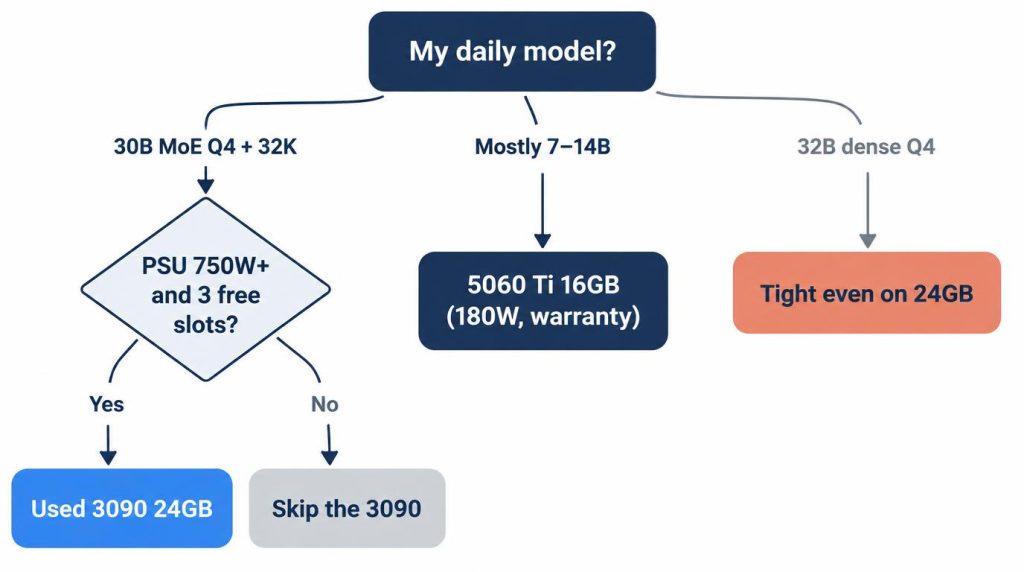
If I had no GPU and could buy just one, I’d pick the 3090, because my daily setup is a 30B MoE Q4 at 32K context.
Two things back that choice. Its 24GB and 936GB/s are a step above the 5060 Ti’s 16GB and 448GB/s. And I confirmed on the 4090 that a 30B MoE Q4 with 32K context fits in 24GB.
The cost is about ₩800,000 more at asking prices, with no warranty.
Needs beyond 24GB are outside this post. I cover that in Mac Studio M3 Ultra for local LLMs.
Before buying, rent one and try it. That’s what I did: I rented a 3090 24GB for 3 hours and first checked whether a 30B Q4 model fit in 24GB.
References
- NVIDIA GeForce RTX 5060 family specs
- NVIDIA GeForce RTX 3090 specs
- TechPowerUp: ASUS GeForce RTX 5060 Ti TUF OC 16GB review
- TechPowerUp GPU database: RTX 3090
- Qwen3-Coder-30B-A3B-Instruct model card (Hugging Face)
- Digital Citizen: RTX 5060 Ti 16GB US median price
Related posts
- Local LLM Too Slow? 8B vs 30B on My RTX 4090
- Own an RTX 4090? DGX Spark vs Mac mini for Local LLMs
- vLLM vs llama.cpp on a Single RTX 4090: Why I Don’t Use vLLM
- Docker Model Runner vs Ollama: Which One to Use (RTX 4090 Test)
I first wrote this in Korean on my blog: https://jjeongil.tistory.com/3605.