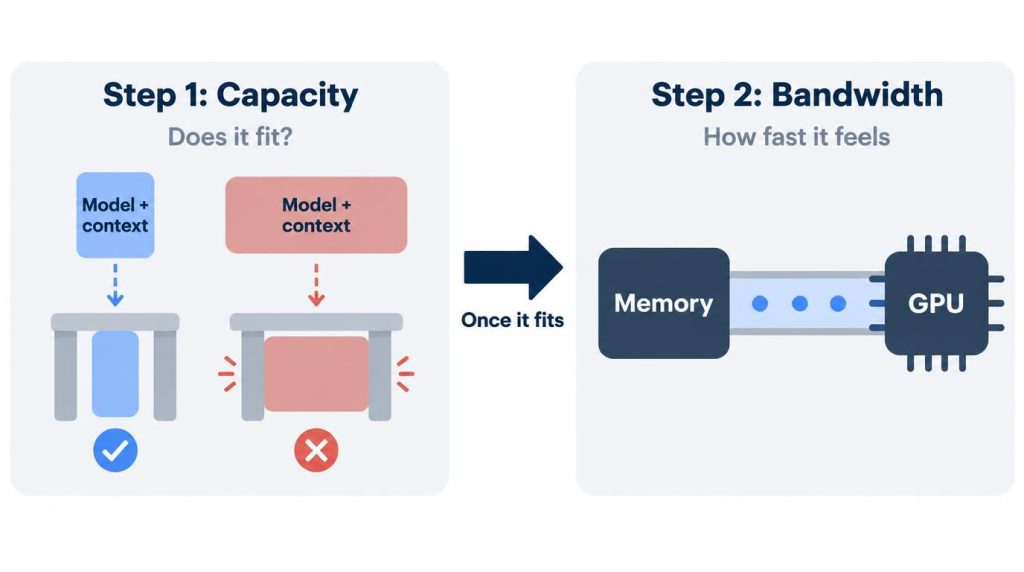
Pick local LLM hardware in two steps. First, does the model plus its context fit in usable memory? Only then does bandwidth matter, because it sets how fast tokens come out.
On paper, the DGX Spark wins step one with 128GB, and the RTX 4090 wins step two with about 1TB/s. I already own a 4090 with 24GB, so the Spark never got past the “should I buy it?” stage. I haven’t bought one.
DGX Spark is NVIDIA’s small desktop AI computer built on the GB10 chip, with 64GB or 128GB of unified memory. I’ve never owned one, so everything I say about it comes from NVIDIA’s official specs.
I bought a Mac mini M6 with 32GB at the end of September 2026. On it, LLMs are side experiments only. Every number I measured myself is from the 4090.
On this page
The specs that decide it
Memory size and memory bandwidth are the two columns I read first. Here they are for the three machines, checked against the official pages on November 1, 2026.
| Device | Memory | Bandwidth | My use |
|---|---|---|---|
| RTX 4090 | 24GB GDDR6X | 1,008GB/s | Hands-on, VRAM measured |
| Mac mini M6 | 32GB unified | 170GB/s | Side experiments |
| DGX Spark | 128GB LPDDR5x unified | 273GB/s | Not owned, specs only |
Read across the rows and the trade-off is plain. The 4090 has the least capacity and the most bandwidth. The Spark is the opposite.
Power is part of the bill too. NVIDIA lists 450W of total graphics power for the RTX 4090 Founders Edition, and that covers the card alone. The whole DGX Spark system uses a 240W power supply, per its product page as of November 1, 2026.
Capacity first: what fits in 24GB on my RTX 4090
The model weights plus the context (the KV cache) have to fit in the memory you can actually use. When they didn’t fit and spilled into system RAM, the model still ran, but not at a speed I’d use every day.
My clearest example is from September 2026. I ran Qwen3-Coder 30B (MoE, a Q4-class quant of about 17GB) on the 4090 in LM Studio.
- 32K context: about 21.1GB of VRAM. Stable.
- 64K context: about 23.4GB. No headroom left.
- 128K context: past the GPU, pushed out into RAM.
So on 24GB, this model was stable up to 32K context, and from 64K on there was no room to spare.
A big context setting can cost you latency
I felt the difference when I had Cline read an entire project. With the same model, I lowered the context setting from 128K to 32K. Time to the first response went from over 10 seconds to about 2.8 seconds.
That wasn’t a controlled benchmark. I didn’t pin the prompt or the cache state, so I don’t claim the drop came from context size alone.
It still taught me that a large maximum context can make latency feel worse. Now I set it only as large as I need.
Can an RTX 4090 run a 70B model?
It can load a quantized 70B-class model if you split it across the GPU and system RAM. I’ve done that, and getting it into memory was fun in itself.
For interactive coding or chat without waiting, though, the 24GB 4090’s advantage shrank a lot.
More broadly, I was optimistic about offloading at first. If VRAM ran short, my 64GB of RAM would take the rest, and it would run one way or another.
It did run. But I noticed the wait for the first token and the slower generation right away. That’s when I learned that running and being usable are different things.
So I don’t do the math “24GB of VRAM plus 64GB of RAM makes 88GB.” I look at how much of the model stays resident in VRAM.
Is DGX Spark faster than an RTX 4090?
On paper, not in generation speed for a model that fits in 24GB. Generation speed tracks memory bandwidth, and the 4090 has about 3.7 times the Spark’s (1,008GB/s vs 273GB/s). I haven’t benchmarked a Spark, so this is a spec reading, not a measurement.
Here is why bandwidth matters. Each new token requires reading the active weights from memory. Once a model fits, generation (decode) speed depends heavily on bandwidth, while prefill for long inputs depends more on compute.
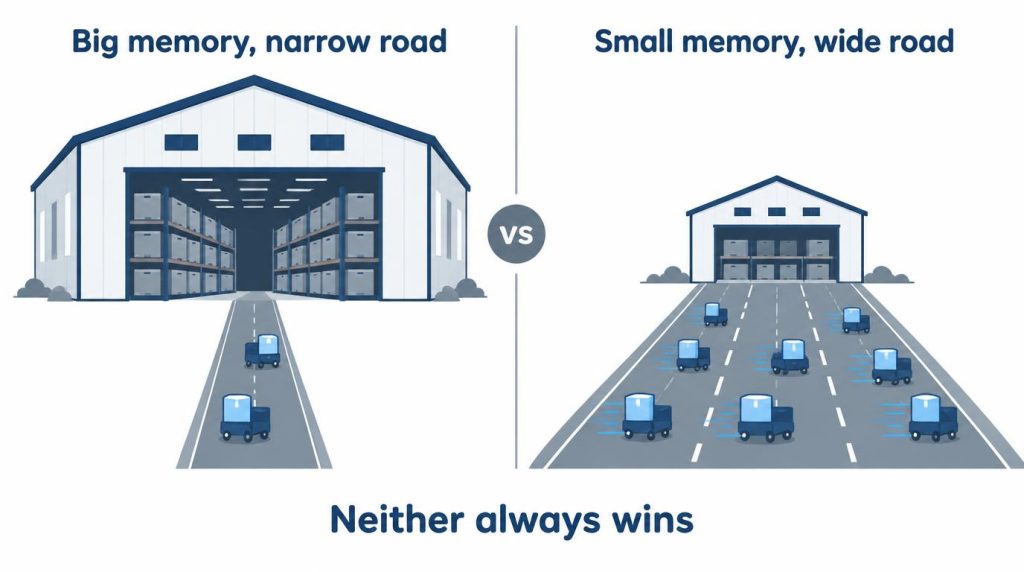
The reverse also holds. If a model doesn’t fit on the 4090, high bandwidth can’t fix the fact that the whole model won’t go on the GPU.
That’s why I don’t think 128GB is automatically better than a 4090. And the 4090 being fast doesn’t make its capacity problem go away.
Where the Mac mini M6 fits
The Mac mini M6 is quiet on my desk, and its jobs are development, agent workflows and light local AI. I didn’t buy it to replace the 4090. I wrote about how it works as a dev machine in a separate post.
Within its 32GB, small to mid-size quantized models were comfortable thanks to unified memory. Within that same 32GB, the bigger the model I tried, the faster the headroom shrank.
I got one thing wrong here. Apple’s unified memory is shared between the CPU and GPU, so the VRAM boundary feels less cramped. I liked that.
But I shouldn’t have put it on the same line as a discrete NVIDIA GPU for speed just by looking at capacity. Since confirming the M6’s 170GB/s, I’m more wary of the thought “it’s 32GB, so local AI should be pretty fast.”
If you want a high-memory Mac in the same kind of comparison, I covered the Mac Studio M3 Ultra 96GB against the 4090 separately.
My four-step check before buying
I read a spec sheet starting from the memory I can actually use, not from the GPU name. Then I go down this list in order.
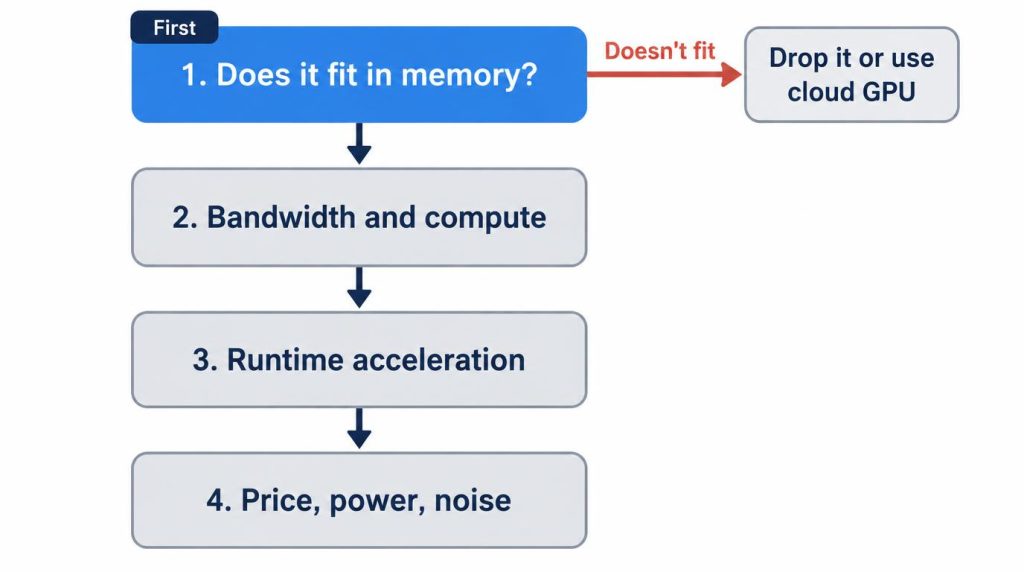
- Do the model, quant and context I want fit in usable memory?
- If so, what are the bandwidth and compute like?
- Is it actually accelerated in runtimes like LM Studio or Ollama?
- Can I live with the price, power and noise?
I’ve ruled hardware out at step one before. An upgrade that adds a bit of compute over the 4090, but whose VRAM barely widens what I can run, didn’t appeal to me.
If I switch GPUs, I’ll check whether the VRAM tier changes before I look at a few percent more compute.
Why I haven’t bought a DGX Spark
None of the three machines replaces the others. The 4090 workstation is a CUDA machine that runs models fitting in 24GB fast, and it comes with costs in power, heat, noise and space.
The Spark sits between it and the Mac mini. What drew me in was a box with far more memory than a 4090, yet smaller than a workstation. I’d had moments on the 4090 where I just wanted a bit more VRAM.
I went as far as reading the official specs, the price range and reviews. The more I looked, the more the 273GB/s stood out too.
How you frame the problem decides it:
- “Can I run a 70B-class model locally?” Then the Spark is attractive.
- “Can I run the 20–30B models I use every day as fast as possible?” Then the 4090 I already own is still worth a lot.
That’s why I haven’t bought one yet.
Who should pick what
My rule comes down to three cases.
- Daily use, and a small model is enough: get the most out of the GPU you already have.
- 70B or larger now and then: check cloud GPUs before new hardware.
- Large models daily, and the data must stay local: buy high-capacity hardware.
For a machine like the Spark, the question isn’t whether I want 128GB. It’s how many hours a week I actually run work that needs 128GB.
I start with a rough break-even estimate. Divide the actual purchase price by the hourly cost of the cloud GPU you’d use, and you get break-even hours.
Then add electricity, depreciation, wait time, data transfer, and the convenience of having it available anytime.
For the wider map of GPUs, Macs and runtimes I’ve tried, see my local LLM hardware and runtime guide.
DGX Spark 64GB vs 128GB, and RTX Spark (as of November 1, 2026)
The comparison in this post uses the 128GB configuration. Prices and configurations keep changing, so check NVIDIA’s pages again right before you buy.
- 64GB configuration: NVIDIA announced it on October 2, 2026. It is sold only through partners (Acer, ASUS, Dell, Gigabyte, HP and MSI), from October 23, starting at $4,999.
- Model size: NVIDIA’s product page lists up to 100B parameters for 64GB and up to 200B for 128GB.
- 128GB price: The official product page shows no price and points to the NVIDIA Marketplace (checked November 1, 2026).
- RTX Spark: A different product from DGX Spark, made for Windows PCs. NVIDIA said PCs with it would arrive in October 2026. I don’t cover its specs here.
Price and configuration change. The order I check things in doesn’t: capacity is the entry ticket, and bandwidth is how fast it feels once you’re in.
References
- NVIDIA DGX Spark: 64GB or 128GB LPDDR5x, 273GB/s, 240W power supply, model-size figures (checked November 1, 2026)
- NVIDIA GeForce RTX 4090: 24GB GDDR6X, 450W total graphics power
- NVIDIA Ada GPU Architecture whitepaper: RTX 4090 memory bandwidth of 1,008GB/s
- Apple Mac mini tech specs: M6 with 32GB at 170GB/s
- Apple Newsroom, M5: unified memory shared by CPU and GPU
Show 2 more sources
- NVIDIA Technical Blog: prefill bound by compute, decode bound by bandwidth
- NVIDIA Blog, October 2, 2026: DGX Spark 64GB (partner sales from October 23, from $4,999) and RTX Spark PCs in October
Related posts
- Local LLM Too Slow? 8B vs 30B on My RTX 4090
- RTX 5060 Ti 16GB vs Used 3090 for Local LLM: Does 30B Fit?
- vLLM vs llama.cpp on a Single RTX 4090: Why I Don’t Use vLLM
- Docker Model Runner vs Ollama: Which One to Use (RTX 4090 Test)
I first wrote this in Korean on my blog: https://jjeongil.tistory.com/3590.