For one person on one RTX 4090, vLLM and llama.cpp generate tokens at about the same speed. vLLM pulls far ahead only when many requests hit the card at once. Red Hat’s comparison found the two engines comparable at one concurrent request and vLLM at about 44 times llama.cpp’s throughput at 64 users, on a data center GPU. I ran vLLM in Docker next to Ollama on my 4090 and went back, because my workload never sent concurrent requests.
vLLM is an inference server built to serve many requests at once. llama.cpp is an engine that runs GGUF models on local hardware, and Ollama and LM Studio are built on top of it.
I’ve run Ollama, llama.cpp, vLLM, and llama-swap myself on a single RTX 4090 with 24GB of VRAM. I use coding agents like Claude Code at work, so my judgments here assume a coding agent workload.
On this page
vLLM vs llama.cpp: how they compare
Concurrency decides it. With one user, use llama.cpp or Ollama. With many users calling the same card at once, use vLLM.
| llama.cpp / Ollama | vLLM | |
|---|---|---|
| 1 concurrent request | Comparable speed | Comparable speed |
| 64 concurrent users (Red Hat, H200) | Baseline | About 44x the tokens/sec |
| TTFT under load (same test) | Over 3 minutes at 64 users | Low and stable |
| Model format | GGUF, native | Mostly Hugging Face format; GGUF experimental |
| VRAM at startup | Weights, then KV cache grows with context | Reserves a fixed share of the card |
| My use on a 4090 | Went back to it | Tried, then left |
The speed and TTFT rows come from Red Hat’s comparison (published June 15, 2026, updated July 13, 2026). It ran Llama 3.1 8B at 16-bit on a single NVIDIA H200 with GuideLLM, from 1 to 64 concurrent users. At one request, it found both engines produce tokens at a comparable rate and both answer immediately.
At 64 users, vLLM produced about 44 times more tokens per second. llama.cpp’s P99 time to first token passed three minutes, while vLLM’s stayed low. That makes it a production-serving result on one data center GPU, not a verdict for every setup.
So don’t read 44x as a 4090 forecast. What carries over is the direction: the gap opens as concurrency grows.
Two vLLM details matter more on a 24GB card. vLLM’s --gpu-memory-utilization sets the fraction of GPU memory one instance uses, and its default is 0.92 in the engine arguments docs (checked October 31, 2026). Lower it if Ollama or anything else shares the card.
GGUF in vLLM now goes through a separate vllm-gguf-plugin. vLLM’s GGUF page (checked October 31, 2026) calls that support “highly experimental and under-optimized.” If your models are GGUF files, llama.cpp is the native path.
Where Ollama and LM Studio fit
Ollama isn’t a separate engine. Red Hat describes Ollama and LM Studio as tools built on llama.cpp, which does the actual inference. They add model management, an API server, and a GUI.
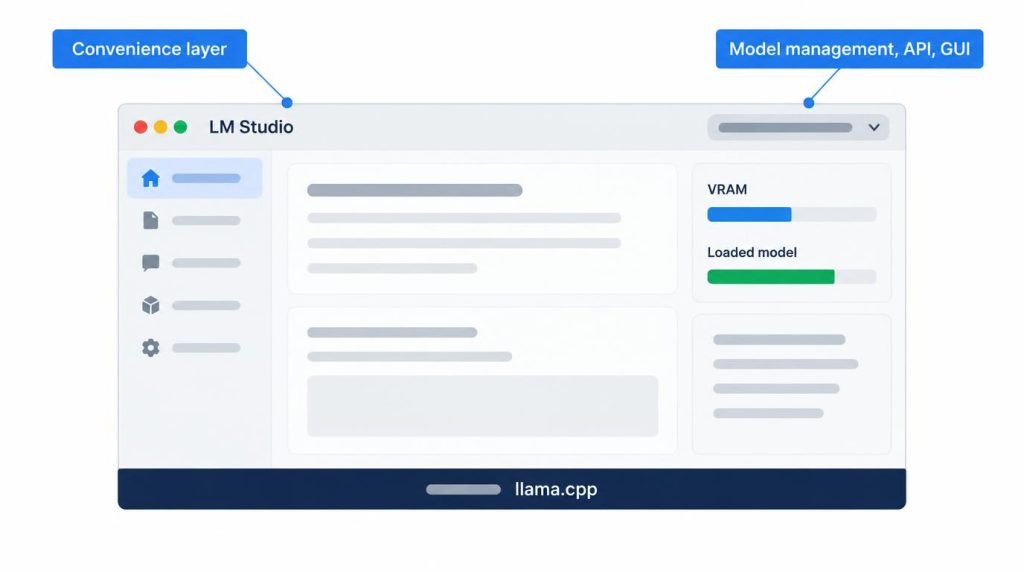
If you want to tune every option yourself, use llama.cpp. If easy management matters more, use Ollama or LM Studio. Docker’s own runner is one more layer here; I compared it in Docker Model Runner vs Ollama.
What happened when I ran vLLM next to Ollama
I ran vLLM in Docker as an OpenAI-compatible API server and compared it directly with Ollama. vLLM didn’t perform badly. I went back to Ollama and llama.cpp because the workload didn’t fit.
That’s why this page has no vLLM tok/s from my run: the decision didn’t come down to speed.
Continuous batching groups incoming requests and interleaves their token generation on the GPU. When I’m the only one using a coding agent or chat on one 4090, there are no concurrent requests to group. With one request, the optimization has no place to work.
When vLLM starts to pay off
The same 4090 is a different story once 5 or 10 people at a company call the API at the same time. The metric that matters stops being single-user tok/s and becomes aggregate throughput and TTFT (time to first token).
That’s the case Red Hat’s 64-user test describes. “You don’t need vLLM on a personal 4090” is only true while the 4090 serves one person. The workload decides, not the GPU.
My tok/s on a 4090 by model size
These are measured ranges by size class from my own runs. Model names, quantization, and context aren’t listed per row, so read them as ballpark figures.
| Model size | Measured tok/s | How it felt |
|---|---|---|
| 8B-class | Over 100 | No lag for interactive coding |
| 14B-class | 70–80 | No lag for interactive coding |
| 30B-class dense | 30–40 | Slower, mostly from context |
On those numbers, it’s easy to call 30B slow. In practice, context length shaped the feel more than model size did.
When I put long code or documents into the context, the KV cache grows and generation speed drops noticeably. Growing the context a lot on one model felt like a bigger slowdown than moving from 8B to 14B. If you’re deciding between model sizes on this card, 8B vs 30B on my RTX 4090 goes further.
Measuring tok/s with eval_count and eval_duration
A fair tok/s number states four things: model, quantization, context length, and decode or prefill. Ollama’s API response carries the timing fields, and per the Ollama API docs (checked October 31, 2026), all timing values are in nanoseconds.
Decode speed is eval_count / (eval_duration / 1e9) tokens per second.
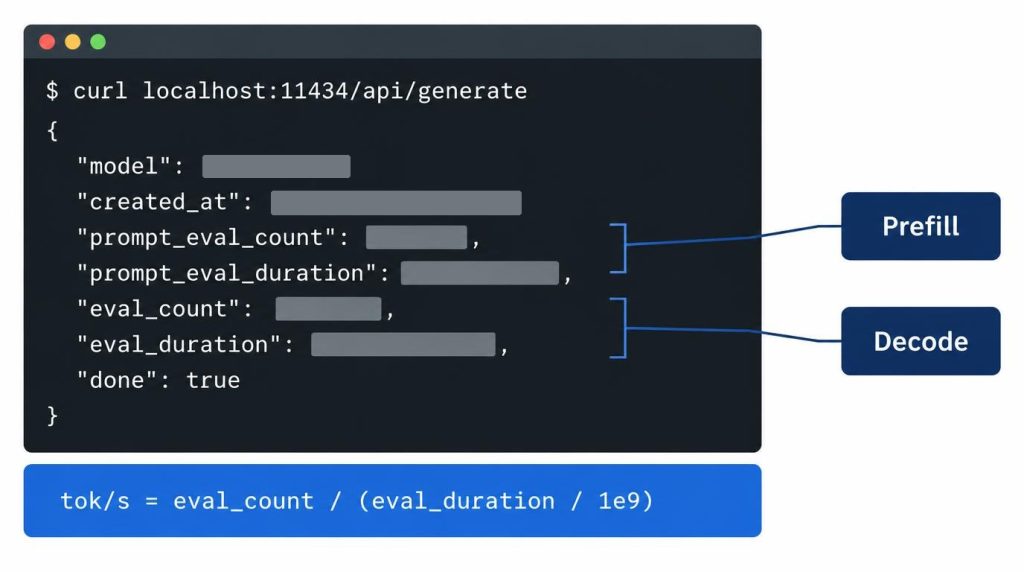
prompt_eval_count and prompt_eval_duration describe prompt processing (prefill). eval_count and eval_duration describe generation (decode). Blend them into one “overall tok/s” and the comparison stops meaning anything.
Fitting model and context in 24GB
On my 4090, Flash Attention and a q8_0 KV cache helped more with context than with speed. They let me hold a longer context in the same 24GB.
In Ollama, the KV cache type is set with OLLAMA_KV_CACHE_TYPE. Per the Ollama FAQ (checked October 31, 2026), the default is f16, and q8_0 uses about half the memory of f16. KV cache quantization works when Flash Attention is on, which Ollama now enables automatically where the backend and GPU support it; OLLAMA_FLASH_ATTENTION=1 forces it.
A 14B-class Q4 model has about 9GB of weights. A 32B-class Q4 model has about 19GB of weights alone, so it loads on a 24GB card but leaves little room for the KV cache, and long-context work gets frustrating.
These days I stay around Q4_K_M or Q5 instead of reaching for higher-precision weights, and give the freed memory to the KV cache. In real work, how long a context I could keep stable mattered more than small quality differences in the weights.
Checking it with ollama ps and nvidia-smi
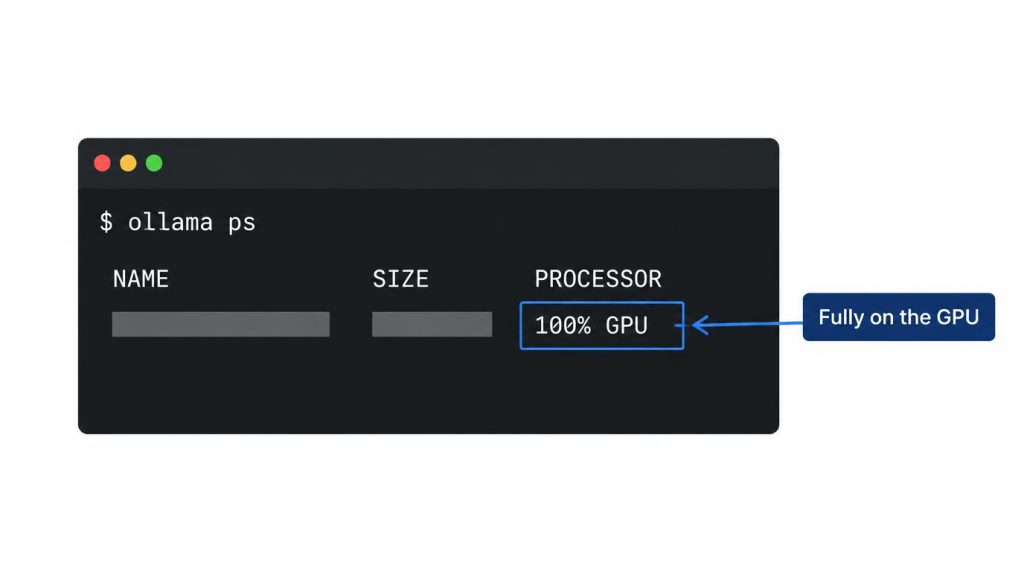
First I run ollama ps and confirm the PROCESSOR column shows 100% GPU. Ollama’s FAQ defines that as the model loaded entirely on the GPU.
Then nvidia-smi shows how much VRAM is left after the model loads. Feeding a long context shows how much the KV cache adds on top.
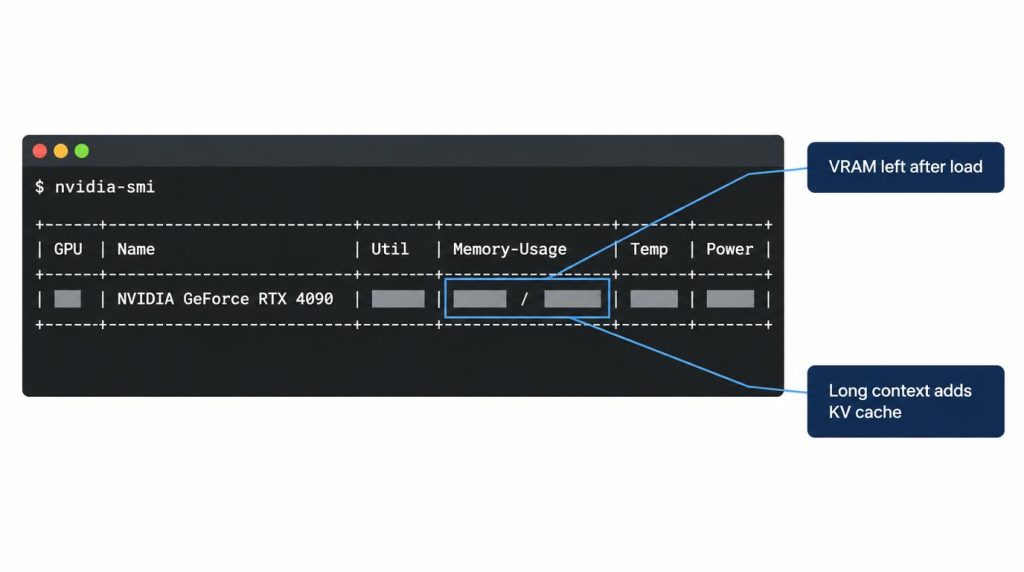
“It runs fine on a 4090” is weak evidence. One screen with GPU offload, VRAM, context, and tok/s together says much more.
Several models in 24GB: llama-swap
I want separate models for coding, chat, and odd jobs, and they don’t all fit in 24GB. llama-swap sits in front of llama-server as one OpenAI-compatible endpoint, reads the model value in each request, and swaps the server behind it. Idle models unload through a ttl setting, and I barely had to change anything on the client side. It solves capacity, not speed.
Speculative decoding on one 4090: tested, turned off
I tested speculative decoding in llama.cpp with a draft model attached, and I don’t keep it on. The draft model takes extra VRAM that I’d rather give to the KV cache, and memory allocation gets complicated. In my setup, the gain wasn’t worth that complexity.
With a coding agent, the bottleneck I felt wasn’t decode speed alone. It was the whole loop: repository context prefill, tool run, file reads, prefill again, then generation. With long prompts and repeated tool calls, faster decode didn’t cut total latency much.
A service that writes long answers from short prompts may be a different case. The draft model guesses the target model’s next tokens and the target only verifies them, so that workload may gain more.
My setup order on one 4090
As of September 2026, this was my setup order:
- Pick a model that fits the workload.
- Pick a quantization that keeps the weights 100% on the GPU.
- Set the context you actually need.
- Save context memory with Flash Attention and a q8_0 KV cache.
- Measure
eval_durationand VRAM. Only then consider vLLM or speculative decoding.
| Bottleneck | Symptom | Fix |
|---|---|---|
| Concurrency | Low throughput under load | vLLM (continuous batching) |
| VRAM | Model + context won’t fit | Quantize, q8_0, llama-swap |
| Decode latency | Tokens come out slowly | Speculative decoding |
Each needs its own fix, so don’t lump them together when you decide. On one 4090, running a local LLM well came down to splitting 24GB between weights, KV cache, context, and workload, not chasing the highest tokens per second.
FAQ
Is vLLM faster than llama.cpp for a single user?
Not by a meaningful margin in Red Hat’s test: at one concurrent request, both produced tokens at a comparable rate. On my 4090 the reason to switch never appeared, because I was the only user.
Doesn’t llama.cpp batch requests too?
Yes. The llama-server README (checked October 31, 2026) lists parallel decoding with multi-user support and continuous batching, enabled by default, with server slots set by -np. Red Hat’s 64-user test still found vLLM far ahead in throughput and TTFT, so for a shared API under heavy load, vLLM is the stronger pick.
How much worse does Q4 actually get?
On benchmark numbers, the drop isn’t big. But on work that needs subtle judgment, like refactoring code, I’ve seen Q4 give slightly worse results myself. For that kind of work, I’d go up a step to Q5 or Q6 and compare.
References
- Red Hat Developer: llama.cpp vs vLLM, choosing the right local LLM inference engine (June 15, 2026, updated July 13, 2026): Ollama/LM Studio on llama.cpp, continuous batching, single-user parity, 64-user throughput (about 44x) and P99 TTFT, Llama 3.1 8B on one H200
- vLLM engine arguments:
--gpu-memory-utilization(default 0.92), checked October 31, 2026 - vLLM docs: GGUF:
vllm-gguf-plugin, experimental status, checked October 31, 2026 - llama.cpp server README:
-npslots, continuous batching on by default, checked October 31, 2026 - Ollama FAQ:
OLLAMA_KV_CACHE_TYPEvalues, Flash Attention defaults, theollama psPROCESSOR column, checked October 31, 2026 - Ollama API usage docs:
eval_count,eval_duration, and other timing fields in nanoseconds, checked October 31, 2026 - llama-swap on GitHub: model swapping by the
modelfield,ttl - Hugging Face Transformers docs: LLM inference optimization: Flash Attention, KV cache, speculative decoding
Related posts
- Local LLM Too Slow? 8B vs 30B on My RTX 4090
- Own an RTX 4090? DGX Spark vs Mac mini for Local LLMs
- RTX 5060 Ti 16GB vs Used 3090 for Local LLM: Does 30B Fit?
- Docker Model Runner vs Ollama: Which One to Use (RTX 4090 Test)
I first wrote this in Korean on my blog: https://jjeongil.tistory.com/3534.