If you already have models, prompts and tool calling working on Ollama in a personal dev setup, I don’t see much reason to switch to Docker Model Runner. If your app already runs inside a Docker workflow, putting the model in that same flow buys real reproducibility. I reached that judgment while repeatedly running a code review agent on a local RTX 4090 (24GB). The switch itself is where things went wrong.
Docker Model Runner (DMR) is Docker’s built-in tool for pulling, running and serving AI models with docker model commands. Ollama is a standalone app that does the same job outside Docker.
On this page
Switch the endpoint, and watch the JSON break
I assumed a local model server is a local model server: point the agent from Ollama to DMR and you’re done. That was the mistake.
Plain chat and completion worked right away. Trouble started when I wired up the code review agent’s structured output and tool calling. I had moved the models and prompts from Ollama almost unchanged, and in the step where each reviewer returns its result as JSON, the parser kept failing.
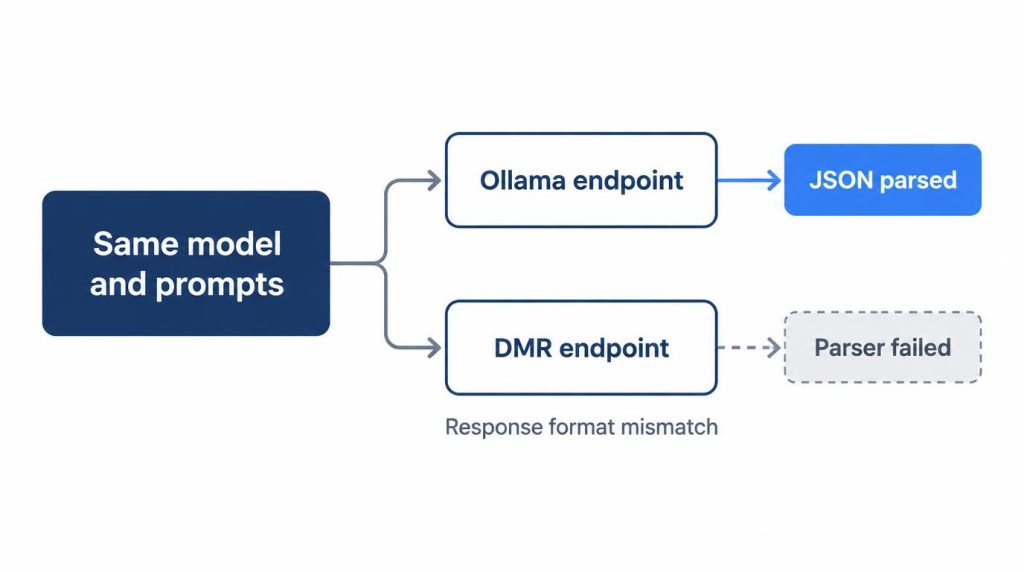
At first I blamed the model and kept rewriting the system prompt. Much later I saw the problem sat between the inference endpoint and my agent harness: they expected different response formats. That day, bringing up the model took 10 minutes, and finding out why the agent wouldn’t run took an hour and a half.
When I pointed that experiment back at the Ollama endpoint, the existing code worked at once.
Ecosystem maturity cost time too. I’d used Ollama for a long time, so search turned up plenty of cases and I already knew workarounds. DMR is newer, so telling apart “my config,” “model support” and “a DMR-side limit” took longer. If the endpoint is fine but the agent still picks the wrong tool, that’s a different problem, covered in AI agent calling the wrong tool.
Test the base path and one JSON call before moving prompts
These are the places where the two servers document different behavior, right at the step that broke for me. They’re places to look, not the confirmed cause. Checked against the official docs listed in Sources:
- Base path. DMR’s OpenAI-compatible routes live under
/engines/v1, while Ollama uses/v1. A client hard-coded for Ollama misses them. - Tool calling. DMR’s API reference lists it as supported with llama.cpp for compatible models. Ollama’s OpenAI compatibility page supports tools on
/v1/chat/completionsbut nottool_choice. - JSON output. DMR documents JSON mode through
response_format: {"type": "json_object"}. Ollama also listsresponse_formatas supported. - Access. The DMR API has no authentication. On Docker Desktop, host processes reach it only with host-side TCP turned on.
Before moving prompts, test the base path and send one structured-output call to each server.
Line up ports, paths and model sources
Both serve local models through an OpenAI-compatible API, so client code looks almost the same. The differences sit in a few settings:
| Ollama | Docker Model Runner | |
|---|---|---|
| Install | Standalone app | Docker Desktop, or docker-model-plugin on Linux |
| Local port | 11434 | 12434 |
| OpenAI base URL | /v1 |
/engines/v1 |
| Model source | Ollama library | Docker Hub, OCI registries, Hugging Face |
On Docker Desktop you turn it on under Settings → AI. The exact menu path kept changing even after DMR reached general availability on September 18, 2025, so I don’t pin it with a screenshot; check Docker’s get-started docs for the current screen.
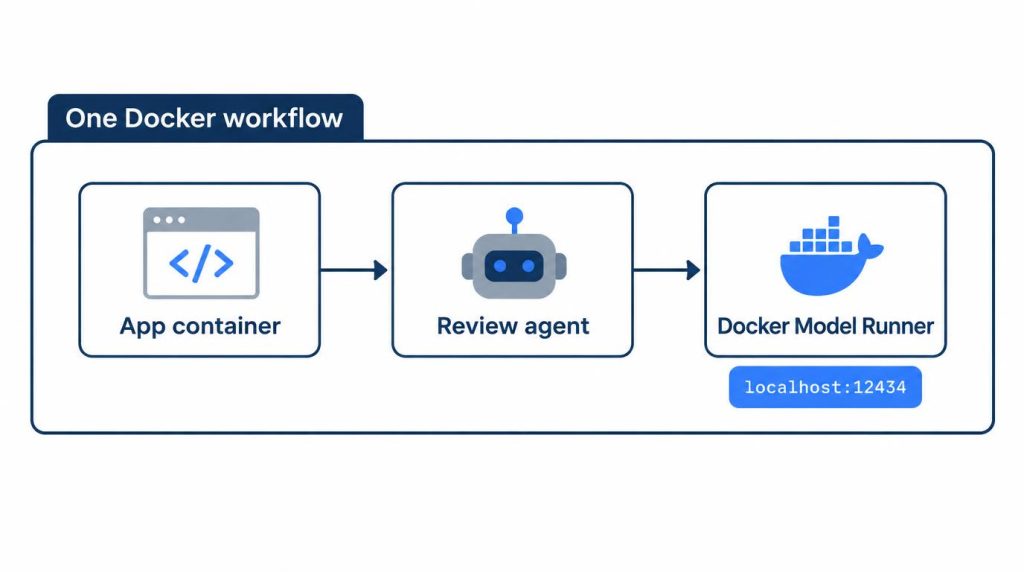
DMR runs llama.cpp by default, with vLLM as an option on NVIDIA GPUs. It also exposes Ollama-compatible routes such as /api/chat and Anthropic-style /v1/messages on the same port. For the engine question itself, see vLLM vs llama.cpp on a single RTX 4090.
Is Docker Model Runner faster than Ollama?
My numbers can’t settle it, and I didn’t try to. On an RTX 4090, 7–8B quantized models ran about 70–90 tok/s and ~20GB-class models about 30–45 tok/s, from repeated runs of the same prompts, not a formal benchmark.
On Ollama alone, an 8B-class Q4_K_M model went well over 100 tok/s, 14B-class models stayed in the 70–80 tok/s range, and 30B-class dense models dropped to 30–40 tok/s. That’s plenty for a coding agent below 30B. I wrote up the size trade-off in 8B vs 30B on my RTX 4090.
Setup: Ubuntu, the same 4090, same prompts run repeatedly:
| Metric | 7–8B, quantized | ~20GB-class model |
|---|---|---|
| Generation speed | ~70–90 tok/s | ~30–45 tok/s |
| Time to first token | ~0.4–0.8 s | ~1–2 s |
| VRAM | ~6–10GB | ~18–22GB |
| GPU use (generating) | ~80–95% | around 90% |
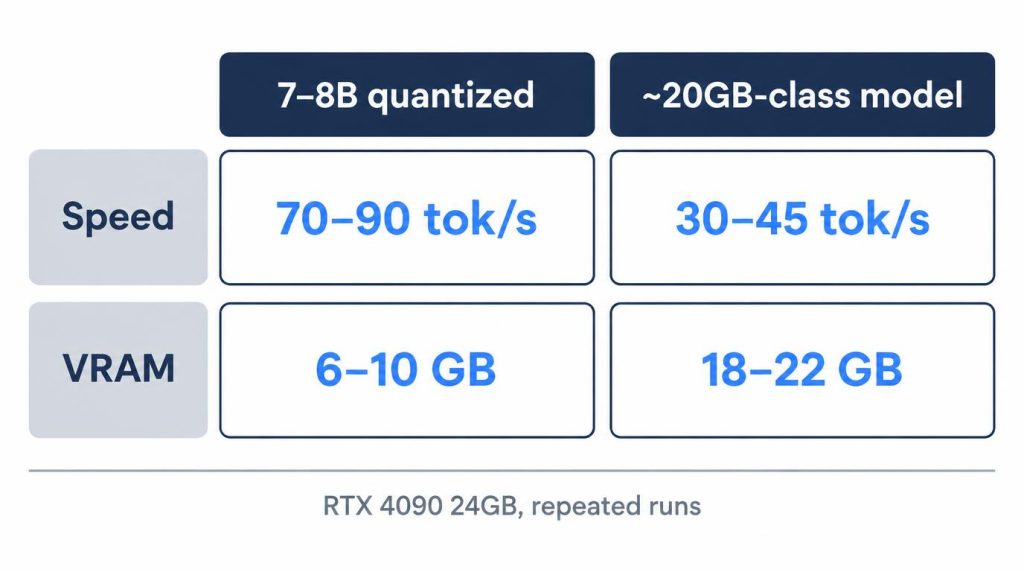
These values move quite a bit with model size, quantization and context length, so I treat them as ranges, not fixed figures.
Count setup time, not tok/s
Rebuilding the environment cost me more than any tok/s gap. The first time, understanding DMR and setting it up while checking the GPU side took 40–60 minutes. Once I had a Docker-based setup, attaching the same shape to another project dropped to about 10 minutes.
I never drew a “DMR is X% faster” conclusion, because speed wasn’t the goal. I wanted one pinned local model so I could keep changing the agent’s structure.
Pin a model locally so only the harness changes
The agent fans out one PR to five reviewers running in parallel, each from a different angle. Repeating that on a cloud API turns every call into cost, and outside variables slip in when the model or API state changes. I wanted to see only what my harness or graph edits changed, and the cloud didn’t give me a clean comparison. On the local 4090 I could repeat the parallel runs dozens of times without thinking about cost.
I’d used Ollama for a long time. Install it, pull one model, and chat starts with almost nothing to configure:
ollama pull qwen3
ollama run qwen3
A REST server then opens on localhost:11434, ready for Python or JavaScript in OpenAI-compatible form.
I first properly hooked up Docker Model Runner in February–March 2026. My question was never whether local chat works. My app and agent already ran in containers, and I wanted to know how much reproducibility improves when the model joins that same Docker flow. I started with Qwen-family 7–8B quantized models, then moved up to the Gemma family and larger Qwen models, comparing speed, VRAM and the quality of the agent’s work.
Should you switch from Ollama to Docker Model Runner?
Not if Ollama already runs your models, prompts and tool calling. Yes if your app and agent already live in containers and you want the model in that same Docker flow.
| Ollama | Docker Model Runner | |
|---|---|---|
| Strength | Proven pull → run → API, many fixes online | Model managed inside the Docker workflow |
| Where I got stuck | Nowhere in my setup | Tool calling + structured output vs harness format |
| Good fit | Personal setup, already validated | Container-based apps |
I’m not saying DMR is worse than Ollama. Dev-environment consistency and model-runtime convenience turned out to be separate problems. A Docker-centric team gets clear advantages from DMR. On a personal setup already validated on Ollama, “it’s new” isn’t reason enough to move.
The local setup was enough for development and regression testing. On complex code reasoning, or where final review quality matters, I still saw a gap with top-tier cloud models. The API has no authentication, so don’t expose port 12434 beyond your machine.
My split now: local Docker Model Runner handles fast iteration tests and agent architecture experiments, where I want one pinned model and many cheap reruns. Final evaluations where quality matters still go to top-tier cloud models.
FAQ
Can apps written for Ollama talk to Docker Model Runner?
For plain chat, yes. Docker’s API reference lists Ollama-compatible endpoints such as /api/chat and /api/generate on port 12434. Once you add tool calling or structured output, check the response format your harness expects first. That’s where my hour and a half went.
Does Docker Model Runner need a GPU?
No, but you feel the difference with one. On my RTX 4090, GPU use during generation went up to 80–95%. Per Docker’s docs, Linux supports CPU, NVIDIA (CUDA), AMD (ROCm) and Vulkan backends, and macOS runs on Apple Silicon.
Sources
- Docker Model Runner, Docker Docs, checked October 31, 2026: default llama.cpp engine, vLLM option, GPU backends (CPU, CUDA, ROCm, Vulkan, Apple Silicon)
- Get started with Docker Model Runner, Docker Docs, checked October 31, 2026: Settings → AI toggle, Linux
docker-model-plugin, host-side TCP on port 12434 - DMR API reference, Docker Docs, checked November 7, 2026:
/engines/v1, Ollama-compatible and Anthropic-style routes, tool calling with llama.cpp, JSON mode, no authentication - Announcing Docker Model Runner GA, Docker Blog, September 18, 2025: general availability date
- OpenAI compatibility, Ollama Docs, checked October 31, 2026:
/v1, tools withouttool_choice,response_format - FAQ, Ollama Docs, checked October 31, 2026: default address 127.0.0.1:11434
Related posts
- Local LLM Too Slow? 8B vs 30B on My RTX 4090
- Own an RTX 4090? DGX Spark vs Mac mini for Local LLMs
- RTX 5060 Ti 16GB vs Used 3090 for Local LLM: Does 30B Fit?
- vLLM vs llama.cpp on a Single RTX 4090: Why I Don’t Use vLLM
I first wrote this in Korean on my blog: https://jjeongil.tistory.com/3284.