Before you buy an N100-class mini PC as a 24/7 home server, check five things. Will it turn itself back on after a power cut? Is 16GB of RAM enough, since that’s the cap? Does “2.5G” on the listing mean a 2.5GbE port? How many lanes does the NVMe slot get? And who stands behind the power adapter and warranty?
Power recovery matters most. The other four you can work around after delivery.
I haven’t bought a mini PC. This list comes from running a laptop as my home server.
On this page
- Home or VPS: where should this server live?
- Check 1: Will it power back on by itself after an outage?
- Check 2: Is 16GB of RAM enough, and can an N100 take 32GB?
- Checks 3 and 4: What “2.5G” and “NVMe” really tell you
- Check 5: Why the adapter and warranty come before price
- Reading a real mini PC listing: what I found
- Mini PC home server checklist: before you buy, after it arrives
Home or VPS: where should this server live?
Put it at home if it only runs internal jobs and nothing outside calls in. If it has to receive webhooks, I’d use a VPS instead.
I decided not to buy a mini PC, even after looking at quotes. My always-on services already ran stably on a VPS, so I judged that adding hardware at home would cost more than it gave back.
The laptop is switched off these days. I power it up only for heavy batch jobs.
Check 1: Will it power back on by itself after an outage?
A mini PC has no battery. So the first check is whether it turns itself back on after an outage and brings your services up with it.
Here’s what happened with my laptop. During localized heavy rain in summer 2025, the power blinked out a couple of times. The laptop stayed up on its battery, but the modem and router on the wall outlet didn’t. My collection script and Telegram bot spent that time logging ConnectionError.
Another time the laptop died without any outage. The adapter plug at the power strip had a bad contact, so charging stopped. The laptop ran down its battery and shut off.
I learned about it at work, from a down alert that Uptime Kuma sent to Telegram. It stayed down until I got home, reseated the plug and pressed the power button.
Remote tricks didn’t help either. Turning a smart plug off and on did nothing, and neither did a Wake-on-LAN (WOL) magic packet over wired LAN. A fully drained laptop ignored both. The BIOS on my LG 15U590 had no power-restore setting at all.
What to look for before you buy
Find out whether the BIOS has a setting like Restore on AC Power Loss. Makers name it differently, and spec sheets rarely mention it. Check the manual, or ask the seller.
What to test after it arrives
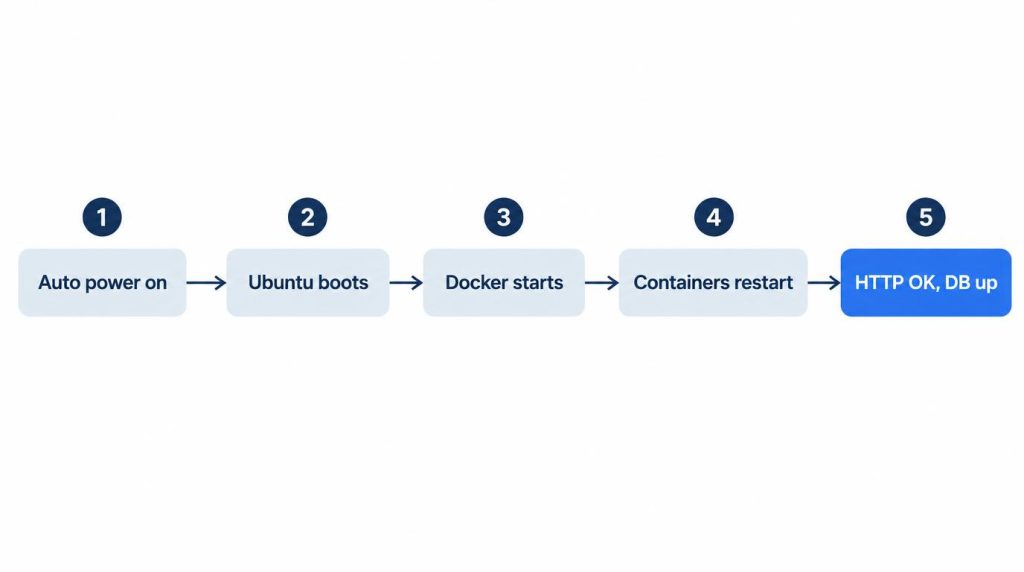
A BIOS toggle alone doesn’t make an unattended server. Pull the plug, plug it back in, and watch all five steps happen without touching anything:
- The machine turns on when power returns
- Ubuntu boots
- The Docker daemon starts
- Containers with a restart policy come back up
- Your service answers HTTP normally, and the database starts cleanly
Do you need a UPS for a mini PC home server?
I decided I didn’t. I had a cheap mini DC UPS in my cart and took it out, for two reasons.
First, as I understand it, a power cut in my apartment complex also takes down the telecom gear in the building’s basement wiring closet. Keeping my own unit powered wouldn’t keep the internet line up.
Second, those brief cuts happen maybe once or twice a year. For that, I didn’t want an unverified cheap lithium-ion battery on mains power around the clock, given the swelling and fire risk.
At home, I treat full uninterruptible power as overkill. A few hours offline is acceptable to me. What I want is a box that comes back by itself once the power does.
Check 2: Is 16GB of RAM enough, and can an N100 take 32GB?
Plan for 16GB. Intel ARK lists 16GB as the N100’s maximum memory, with one memory channel (checked November 4, 2026). A 32GB build is outside that spec sheet, and I haven’t tested one.
The newer N150 doesn’t raise the ceiling. Its ARK page also lists 16GB and a single channel (checked November 4, 2026).
If you need more than 16GB, I compared Mac mini memory configs for development separately.
How my 16GB was actually used
My laptop started with 8GB. Around 2019–2020 it was my main dev machine. With Docker Desktop, IntelliJ and dozens of Chrome tabs open, usage went past 7.5GB, swap grew by several GB, and the screen froze often.
I bought a DDR4 8GB module, opened the bottom panel and went to 16GB. After that, running Docker and the IDE together caused clearly less lag and fan noise.
As a home server, it ran four to six containers, such as PostgreSQL, FastAPI and Nginx. They sat around 3–4GB, and swap barely moved.
Where 16GB ran out
A crawling batch broke it. I loaded tens of thousands of text records into a pandas DataFrame in one go, then ran regex cleanup. Object copies pushed one process past 10GB, and the whole machine reached about 15GB.
Swap jumped to nearly 2GB in moments. Typing over SSH stalled for 1–2 seconds at a time.
I swapped the one-shot read_json load for a generator that reads in chunks. Swap usage disappeared, and the machine felt much quicker.
My takeaway: even with 16GB, a single node gets stuck in swap if a batch doesn’t stream in chunks.
A separate reproduction with synthetic data shows the shape of the problem. With 300,000 JSONL lines (122MB), loading everything took about 3.8 times the file size in Python object memory (469MB). Processing line by line took 0.03MB. Those are tracemalloc numbers, not values from my incident.
Once the machine arrives, run free -h to confirm the RAM it detects and to watch swap.
Checks 3 and 4: What “2.5G” and “NVMe” really tell you
On a spec sheet, both words are incomplete until you know the chipset and the slot.
2.5GbE: port speed vs link speed
“2.5G” can mean three things: the speed the port supports, the speed it negotiates with your router, and the throughput you actually get.
Plug a 2.5GbE port into a 1Gbps router port and it links at 1Gbps. After delivery, lspci shows the network chipset and ethtool shows the negotiated speed.
NVMe: read the slot’s lane count
NVMe speed depends on how many PCIe lanes the maker wired to the M.2 slot. Intel ARK lists 9 PCI Express lanes at PCIe Gen 3 for the whole N100 (checked November 4, 2026).
The slot’s lane count differs by model. One listing I read showed the M.2 slot as PCIe 1X in its spec image. The text on the same page claimed an NVMe speed of 800MB/s. Read the lane label and the speed claim together.
After delivery, lsblk only confirms that the drive is detected and shows its capacity.
Check 5: Why the adapter and warranty come before price
On a machine that runs 24/7, a dead adapter stops the server even when the unit itself is fine. My laptop’s bad plug contact is the small version of that.
If you’re buying cross-border, check the listing for two things: whether service is available where you live, and who handles warranty claims.
Reading a real mini PC listing: what I found
When a listing puts the details in images, the text alone may not give you the model name, LAN speed or RAM type, so open the spec images and read the option names too.
Here’s one I read while considering a purchase, on October 9, 2026. It was a cross-border listing, and my search term was “EQ12 N100”.
The Korean text had no exact model name. It said “Gigabit Ethernet port ×1”, “1 x 16G RAM (supports 3200MHz)” and “pre-installed W-11 Pro” (my translations). Even the spec image called the product only “Mini PC”. So I can’t say this was the model I searched for.
What I’d check on any listing, with what that page showed:
- Model name. Is it in the images or option names? This spec image said only “Mini PC”.
- LAN speed. Gigabit or 2.5G? This one read
Realtek 8111H 1000M ×1, a single gigabit port. - Slot layout. It listed
SO-DIMM DDR4 ×1, M.2PCIe 1X, and one 2.5-inch SATA bay. A MHz figure alone tells you nothing about slots. - Power features. It listed
WOL, AUTO POWER ONand12V-3A Certification. It didn’t say when the machine powers back on after an outage, or what the certification was. Check recovery in the BIOS yourself. - Windows license and returns. Cross-border listings sometimes show a separate, high return fee. This page did.
Mini PC home server checklist: before you buy, after it arrives
Use the second column before you order and the third once the box is on your desk.
| Item | Before buying | After arrival | If it fails |
|---|---|---|---|
| Power recovery | BIOS option in manual | Pull plug, watch 5 steps | Stays off after outage |
| Memory | Intel ARK max | free -h |
Swap grows, SSH lags |
| NIC | Chipset, port speed | lspci, ethtool |
Links below spec |
| NVMe | Slot lanes | lsblk |
Slower than claimed |
| Adapter, warranty | Service terms | Adapter after first run | Sudden shutdowns |
If you only have time for one check, make it power recovery. You can fix the rest after you buy. A box that doesn’t come back after an outage just stays off, and nobody knows.
Sources
- Intel Processor N100 specifications (Intel ARK): max memory 16GB, 1 memory channel, 9 PCIe lanes, PCIe Gen 3 (checked November 4, 2026)
- Intel Processor N150 specifications (Intel ARK): max memory 16GB, 1 memory channel (checked November 4, 2026)
Related posts
- n8n Retry On Fail Sent It Twice: 8 Months of Self-Hosting
- TigerVNC Black Screen on Ubuntu: Check xstartup First
- 504 Gateway Timeout but No App Errors? Find Who Cut It Off
- Mac mini M6 32GB Review: One Month as My Dev Machine
I first wrote this in Korean on my blog: https://jjeongil.tistory.com/3598.