Yes, 32GB is enough for a developer Mac mini M6, with one limit. After a month as my main machine, running IntelliJ, Docker and up to three AI coding agents, the 32GB, 1TB model got tight on about four days, the fan was audible once, and builds stayed in the 40–50 second range. I would buy the same configuration again.
The Mac mini M6 is Apple’s compact desktop, built on the 12-core M6 chip and sold from $899 with 16GB, configurable up to 32GB (Apple Newsroom, August 25, 2026). Most launch reviews tested 16GB or 24GB units for about a week. This is a month on 32GB, with a short follow-up after macOS 27.2.
On this page
- What I bought and what it replaced
- Was 32GB enough after a month of Docker, IntelliJ and AI agents?
- Three small problems in my first month
- Fan noise and build times under load
- Is 1TB the right amount of storage for development?
- After macOS 27.2: my November 1 check
- Would I buy the same configuration again?
- FAQ
What I bought and what it replaced
I bought the Mac mini M6 with 32GB and 1TB to replace an M1 with 16GB. I ordered it on the evening of September 22, 2026, it arrived September 24, and October 24 marked 30 days.
On Apple’s US store, 32GB with 1TB is one of the four ready-made M6 configurations, so you don’t have to build it to order (Buy Mac mini, checked November 1, 2026).
Going from 16GB to 32GB changed more for me than the chip generation did.
I skipped Migration Assistant. I made a new user account, installed the JDK and Homebrew fresh for arm64 under /opt/homebrew, brought projects back with git clone, and moved only the settings I needed by hand.
Was 32GB enough after a month of Docker, IntelliJ and AI agents?
Mostly, yes. In the first month, 32GB felt tight on about four days, roughly once a week, and every one of those days had three AI coding agents running alongside a Docker integration test run.
In early October, a normal day sat at 26–28GB of Memory Used with little or no swap (full snapshot in my M6 vs M5 Pro post).
The worst day had all of this open at once:
- Three agents
- IntelliJ
- About 20 Chrome tabs
- Five containers, with OrbStack’s memory limit raised from my usual 8GB to 12GB
- A 7–8B model in 4-bit, loaded on the Mac for a short test
Activity Monitor showed Memory Used in the low 30s of GB and about 3GB of swap. For the first time, the memory pressure graph, which Apple describes as how efficiently memory is serving your processing needs, turned yellow for a moment.
I never saw red, and the build didn’t fail. But each switch between agent windows took a beat. That’s why I read swap and the pressure color next to Memory Used, not Memory Used alone.
What I changed after the worst day
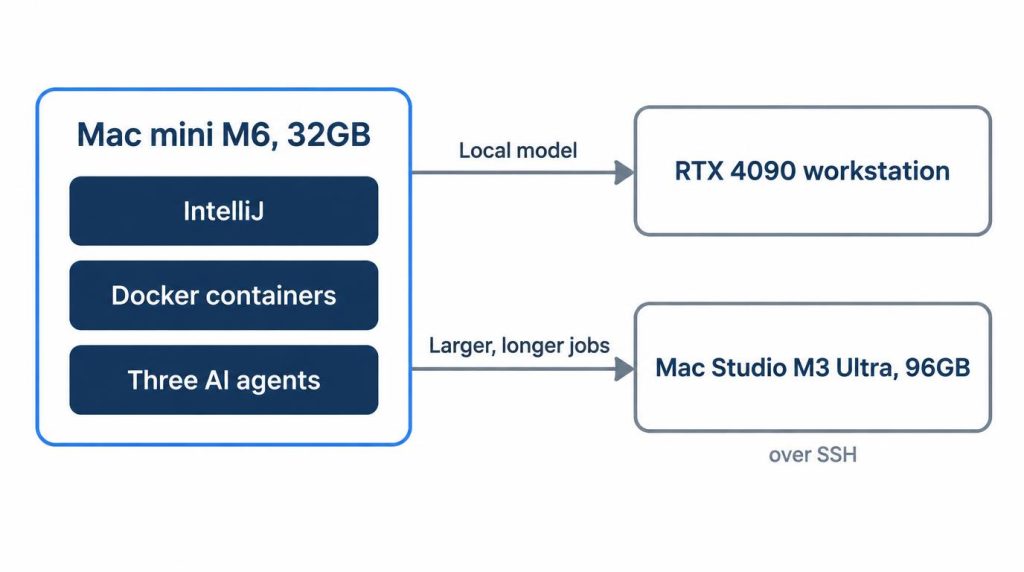
I stopped running a local model while three agents are up. If I need a model, it goes to my RTX 4090 workstation, where 8B and 30B models run without touching the Mac’s memory. Since then, on normal days, swap has stayed under 1GB and I haven’t seen yellow.
Larger, longer jobs already went to a Mac Studio M3 Ultra with 96GB that I reach over SSH.
How I cap OrbStack’s memory
OrbStack is the Docker runtime on this Mac. Its memory limit lives in Settings, on the System tab, as the Memory limit slider.
OrbStack’s docs say the default is no more than 8GB, and the limit is a cap rather than a reservation, so memory goes back to macOS once containers stop needing it.
On the worst day I moved the slider to 12GB for five containers; from a terminal, orb config set memory_mib 12288 sets the same value. I put it back to 8GB that evening. I don’t go above 12GB, because I bought 32GB to leave room for the IDE and agents, not to hand it all to containers.
24GB vs 32GB: why I didn’t take 24GB
At the end I was choosing between the M6 with 24GB and the M5 Pro base model, which also starts at 24GB. I decided that 24 to 32GB mattered more than a CPU or GPU tier, because my day is IntelliJ, two or three agents, Docker and Chrome, and I expected memory to stop me before the CPU did.
My M1 16GB was already out of room. A 24GB Mac would have been only half of the jump I wanted.
By my estimate, not a test on a 24GB unit, a normal day at 26–28GB would leave 24GB short by 2–4GB, pushed into compression or swap. The pressure graph would rise into yellow on ordinary days, and the low-30s state of my tight days would come every day.
Apple’s specs point the same way: the Mac mini specs page lists 153GB/s of memory bandwidth for the 16GB M6 and 170GB/s for the 24GB and 32GB options (checked November 1, 2026).
Korean search demand points the same way: on Naver’s keyword tool on November 1, 2026, “Mac mini M6 32GB” in Korean drew about 1,070 monthly searches against about 80 for the 24GB version.
Three small problems in my first month
The Mac arrived on macOS 27.0. In the first month I installed one update, 27.0.1, released September 28.
Rectangle took about 3 minutes to fix, including time spent looking in the wrong place. After 27.0.1, its shortcuts stopped working.
I assumed new macOS window-tiling shortcuts collided with Rectangle’s. Keyboard Shortcuts in System Settings showed no conflicts, and relaunching Rectangle changed nothing.
The real cause was in System Settings > Privacy & Security > Accessibility. Rectangle’s switch looked on, but the update had invalidated the permission. Toggling it off and on brought the shortcuts back. Now, when a shortcut app breaks after an update, I open Accessibility first.
| Item | My result | How I know |
|---|---|---|
| Sleep/wake | One 2–3s black screen | Notes |
| Docker arch | One amd64 tag, 10 min | Notes |
| Bluetooth, Wi‑Fi | No drops | Memory, no reconnects |
| Restarts | One, for that update | Update history |
The black screen happened once, in the first week of October, on my Dell U2723QE (4K at 60Hz over a direct USB‑C cable, HDR off). It didn’t come back, and I never found the cause.
One image tag I pulled was amd64-only and triggered a platform mismatch warning: does not match the detected host platform. I checked its architecture and switched to an arm64 tag.
Fan noise and build times under load
Yes, the Mac mini M6 has a fan you can hear, but I heard it only once in the first month: about 15 minutes into a full Docker integration test run with three agents going. Apple’s specs page lists a typical acoustic level of 5 dBA at idle.
That one time, it was a low rush of air I noticed only when I listened for it. It went quiet within 1–2 minutes after the tests finished. That’s by ear, not a decibel meter. My 4090 box needs its door closed to fade out; the Mac mini has never bothered me.
Incremental Gradle build and test runs finish in 40–50 seconds. My latest was BUILD SUCCESSFUL in 46s, with the Gradle daemon up and the cache warm. Agents stretch that time:
- One or two agents add 5–10 seconds, so builds finish in the 50s.
- Three agents, each running tests in its own worktree, push it to 60–80 seconds.
- Even on the busiest days, it never went past 90 seconds.
By my math, that’s about 1.2–1.7 times normal. These are numbers I saw over the month, not controlled, repeated runs. With three or more agents, I now work in another window instead of waiting for the build.
Is 1TB the right amount of storage for development?
For my workload, yes. As of October 21, 2026, I was using about 270GB of the 994GB available, about 55GB of it OrbStack. By my estimate, 512GB would have pushed me into regular cleanups within two months, and 256GB would have run out in the first week.
Roughly where most of the 270GB goes:
- OrbStack, about 55GB: images about 25GB, volumes about 20GB, build cache the rest
- System and apps, about 100GB
- Repository clones and build output, about 40GB
- Gradle and Maven caches, about 25GB
- Small local models, about 20GB
- IntelliJ caches and indexes, about 10GB
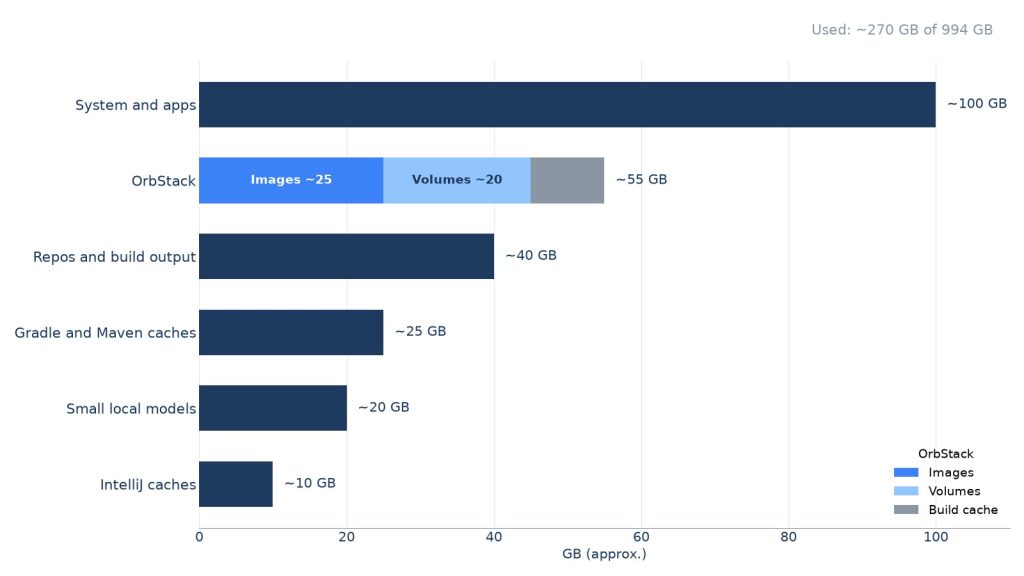
The volumes are mostly PostgreSQL and Redis data plus test dumps. docker system df marks about half the images as reclaimable. A monthly prune frees about 10GB, and I prune first whenever free space drops below 200GB.
A 2TB portable NVMe SSD holds datasets, old project archives and image backups, about 600GB so far, over one USB4 40Gbps cable. Projects and OrbStack data stay internal, because container I/O shouldn’t depend on a cable or a mount that can drop after sleep.
On 512GB, about 490GB would be usable, so I’d start with about 220GB free. OrbStack and caches grow about 10GB a month. That crosses my 200GB prune line in two months and hits 100GB about a year in, not the six months I first guessed.
Korean buyers worry about the 256GB model too. On October 21, 2026, I counted the top 25 Naver blog posts about it: 22 discuss external SSDs or storage space. Those are other owners’ posts, not my experience.
After macOS 27.2: my November 1 check
Apple released macOS 27.2 on October 26, 2026. I installed it on the Mac mini on the evening of October 28 through Software Update; it took one restart and under 20 minutes.
None of the three problems came back. Rectangle’s shortcuts worked right after the restart, and its Accessibility switch was still on. OrbStack started at login with the PostgreSQL and Redis containers up, and an integration test run passed.
The Mac woke from sleep three or four times in the four days after the update, and the monitor came on immediately each time.
As of November 1, About This Mac > Storage shows about 280GB used, roughly 10GB more than on October 21, mostly OrbStack images and Gradle cache. That leaves about 700GB free.
Tight memory days now number about five, one more than at 30 days, and it looked the same: three agents plus a Docker integration test, yellow pressure, about 3GB of swap. The update didn’t make it worse. My rule is to look at the M5 Pro again if yellow-pressure days pass five or six in a month, so I’m still counting.
Would I buy the same configuration again?
Yes, the same M6 with 32GB and 1TB. My biggest regret is the 32GB ceiling: tight days were rare, but there’s no upgrading later. What I like most is how steady builds and fan noise stay.
Going to 64GB on the M5 Pro costs much more, and my heavy GPU work already runs on the 4090 (I compared that route in DGX Spark vs RTX 4090 for local LLMs). So memory first, then storage, still feels like the right order.
My verdict:
- Buy it if you run an IDE, Docker and a few AI agents, and large models live elsewhere.
- Move up from an M1 16GB if you run Docker and agents together.
- Skip it if you already have an M4 with more than 32GB, or you work mostly away from a desk.
- Go M5 Pro if you need more than 32GB or sustained GPU work.
I haven’t used a 16GB M6. For that question and the full M5 Pro comparison, see my Mac mini M6 vs M5 Pro post. I’ll update this after three to four months of use, in January 2027.
FAQ
How many AI coding agents can a 32GB Mac mini M6 handle?
In my setup, three agents is the edge. Every tight day had three agents plus a Docker integration test; with one or two, builds ran 5–10 seconds slower and memory stayed green.
Can you upgrade the Mac mini M6’s RAM later?
No. Memory is picked when you order (16GB, 24GB or 32GB on the M6) and can’t be added afterward, which is why I went straight to 32GB.
Mac mini M6 32GB or M5 Pro 24GB for development?
For my work, the M6 with 32GB: my tight days were about memory, and the M5 Pro base model starts at 24GB for $1,699. If you need more than 32GB, the M5 Pro is the better fit, since it goes up to 64GB.
Sources
- Apple unveils a more powerful Mac mini featuring the all-new M6 and M5 Pro, Apple Newsroom, August 25, 2026: M6 specs, memory up to 32GB, $899 and M5 Pro $1,699 starting prices, M5 Pro up to 64GB
- Mac mini – Tech Specs, Apple, checked November 1, 2026: M6 memory options and bandwidth (153GB/s and 170GB/s), 5 dBA typical idle acoustic level
- Buy Mac mini, Apple Store, checked November 1, 2026: M6 32GB/1TB standard configuration, M5 Pro configurations start at 24GB
- M6 Mac mini review, 9to5Mac, September 21, 2026: a launch review on a 24GB unit after about a week
- Apple security releases, Apple Support, checked November 1, 2026: macOS 27.0.1 (September 28) and 27.2 (October 26) release dates
Show 5 more sources
- View memory usage in Activity Monitor on Mac, Apple Support: what memory pressure and swap used mean
- Settings, OrbStack Docs, checked November 1, 2026: Memory limit location,
memory_mibkey, 8GB default cap - Engine API version history, Docker Docs: the platform mismatch warning
- Naver searches, October 21, 2026 (Korean queries on Mac mini M6 256GB storage and external SSDs): the 22-of-25 storage tally
- Naver keyword tool, November 1, 2026: monthly Korean searches for the M6 32GB and 24GB models