If the Gemini app isn’t loading your chats, they’re probably not deleted. Open My Activity first: if your prompts are listed there, the problem is the app, the account, or a Google bug.
If they’re gone from My Activity too, they were never saved or were auto-deleted. That’s what happened to some of mine this month: Gemini’s default auto-delete removes activity older than 18 months.
I use Gemini mostly in a pinned gemini.google.com tab on my Mac, about 65–75% of the time. The rest is the Gemini app on my iPhone.
On this page
- Are my Gemini chats deleted or just hidden?
- My three-place check in October 2026
- Why is the Gemini app not loading chats that show on the web?
- Chats in My Activity but missing from the sidebar
- Keep Activity, Temporary chats and auto-delete
- What not to do while chats are missing
- How I keep important Gemini chats now
- FAQ
Are my Gemini chats deleted or just hidden?
Check three places with the same Google account: the app’s chat list, the gemini.google.com sidebar, and My Activity. If My Activity still lists your prompts, the data exists, and you’re facing a display, app, or account problem.
My Activity is Google’s account-level record of what you sent to Gemini. The chat lists in the app and on the web are just views of that record.
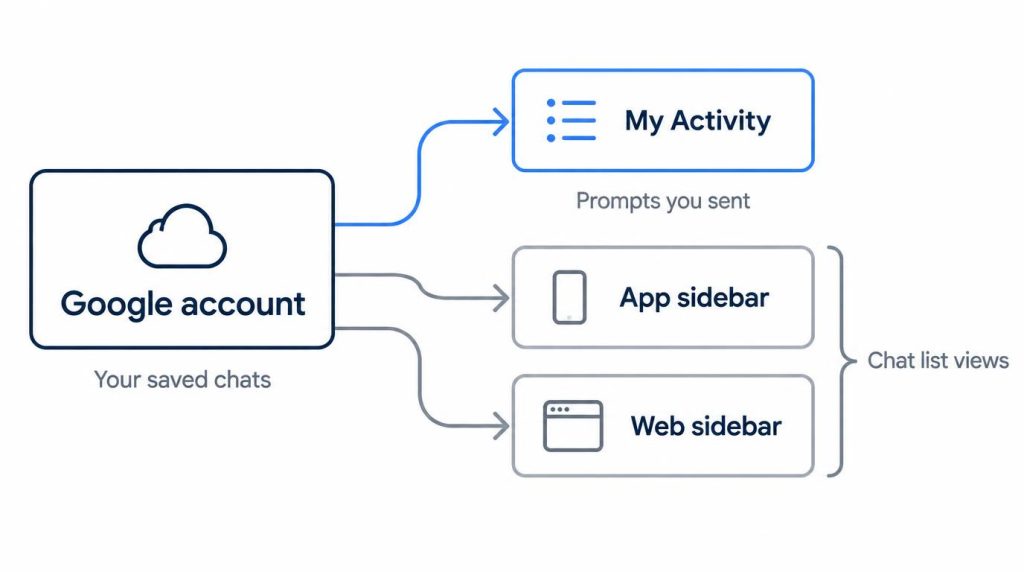
Where to look, per Google’s Gemini Apps Help (checked October 30, 2026):
- iPhone or Android app, chat list: tap Menu at the top. Your pinned and recent chats are under “Recent.”
- iPhone app, activity: tap Menu, then your profile picture or initial, then Gemini Apps Activity.
- Web, activity: open Settings & help > Activity on gemini.google.com, or go straight to myactivity.google.com/product/gemini.
Check that the profile picture matches the account you chat with. My Activity lists your prompts, not chat titles, so compare by the first thing you typed.
| App list | Web sidebar | My Activity | Go to |
|---|---|---|---|
| Missing | Shows | Shows | Fix the app |
| Missing | Missing | Shows | Account or bug |
| Won’t open | Won’t open | Shows | Account or bug |
| Missing | Missing | Missing | Not saved or auto-deleted |
My three-place check in October 2026
When I checked all three with my personal Gmail in October 2026, the iPhone app and the web showed the same 10 most recent chats in the same order: 10 of 10. In My Activity, 0 of those 10 titles matched word for word, but matching by first prompt found all 10. A chat with several back-and-forths splits into several entries there.
The oldest item was from late April in all three, just inside the 18-month auto-delete line. My Activity’s went a few days further back, since it dates each prompt, not the chat’s last activity.
I also tried the search box in the chat list, on the Mac web sidebar and then in the iPhone app. I typed words likely to be in a title: a topic I remembered, or a tool or library name. Chats from the last nine months came up right away, with the same results on web and app. My early 2025 chats returned nothing for any word. Search hadn’t missed them; auto-delete had already removed them.
So when search comes up empty now, I check the auto-delete period before trying other words.
Why is the Gemini app not loading chats that show on the web?
If the web lists your chats and the app doesn’t, your chats are fine and the app is the problem. Update it, force-quit it, and switch between Wi-Fi and cellular before trying anything heavier.
Both lists come from the same account. During my check, a chat I had just started in the iPhone app was at the top of the web list after one refresh.
On iPhone, the heavier step is Settings > General > iPhone Storage > Gemini > Offload App, then reinstall.
On Android, the usual steps are clearing the Gemini app’s cache (Settings > Apps > Gemini > Storage & cache) and updating Android System WebView. I don’t use Android, so treat those as general steps, not tested ones.
Forum users with a stuck chat list report the error “Sorry, couldn’t connect to server. Please try again.” If you were in the middle of work when an AI service failed, I wrote up how I handle a fallback during a Claude outage.
If it’s the other way around, with chats in the app and an empty web list, check the web account first.
Chats in My Activity but missing from the sidebar
When My Activity has your prompts and both chat lists are empty, the usual causes are a different Google account or a failure on Google’s side.
Is the wrong account hiding my chats?
Often, yes. Chats belong to one Google account, so a different account shows an empty list. I use Gemini with one personal Gmail account. My work Google Workspace account lives only on my work laptop.
This spring I opened gemini.google.com on that laptop to check a personal chat. The list was empty.
Refreshing didn’t help, and neither did an incognito window. Then I saw it had opened with my work account. Switching profiles brought every chat back, after 5–10 wasted minutes.
On work or school accounts, an administrator controls whether Gemini keeps activity, and you may not be able to change how long chats are kept.
What if it’s Google’s bug?
It points to a bug when the account is right, both lists are empty, and My Activity still lists your prompts.
On February 23, 2026, The Register reported Google saying it was “fixing a bug that temporarily hid chat history for a small number of users.”
If your account and settings check out, report it from Settings & help > Send feedback on gemini.google.com, and wait.
Can I open an old Gemini chat by its link?
Only if the chat still exists. I opened three gemini.google.com/app/ links from my Mac’s Chrome history, signed in to my personal account: one from the past month, one from late April, and one from much earlier, in early 2025.
The first two opened in full, and both were already in the sidebar. The 2025 one wouldn’t load; it was past the 18-month line and missing from the sidebar too.
A link points to where a chat was, not to its content. It may help when the list fails to load, but not after auto-delete, so I check My Activity before trying old links.
Keep Activity, Temporary chats and auto-delete
If a chat is missing from My Activity too, it was never saved or was auto-deleted. Google documents no way for users to restore either one.
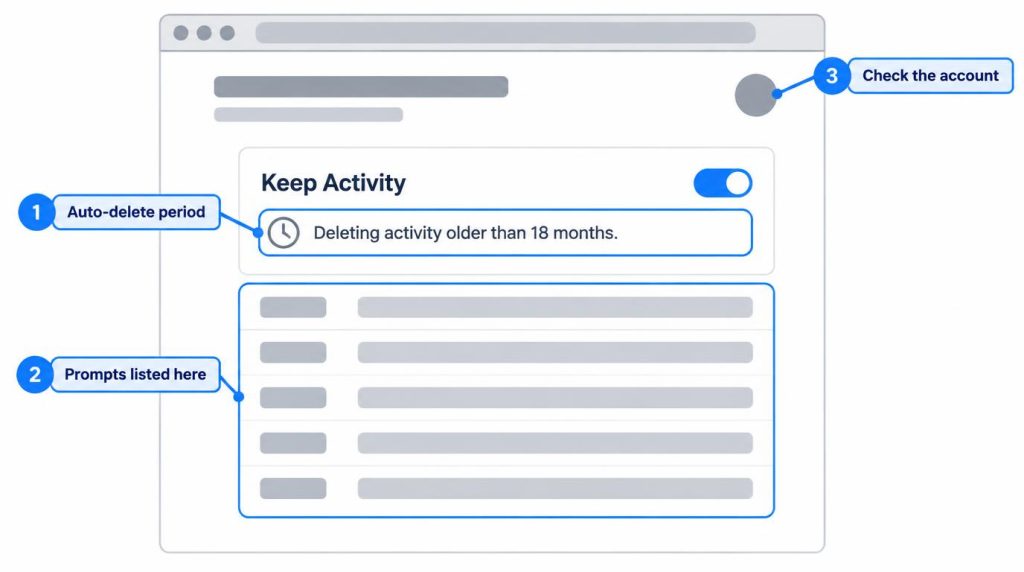
Keep Activity (formerly Gemini Apps Activity) is the setting that saves your Gemini chats to your Google account. Per Google’s help pages (checked October 30, 2026), it’s on by default for users 18 and over, and the Recent chat list on a personal account only works while it’s on.
Nothing reaches your activity with Keep Activity off or in Temporary chat. Google says it still keeps those chats for up to 72 hours, but they never appear in your activity or chat list.
I tested one Temporary chat in Chrome on my Mac: a one-line question, then I closed the tab. It didn’t show up in the app list, the web sidebar (even after a refresh), or My Activity.
Auto-delete runs at 3, 18, or 36 months, or you can choose “Don’t auto-delete activity.” The default is 18 months, and mine was never changed.
This month I looked for my oldest chats, from early 2025, when I used Gemini free on the web. Neither list had them.
The Activity page said “Deleting activity older than 18 months.” Everything from the last nine months was there. The whole search took 25–35 minutes, most of it spent confirming the rest was gone.
Korean help posts don’t fill this gap either (Claude Code pulled and tallied them for me on October 23, 2026; this isn’t my own experience). Of the top 25 Naver blog posts for “Gemini chat history disappeared,” about 12 explain how to delete history or turn it off.
One Naver Q&A user chatted through a KakaoTalk search shortcut while signed out, and nothing was saved.
What not to do while chats are missing
Don’t delete activity, and don’t toggle Keep Activity off and on. Both can cost more than they fix. I start with read-only checks: account, then auto-delete period, then My Activity.
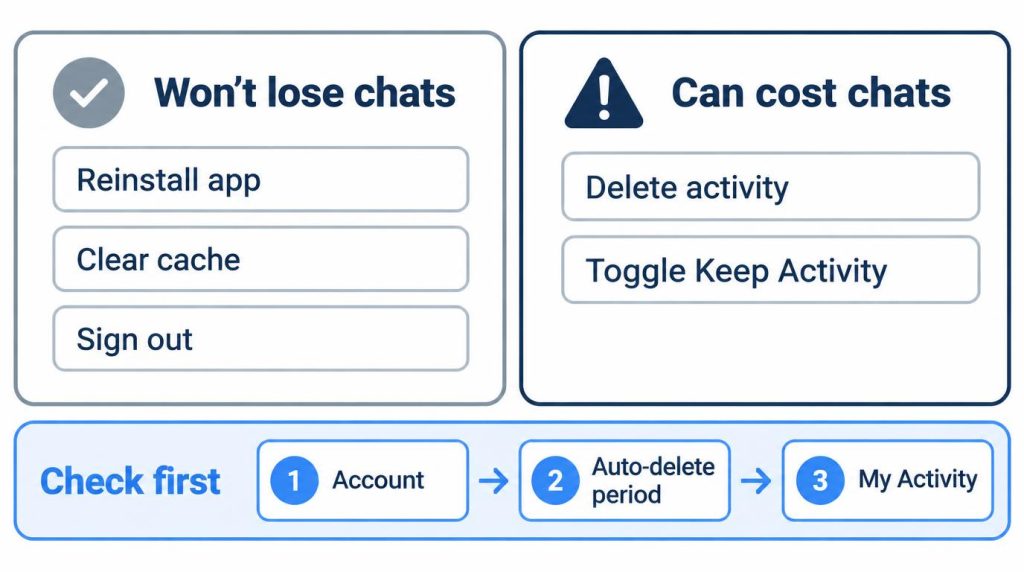
Reinstalling, clearing the cache, and signing out won’t help when chats live on your account. They don’t lose anything either.
Deleting activity does. Google’s help page says deleting a chat from the list also removes it from your activity, and there’s no trash to restore from. When my old chats vanished, My Activity was the only place I could check.
Turning Keep Activity off stops new chats from saving.
How I keep important Gemini chats now
Copy what you’ll need again out of Gemini, into Docs or a notes app. Its history is subject to auto-delete, so I treat it as temporary storage.
Gemini isn’t my main assistant; ChatGPT and Claude get more use, and I’ve stayed on Claude Pro rather than Max. I open Gemini for Google account tasks, images, and model comparisons. I’ve been on Google AI Pro for about nine months.
After auto-delete took my oldest 2025 chats this month, I started exporting. Chats with a conclusion or code go to Docs from the share menu, titled with the date first.
Short commands go into a notes app. I don’t archive with share links. I make one only to show a colleague, then delete it.
I tried Google Takeout once. It exported activity entries, awkward to reread, so I don’t use it for backups.
My rule: if asking again gives the same answer, I let it go. If it took a lot of my input, it goes to Docs.
FAQ
Can I recover deleted Gemini chats?
Google’s help pages describe no restore for chats you deleted or that auto-delete removed. If My Activity doesn’t list them, nothing documented brings them back.
Will turning Keep Activity back on restore missing Gemini chats?
Google doesn’t say so. It saves new chats from that point. Chats made while it was off, or removed by auto-delete, aren’t documented as coming back.
How do I export my Gemini chat history?
Use Google Takeout. Choose My Activity, then select Gemini Apps under “All activity data included.”
Sources
- Manage & delete your activity in Gemini Apps, Google Gemini Apps Help, accessed 2026-10-30: web and iPhone activity paths, Keep Activity default, 72-hour retention, auto-delete periods, work or school admin control
- Find & manage your recent chats in Gemini Apps, Google Gemini Apps Help, accessed 2026-10-30: Menu > Recent, chat search, Recent needs Keep Activity, deleting a chat removes its activity
- Send feedback or report a problem with Gemini Apps, Google Gemini Apps Help, accessed 2026-10-30: Settings & help > Send feedback
- Temporary chats and new privacy controls, Google Blog, 2025-08-13: Keep Activity rename, Temporary chats kept up to 72 hours and hidden from recent chats
- Gemini users say their chat histories have quietly vanished, The Register, 2026-02-23: Google’s statement on the chat history bug
Show 3 more sources
- Gemini chat history error “Sorry couldn’t connect to server”, Google AI Developers Forum, accessed 2026-10-23: error message reported by users
- Download your Gemini Apps data, Google Gemini Apps Help, accessed 2026-10-23: Takeout export of Gemini data
- Naver searches (2026-10-23, queries “제미나이 대화 기록 사라짐” and “제미나이 앱 대화 목록 안 보임” (Gemini chat history disappeared / Gemini app chat list not showing), top 25 posts each): Korean posts tally