Partly. As of November 3, 2026, HackerRank records copy-paste and tab switches by default and runs a code-similarity check on every test. Employers can add an AI plagiarism model, webcam proctoring, and a locked-down desktop app. None of these signals proves a candidate used AI.
I’ve used HackerRank and Codility as an interviewer for backend Java/Spring roles. When a flag shows up, I treat it as a reason to ask questions in the live interview, not as a verdict.
On this page
- What HackerRank checks during a test
- Hidden overlay apps and Desktop App Mode
- What about a phone or second device?
- Does a flag mean the candidate cheated?
- What I check in the live interview after a flag
- Can employers allow AI in a HackerRank test?
- Codility, CodeSignal, and CoderPad: what each one checks
- FAQ
- References
What HackerRank checks during a test
HackerRank is a platform for timed, automatically graded coding tests. It doesn’t read a candidate’s mind or their ChatGPT history. It watches what happens inside the test window and compares the code with other submissions.
Here’s what HackerRank’s help center describes, checked on November 3, 2026:
| Signal | Default? | What it shows or does |
|---|---|---|
| Copy-paste tracking | On | How often text was copied or pasted, and what was pasted |
| Tab proctoring | On | How often and how long the candidate left the window |
| MOSS code similarity | On, all tests | Large overlaps with other submissions |
| AI Plagiarism Detection | Opt-in per test | High or Medium confidence flags |
| Secure Mode | Employer setting | Full screen, copy-paste blocked, no multiple monitors |
| Proctor Mode | AI Add-on | Secure Mode plus screenshot analysis and webcam anomaly detection |
| Desktop App Mode | AI Add-on | Proctor Mode plus OS-level monitoring in a native app |
MOSS (Measure of Software Similarity) splits code into tokens, so renaming variables or changing whitespace doesn’t hide a match. HackerRank sorts MOSS matches into High (90% or more), Medium (80–90%), and Low (under 80%).
The AI Plagiarism Detection model looks at large pastes from outside, coding patterns, how the code evolved across attempts, and tab switching. When an employer turns it on, the candidate has to consent before the test starts.
Unless the employer turns on extra options, a plain test relies on copy-paste logs, tab proctoring, and MOSS. No webcam is involved.
Hidden overlay apps and Desktop App Mode
Copy-paste logs and tab proctoring only see the test tab. Separate desktop apps such as Cluely and Ultracode, which HackerRank itself calls “invisible cheating tools,” run outside it.
HackerRank’s answer is Desktop App Mode, part of the AI Add-on, which it says adds controls “not possible in web browsers.” According to its Desktop App Mode article (checked November 3, 2026), candidates install a native app for Windows or macOS and start the test from it. The app:
- closes other applications during the test, naming Cluely, Ultracode, video conferencing, messaging, and LLM apps;
- blocks screen sharing, remote access, and screenshots;
- checks for a single, non-mirrored display and asks for webcam access.
The employer has to enable Proctor Mode first, so a test runs this way only when the employer has turned it on. If the invitation tells you to download the HackerRank Desktop App, you’re in this mode. If you just open a link in a browser, you aren’t.
What about a phone or second device?
The default signals can’t see a phone. Copy-paste logs and tab proctoring only record what happens in the test window. HackerRank’s integrity articles don’t mention phones or second devices.
The only options that look beyond the test window use the webcam. With Image Proctoring the system takes periodic snapshots during the test, and Image Analysis uses AI to look for suspicious activity in them. Proctor Mode adds webcam anomaly detection. All of these are employer-enabled options, and you’ll see a webcam prompt before the test starts if they’re on.
Does a flag mean the candidate cheated?
HackerRank’s own documentation says a flag isn’t proof.
Its MOSS article states that the model “cannot determine the exact source of plagiarism” and recommends reviewing the code playback before a final decision. Its AI Plagiarism Detection article gives the model an overall precision of 85%. That means about 15% of flagged sessions may be wrong, and the article says “Human oversight remains crucial.”
The help center also notes weak spots. Detection is limited when a question needs very little code. Pasting from an external IDE into a standard coding question is likely to be flagged, even if the candidate wrote that code.
My own rule matches this. I don’t use these signals as a yes-or-no verdict on AI use. Switching tabs several times isn’t necessarily cheating, and a clean report doesn’t guarantee the candidate didn’t use AI.
What I check in the live interview after a flag
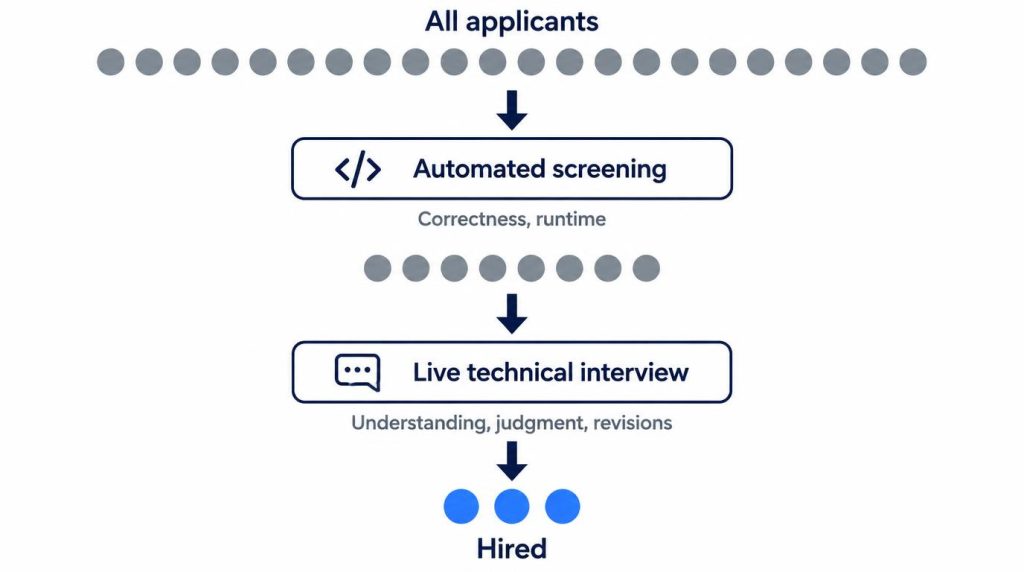
In our process, candidates solve 2–3 problems within a fixed time limit and the platform grades them. Only those who pass move on to the technical interview. I use the test only there, right after the résumé screen.
When I want to know whether candidates understand their own code, I come back to it in the live interview:
- “Why did you write this part this way?”
- “If the requirements changed, where would you have to edit?”
- “How would you write this without this library?”
That’s where it shows. I think checking whether a candidate can understand and modify the code they submitted is a more useful hiring signal than trying to guess whether they used AI. Automated grading is good at checking answers. The live interview shows how those answers connect to the candidate’s real problem-solving.
A score can mislead in both directions, and I’ve seen the same pattern more than once. I remember one candidate who solved the algorithm problems within the time limit without trouble. Then we went through the project code they had submitted. I asked why they chose this data structure, what happens when concurrent requests come in, and why they scoped the DB transaction the way they did. Their answers quickly got shaky.
Another candidate’s score wasn’t especially high, but it cleared the cutoff. In the live interview, they broke the problem into small steps and kept revising their code as the interviewer added new conditions. That looked closer to the real job.
So I read the automated score as a screening signal, one minimum bar applied the same way to many candidates, not a grade for overall development ability. HackerRank’s own research points the same way: it reports that 77% of developers say the assessments they face don’t reflect the skills the job actually needs.
In the live session I look at five things:
- How they interpret the requirements
- Whether they fill gaps by asking questions
- Whether they find edge cases on their own
- How they change the existing design when a new condition comes in
- How they fix an approach that failed
I don’t reuse the automated test’s problem in the live interview. Asking the same problem again only double-checks the same signal.
Can employers allow AI in a HackerRank test?
Yes. HackerRank now sells AI-Assisted Tests as part of its AI Add-on. As of November 3, 2026, the test setter picks one of three levels per section:
- No AI assistant: no AI help in that section.
- Guarded AI assistant (the default): help with syntax, the platform, and concepts, but no complete solutions.
- Unguarded AI assistant: free use, with Plan, Ask, and Agent modes, model switching, and inline completions.
The full chat with the assistant shows up in the report through the AI Assistant Transcript, which is on by default. An optional AI Fluency report summarizes how the candidate worked with the assistant.
My view is that treating any AI use as cheating won’t hold up for long. Developers use AI on the job. If hiring alone bans it completely, the gap between the work environment and the test environment gets too wide. My current judgment is also that plain take-home coding tests have become less reliable since generative AI arrived.
So the question is shifting. It’s less “Did they use AI?” and more “How much AI do we allow, and what are we evaluating?”
Codility, CodeSignal, and CoderPad: what each one checks
I’ve used two of these platforms myself, HackerRank and Codility. For CodeSignal and CoderPad, the rows below come only from their official pages, checked November 3, 2026; I haven’t run them.
| Platform | Used it | Main integrity checks (official) |
|---|---|---|
| HackerRank | Yes | Copy-paste and tab logs, MOSS, AI plagiarism model; webcam and desktop app as add-ons |
| Codility | Yes | Similarity Check, AI copilot usage logs, an overall Integrity Risk level |
| CodeSignal | No | Suspicion Score from similarity, telemetry and copy-paste; optional video, audio and screen recording |
| CoderPad Screen | No | Exact-match plagiarism, external paste flag, left-the-test and full-screen exit alerts |
Codility added an option to log a candidate’s AI copilot use during 2025–2026. Its support and product pages describe the Integrity Risk level as decision support for hiring teams, not an automated verdict.
CodeSignal says its Suspicion Score gives “a clear breakdown of issues requiring review,” with human reviewers validating flagged activity. Its proctoring records the whole session and can ask for a government-issued photo ID.
CoderPad Screen recognizes code identical to another candidate’s submission and flags code “pasted from an external source.” If a candidate exits full screen or switches monitors, an alert fires after a 10-second grace period. Its documentation says plainly that “suspicious behavior does not always indicate cheating behavior.”
Across all four platforms, the pattern is the same: each one flags behavior for a human to review, and none claims to prove AI use on its own.
FAQ
Can HackerRank tell if code was written by ChatGPT?
Not with certainty. MOSS finds overlaps with other submissions but can’t say where code came from. The optional AI plagiarism model gives High or Medium confidence flags at 85% precision, and HackerRank tells employers to review the playback before deciding.
Does switching tabs fail a HackerRank test?
HackerRank logs the count and duration of tab switches, and the employer decides what to make of them. Secure Mode adds an alert on tab switches. I don’t treat a few tab switches as cheating on their own.
Is HackerRank webcam proctoring always on?
Webcam snapshots, image analysis, photo ID capture, and Proctor Mode are all employer-enabled options, and Proctor Mode is part of the paid AI Add-on. If none of them is on, the test doesn’t ask for your camera.
Are AI interviews replacing coding tests?
Attempts are increasing. As of 2026, companies such as Nexon and Kurly in Korea, along with Google, are trying AI interviews in place of coding tests. It’s still early, so I’m holding off on saying whether they’ll fully replace them.
References
- HackerRank Help: Test Integrity: copy-paste tracking, tab proctoring, Secure Mode, Proctor Mode, Desktop App Mode, and webcam image proctoring. Checked November 3, 2026.
- HackerRank Help: Desktop App Mode: blocked apps (Cluely, Ultracode, LLM apps), screen-sharing and screenshot blocks, Windows and macOS. Checked November 3, 2026.
- HackerRank Help: Plagiarism Detection Using MOSS: MOSS on by default, match bands, and the “cannot determine the exact source” limit.
- HackerRank Help: AI Plagiarism Detection: signals, candidate consent, and 85% precision.
- HackerRank Help: AI-Assisted Tests: No AI, Guarded, and Unguarded assistant levels; AI Assistant Transcript.
Show 4 more sources
- HackerRank: Real-World Software Skills vs. Algorithm Tests: source of the 77% figure.
- Codility Support: Integrity Risk: how Codility rolls integrity signals into one level.
- CodeSignal: Cheating and fraud: Suspicion Score, AI proctoring, ID verification. Checked November 3, 2026.
- CoderPad Docs: Cheating prevention and detection in Screen: plagiarism, external paste flag, full-screen alerts (page modified April 17, 2026).
I first wrote this in Korean on my blog: https://jjeongil.tistory.com/838.