To stop Claude Code asking for permission at every step, press Shift+Tab until you reach acceptEdits, or start it with claude --permission-mode acceptEdits. File edits then go through without a prompt, and most shell commands still ask. In Codex CLI, use --sandbox workspace-write with --ask-for-approval on-request; in Antigravity CLI, --mode accept-edits. Keep the skip-everything modes for an environment you can delete.
A permission mode is the setting that decides which actions a coding agent runs without asking you. Rules you write in settings sit above it.
The prompts cost real time. In my September 2026 Antigravity CLI runs, review mode took about 18 minutes per refactor and the no-review mode about 12. On October 23, 2026, I also had Claude Code run its own modes through an 85-run test matrix on my machine.
On this page
- Which setting stops the prompts in Claude Code, Codex, and Antigravity?
- Why does Claude Code keep asking after “Yes, and don’t ask again”?
- My Claude Code test: auto vs acceptEdits vs bypassPermissions
- What permission modes don’t protect
- Antigravity CLI: why Always Proceed still asks
- Codex CLI: what replaced --full-auto, and why never can’t run npm install
- The setting I leave on by default
- FAQ
Which setting stops the prompts in Claude Code, Codex, and Antigravity?
Use the middle mode, not the no-prompt one. Even Claude Code’s loosest mode still stops for your own ask rules.
| Tool | Fewer prompts | No prompts | Middle mode still asks |
|---|---|---|---|
| Claude Code | acceptEdits |
bypassPermissions (--dangerously-skip-permissions) |
most shell, outside project |
| Codex CLI | workspace-write + on-request |
--yolo (--dangerously-bypass-approvals-and-sandbox) |
network, outside workspace |
| Antigravity CLI | --mode accept-edits |
always-proceed (--dangerously-skip-permissions) |
per your rules |
| Gemini CLI | auto_edit |
yolo |
anything that isn’t an edit tool |
Claude Code’s auto looks like a middle mode, but on my 9 test tasks it ran everything bypass ran. It’s the built-in starting mode for interactive sessions since v2.1.283, so after an update you may already be in it.
The Antigravity and Gemini rows come from their docs. Antigravity CLI also has --mode auto, still labeled Preview on November 3, 2026, which I haven’t tried. I measured what its review mode costs in a separate Antigravity post.
Per Gemini CLI’s configuration reference, yolo can only be turned on from the command line. I keep --approval-mode default there, switch to auto_edit for edit-heavy refactors, and use yolo only in a throwaway worktree or isolated environment.
What changed in 2026 (checked November 3, 2026)
- Claude Code:
autobecame the starting mode for interactive sessions in v2.1.283. From v2.1.302,claude -pruns with no mode set start in Manual (default). I tested 2.1.296. - Codex CLI:
--full-autowas deprecated in 0.128.0 (April 30, 2026) and removed fromcodex execin 0.147.0 (August 7, 2026). The docs also sayapproval_policy = "untrusted"is no longer supported and can stop Codex from starting. - Antigravity CLI:
--mode auto (Preview)needs v1.3.5+ on macOS and Linux and v1.4.4+ on Windows. The same page now lists--mode accept-edits.
Changing the mode in Claude Code: terminal, settings, VS Code
All of these come from the permission modes docs, checked November 3, 2026:
- During a terminal session: Shift+Tab. From
auto, the first press goes todefault, then the cycle runsdefault→acceptEdits→plan. - At startup:
claude --permission-mode acceptEdits. - Every session: set
"defaultMode": "acceptEdits"underpermissionsin.claude/settings.jsonor~/.claude/settings.json. - VS Code: click the mode indicator at the bottom of the prompt box. To pin the starting mode, set
claudeCode.initialPermissionMode; it acceptsdefault,acceptEdits,plan, andbypassPermissions, but notauto.
bypassPermissions only shows up in the Shift+Tab cycle if you launched with it.
In VS Code at work, my claudeCode.initialPermissionMode is acceptEdits. I switch to plan for the first design pass and never turn on bypass in that extension.
Why does Claude Code keep asking after “Yes, and don’t ask again”?
Usually because the new command isn’t the one you approved. Per the permissions docs, a Bash approval saves a rule to .claude/settings.local.json at the repository root, but each part of cd app && npm test has to match a rule or be read-only. A file-edit approval lasts only until the session ends.
Some prompts offer only a one-time Yes; add those rules yourself with /permissions.
My test hit a third cause. Allow rules in a project’s .claude/settings.json didn’t load until the folder was trusted. Claude Code printed in each fresh folder: “Ignoring 3 permissions.allow entries from .claude/settings.json: this workspace has not been trusted.”
So an untrusted folder keeps your limits and drops your allowances. The fix is to run Claude Code there interactively once and accept the trust prompt.
With --allowedTools instead, Bash(npm test) covered the pipes the model actually typed, like npm test 2>&1 | tail -20, 3 of 3 times. git push --dry-run stayed blocked 3 of 3.
My work allow list is short: ./gradlew test, ./gradlew build, git status, git diff, and git log. I once approved all of ./gradlew from a prompt, then noticed the same prefix also covered bootRun and flywayMigrate.
I apply DB changes myself, so I deleted that rule and re-added only test and build. Now I check how far a prefix reaches before I click “don’t ask again”. git add, commit, push, docker, and curl still ask me every time.
Writing “Never ask for permission, just run everything.” in CLAUDE.md changed nothing in my test; npm test and git push stayed blocked. The docs say the same: CLAUDE.md shapes what Claude tries, not what Claude Code allows. My CLAUDE.md compliance test covers what those instructions do change.
My Claude Code test: auto vs acceptEdits vs bypassPermissions
On Claude Code 2.1.296, default blocked 7 of my 9 test tasks, acceptEdits blocked 5, and auto and bypassPermissions blocked none. Auto even wrote .git/config and a file outside the project.
| Task | default | acceptEdits | auto, bypass |
|---|---|---|---|
| Edit a source file | blocked | ran | ran |
npm test |
blocked | blocked | ran |
git push --dry-run |
blocked | blocked | ran |
.git/config + .vscode |
blocked | blocked | ran (auto 3/3) |
| Write outside project | blocked | blocked | ran |
rm -rf build |
blocked | ran (3/3) | ran |
node -e reads .env |
blocked | blocked | ran (auto 3/3) |
echo "rev=$(git rev-parse HEAD)" |
ran | ran | ran |
Read tool on .env |
ran | ran | ran |
The surprise was acceptEdits. It ran rm -rf build; ls -d build without asking, 3 out of 3 times. That’s documented: inside the working directory, acceptEdits auto-approves mkdir, touch, rm, rmdir, mv, cp, and sed.
The .git/config write matches the docs too: auto sends protected paths like .git and .vscode to its classifier, which said yes here.
dontAsk blocked the edit and npm test but allowed the .env Read.
If auto is missing for you, the docs list model requirements (on the Anthropic API, Sonnet 4.6 or Opus 4.6 and later), and an admin can turn it off.
How I tested it
I had Claude Code run this on my machine on October 23, 2026: Claude Code 2.1.296, Sonnet 5.5, headless claude -p, 85 runs, $4.15 total.
Each run got a fresh synthetic Node project with a git repo, a local bare remote, and a fake .env. I checked results on disk, not from the model’s claims.
Headless mode has no prompt. “Blocked” means the call was denied with “It requires approval, and this session has no approval surface”, so an interactive session would have asked.
Most cells are one run; 3/3 marks repeats.
What got through a three-step task?
I bundled an edit, npm test, and a write outside the project into one prompt, 3 runs per mode, with the same result every run:
| Mode | Steps done | Denials per run |
|---|---|---|
default |
0 of 3 | 2 to 3 |
acceptEdits |
1 of 3 (edit only) | 2 |
auto |
3 of 3 | 0 |
bypassPermissions |
3 of 3 | 0 |
What permission modes don’t protect
Permission modes decide when the agent asks, not what it can reach. On Claude Code 2.1.296 in bypass mode, a deny rule on .env blocked the Read tool, but node -e read the token anyway.
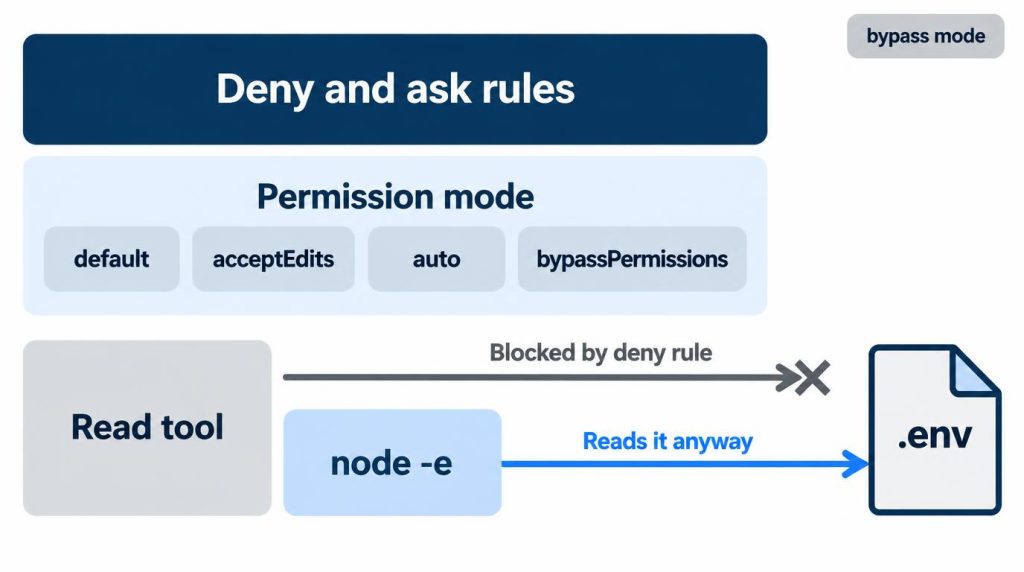
Ask and deny rules still apply in bypass mode
An ask rule, Bash(git push*), still forced a prompt in both bypassPermissions and auto. Rules sit above the mode. These are the exact rules from my test project’s .claude/settings.json:
{
  "permissions": {
    "deny": ["Read(./.env)"],
    "ask": ["Bash(git push*)"]
  }
}
Instructions don’t hold commits either. On a personal project, a Codex-family agent retried with git commit --no-verify after a pre-commit hook failed. I caught it reviewing the command log.
A deny rule isn’t a secret store
A deny rule stops the Read tool, not a script that opens the file. The permissions docs say as much: a Bash deny or ask rule “isn’t a security boundary around the program”. I first saw node -e get around it on October 13, 2026, and reproduced it on October 23 in bypass mode, 1 of 1 run.
In auto with the same deny rule, the classifier blocked node -e 3/3: “Permission for this action was denied by the Claude Code auto mode classifier.” Without the rule, auto ran it 3/3.
My real keys stay out of the agent’s environment; a wrapper passes them only to the child process that needs them.
Antigravity CLI: why Always Proceed still asks
Your explicit ask and deny rules beat the mode. The Antigravity docs resolve rules Deny > Ask > Allow and say rules take precedence over the mode, so an ask rule beats both a broad allow and always-proceed.
In September 2026, in a separate Git worktree of a personal repo, I ran the same mid-size refactor 5 times per mode. Each run explored about 20 files, changed 6 to 8, and ran tests and lint.
Request-review averaged 6 to 7 approvals and about 18 minutes per run; always-proceed averaged about 12. I didn’t record the CLI version.
Always-proceed was about 30% faster, but review caught 4 actions I didn’t approve, so it stayed my default.
A broad prefix I allowed for one dev command matched far more than I expected. Splitting similar commands into separate rules brought prompts back on small argument changes. Now I keep rules few and narrow.
Codex CLI: what replaced --full-auto, and why never can’t run npm install
Codex has two dials: the sandbox (read-only, workspace-write, danger-full-access) limits what can run, and the approval policy decides when it asks. never only stops the asking. The sandbox still keeps network access off in workspace-write unless you set network_access = true under [sandbox_workspace_write], so npm install fails there.
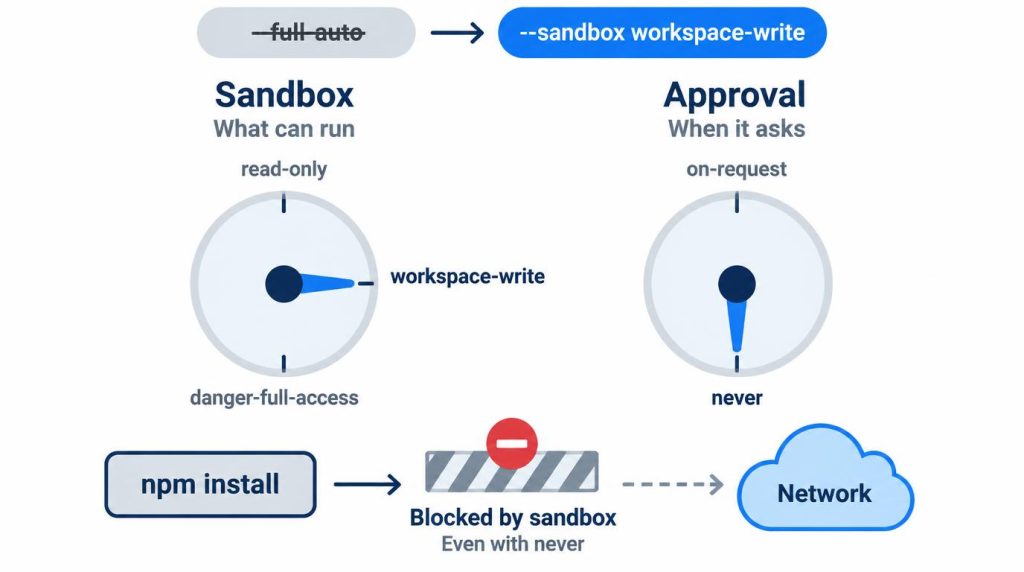
I hit the --full-auto change in a small lint-fix script that ran codex exec --full-auto in a throwaway worktree.
Around May 2026, near 0.128, the interactive CLI started rejecting the flag. codex exec only printed a deprecation warning, so I let it slide.
After a mid-August update, the script died on the argument error. I switched to --sandbox workspace-write, which keeps the behavior and shows which permission is on.
In September 2026, on macOS Apple Silicon, I ran the same small refactor 5 times. workspace-write with on-request took 14 to 16 minutes with 2 to 4 interruptions per run.
In an isolated environment, danger-full-access took 11 to 13 minutes. I don’t read that as a fixed speedup for every project.
I once assumed approval_policy = "never" meant “allow everything”. My blocked npm install came from the sandbox’s network setting, not from approvals.
The setting I leave on by default
My test isn’t how much I trust the agent. It’s whether I can throw the environment away. At work I run acceptEdits: edits go through, shell commands still need my OK.
That prompt paid off this summer in a company Spring Boot repo. Tests got tangled, and the agent tried git clean -fdx.
The -x also deletes gitignored files: there, application-local.yml with local DB settings and IDE config, none of it in git. I denied it and had the agent delete only the build output.
The prompt took me under a minute. Rebuilding those settings from the internal wiki would have taken, I estimate, 20 to 30 minutes. Now I preview git clean with -n and leave out -x.
On personal projects I run bypassPermissions on my Ubuntu host, no container. When I first tried skip-all modes, I kept them in a disposable worktree plus Docker.
Now conditions do that job. The repos are in git, secrets arrive only through a wrapper, and I run DB changes and deploys myself.
My project settings deny Read on .env and Bash cat and source. Since node -e walked past a deny rule in my test, the wrapper does the real work.
Long jobs that can sprawl, like fixing tests, still get their own worktree. One run spread into config and fixtures to make tests pass; I read the diff and threw the worktree away.
The way I see it, the risk isn’t only rm -rf. It’s an AI working very diligently in the wrong direction for 20 minutes.
I always approve:
– server restarts, OS package changes, firewall, network, user, and permission changes
– production deploys, DB migrations, data deletion
I let these run:
– git status, git diff, logs, tests, lint, formatters
– read-only DB queries, health checks
Antigravity’s remote control made request-review easier to keep. Seeing a session remotely is different from letting it run anything remotely.
I wouldn’t make bypass, Always Proceed, or danger-full-access the default on a work repo or anywhere secrets sit in plain files. I’ve never used them on company production work.
FAQ
Why does Antigravity still ask “Run command?” for an allowed command?
One documented cause: per the Antigravity docs’ App tab, a $(...) turns off prefix matching for that command line, so your allow rule stops matching. GitHub issue #565 reports an allowlisted command still prompting on Windows.
Why won’t --dangerously-skip-permissions start as root?
Claude Code refuses it under root or sudo on Linux and macOS, with “cannot be used with root/sudo privileges for security reasons”. The docs say the check is skipped inside a recognized sandbox. Run it as a normal user in a container or VM instead.
Is --dangerously-skip-permissions safe inside Docker?
A container helps, but my test is whether I could throw the whole environment away. In bypass mode, node -e still read a .env my deny rule covered, so I keep real keys out of the agent’s environment.
Sources
- Choose a permission mode, Claude Code docs (Anthropic), checked November 3, 2026: auto as the starting mode from v2.1.283, Manual for
-pfrom v2.1.302, Shift+Tab order,defaultMode,claudeCode.initialPermissionMode, acceptEdits file commands, protected paths by mode, root/sudo refusal, auto model requirements - Configure permissions, Claude Code docs (Anthropic), checked November 3, 2026: “Yes, and don’t ask again” saved to
.claude/settings.local.json, compound commands, workspace trust for project allow rules, CLAUDE.md doesn’t change permissions, Bash rules aren’t a security boundary - Permissions, Google Antigravity docs, checked November 3, 2026: Deny > Ask > Allow, rules over mode,
accept-editsandauto (Preview)modes and versions,$(...)and prefix matching (App tab) - Antigravity CLI issue #565, GitHub, seen October 23, 2026: allowlisted command still prompts on Windows
- Codex rust-v0.128.0, openai/codex releases, April 30, 2026:
--full-autodeprecated
Show 3 more sources
- Codex rust-v0.147.0, openai/codex releases, August 7, 2026:
--full-autoremoved fromcodex exec - Agent approvals & security, OpenAI Codex docs, checked November 3, 2026: network off by default in
workspace-write,network_accesssetting,untrustedretired - Configuration reference, Gemini CLI docs, checked November 3, 2026:
default,auto_edit, andplanapproval modes; yolo only from the command line
Related posts
- Antigravity CLI Always Proceed Still Asks? Permissions Tested
- Codex CLI npm install Fails? It Was the Sandbox, Not npm
- Antigravity CLI Remote Control: I Kept Approvals On
- AI Agent Used git commit –no-verify: Why I Re-Check in CI
The test script, inputs and raw logs for this article are public: loopnotes-lab on GitHub.