If Antigravity CLI keeps asking for approval after you set Always Proceed, look at three things first. Artifact Review is a separate setting from Tool Permission. Your own ask and deny rules outrank everything. And the docs’ App tab notes that commands with $(...) turn off prefix matching for the whole line.
Should you leave Always Proceed on? I ran the same refactor 5 times in each mode. always-proceed finished about 30% faster, but request-review stopped 4 actions I hadn’t approved. So I keep risky actions on ask or deny and auto-allow only reads and checks.
On this page
- Why does Antigravity CLI still ask with Always Proceed on?
- How do you skip all permission prompts in Antigravity CLI?
- Is always-proceed worth it? My 5-run test
- Allow, ask, or deny: sort commands by failure cost
- Does command(git) also allow git push?
- Are workspace files, the web, and MCP the same permission?
- Run a block test before turning on Always Proceed
Why does Antigravity CLI still ask with Always Proceed on?
Always Proceed is not one master switch. Result review, the Tool Permission mode, your fine-grained rules, and the sandbox boundary each sit on a different layer. A prompt can come from any of them.
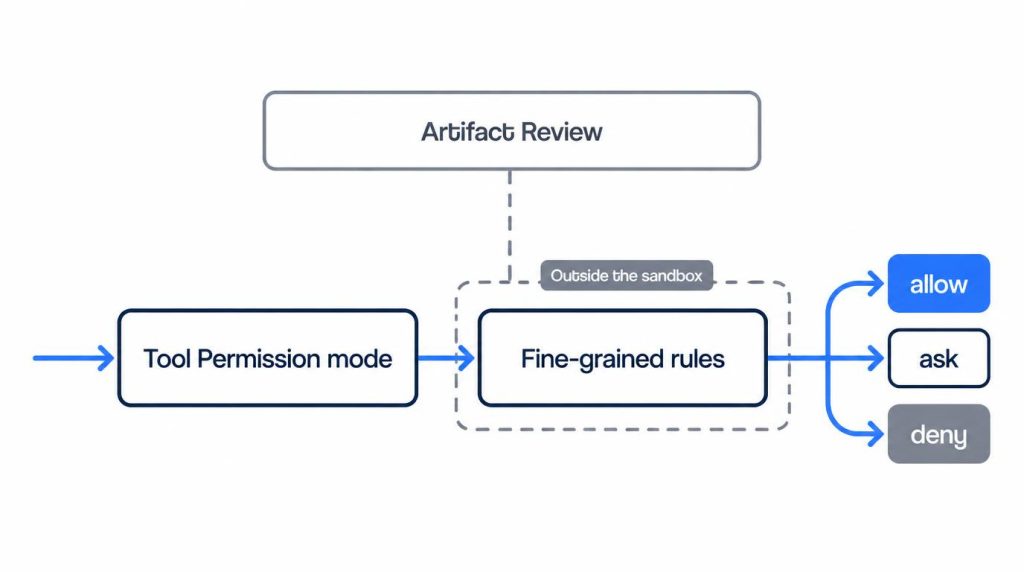
Artifact Review is not Tool Permission
Open /config and you’ll see both. In Google’s CLI codelab, Artifact Review shows up as its own entry, while Tool Permission “controls whether terminal commands require your approval before running.”
Picking Always Proceed on one side doesn’t clear the prompts on the other. If you assume it does, you end up tracing the wrong setting.
An ask or deny rule overlaps
The Permissions docs (checked October 30, 2026) say your allow, ask, and deny rules “always take precedence,” in the order Deny > Ask > Allow. A command that matches both an allow rule and an ask rule therefore stops.
Watch for this if you copied the sample settings.json from the docs. Its ask list contains command(*), which matches every command.
The command never matched your allow rule
Two documented cases break matching. On the docs’ App tab, a line with command substitution such as git log $(whoami) turns off prefix matching for the whole line. On Windows shells, a command the CLI can’t split into words needs an exact match unless you write a regex: rule.
Nothing overlaps and it still asks
Then you may be looking at a bug report, not a setting. GitHub issue #565, opened July 8, 2026 on Windows 11, describes allowlisted commands still showing “Run command?” with always-proceed and a trusted workspace. The reporter closed it on July 14, 2026 without a documented fix.
I haven’t reproduced that issue, so I can’t say which versions it affects.
How do you skip all permission prompts in Antigravity CLI?
Launch with agy --dangerously-skip-permissions. The codelab says it “will auto approve all tool permissions,” and the Permissions docs map it to always-proceed. To make it stick, set Tool Permission through /config, or edit ~/.gemini/antigravity-cli/settings.json and restart the CLI.
Before you do, here is what each option actually changes, per the docs and codelab as of October 30, 2026:
| Mode | What it does |
|---|---|
request-review |
Default; checks in before changing files or your system |
proceed-in-sandbox |
Runs commands without asking, inside a sandbox |
always-proceed |
Fully autonomous; same as the skip flag |
strict |
Zero-trust, most prompts |
auto (Preview) |
Sandboxed runs allowed; outside runs auto-checked |
accept-edits |
Auto-approves workspace edits only |
Two details changed after my original write-up on September 16, 2026. auto arrived as a Preview in v1.3.5 on macOS and Linux and v1.4.4 on Windows. From v1.4.4, proceed-in-sandbox behaves like request-review when no sandbox is available.
strict and always-proceed also take precedence over auto. I haven’t tested auto or accept-edits myself. For how the same middle modes compare in Claude Code and Codex, see my cross-tool permission prompt guide.
Is always-proceed worth it? My 5-run test
In my runs it saved about 6 minutes per task, roughly 30%. But request-review stopped 4 commands or changes I hadn’t approved, so always-proceed didn’t become my default.
I gave Antigravity CLI the same mid-sized refactor 10 times, 5 per mode. Code quality wasn’t the main point. I mostly wanted to see how much time wider permissions saved and which actions slipped through on their own.
| Item | request-review |
always-proceed |
|---|---|---|
| Runs | 5 | 5 |
| Approvals per run (avg) | 6–7 | None, proceeds |
| Time to finish (avg) | About 18 min | About 12 min |
| Stopped at approval | 4 in total | Could have run unattended |
Each run explored 20-odd files, changed 6–8 of them, and ran tests and lint.
With always-proceed, if I had stepped away from the keyboard, those actions could have gone straight through.
I didn’t record the exact command names or arguments, so I won’t map the 4 stops to specific commands. I also didn’t note the CLI version, so treat this as one setup, not a rule for every version or project.
If you keep review on but can’t always watch the session locally, see my Antigravity CLI Remote Control post.
Allow, ask, or deny: sort commands by failure cost
Judge by what happens when the command fails, not by its name. I run every command through four questions: does it touch assets, does it change external state, can I undo it right away, and does it send anything out of the workspace? One risky answer keeps it on ask or deny.
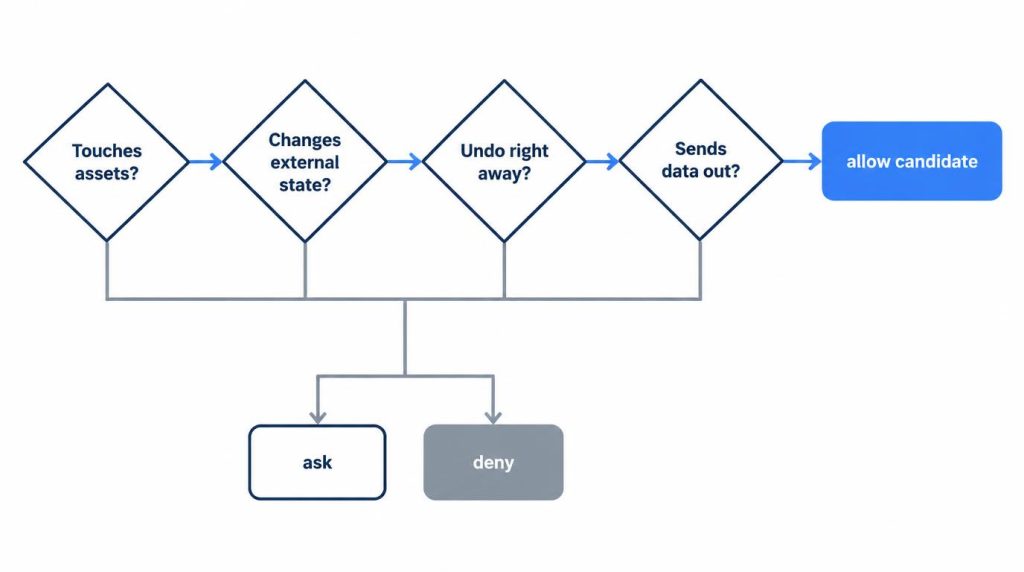
| Task | Undo right away? | Setting |
|---|---|---|
git status, git diff |
Nothing changes | allow candidate |
| Tests, lint, build | Rerun or delete | allow |
| File edits | Git restores them | ask |
| Dependency install | Recreate the container | ask |
git push |
Maybe not | ask |
| Deploy, DB migration | Rollback uncertain | ask or deny |
| Delete, permission change, outside message | Hard or impossible | deny |
A dependency install looks local, but it queries a registry and can send package names out. A git push changes the remote repository and ships your code.
Reading an asset and changing it are different questions
Once a command touches credentials, personal files, or production data, it’s no longer a simple local command. File edits are recoverable with Git, yet they still change the thing you’re working on, so ask is the better starting default.
Sending data out is its own boundary
A smarter model doesn’t lower the cost of undoing external state. Deploys, migrations, and outbound messages stay behind a person even when everything else runs freely.
Does command(git) also allow git push?
Yes. The Permissions docs say command(prefix) matches “word-by-word literally,” so command(git) covers git push, git reset, and every other git subcommand. To keep pushes on approval, add command(git push) to ask; under Deny > Ask > Allow, that rule wins.
To cut repeated approvals, I once allowed a wide prefix for a development command, and more commands landed inside it than I expected.
Going the other way didn’t help either. When I wrote several rules for similar commands, some passed automatically, and a slightly different argument brought the prompt back.
More rules didn’t look any safer to me. Since then I keep permission rules few, narrow, and predictable.
Keep unsandboxed out of the same allow list
unsandboxed(...) rules allow running outside the sandbox. Since my original write-up on September 16, 2026, the docs added that these rules are for business and enterprise accounts; other accounts get a warning and should use command(...) instead.
Either way, I don’t put sandbox escapes in the same allow range as tests and lint.
Widen from the ask log, not from command(*)
I don’t bolt exceptions onto a broad command(*) allow. In settings.json, I allow read and verification work narrowly first. Then I move only rules the ask log shows to be low-impact. The /permissions command lets you edit these rules inside the CLI.
Are workspace files, the web, and MCP the same permission?
No. By default the CLI auto-allows workspace files, but read_url and execute_url start on ask, and so do commands, MCP tools, and files outside the workspace, depending on mode. A code sandbox and a credential sandbox are separate things, too.
What I opened, and what I kept closed
I ran the measurements in a separate Git worktree of a personal local repository, plus a Docker container for testing. The original repository and working branch stayed apart, so if anything went wrong I could just delete the worktree.
Production credentials, my whole home directory, and SSH keys stayed out of reach. I didn’t open read_file or write_file beyond the workspace either.
The web and MCP look like reads but still connect outward
I tested web access and read-type MCP only partly. Even read_url can send data out and expose the agent to prompt injection. I treated execute_url and external tools as a separate boundary because they change state.
Tools that change external state, like Jira edits or deployment, never got opened broadly alongside always-proceed. On work repositories I was more conservative, and I have no experience with broad auto-approval on remote production servers.
Isolation and recovery move the line
With a worktree, a disposable container, and no credentials, the scope can be wide. Once a production database or customer data is connected, the same command drops back to ask or deny. For a concrete case of a sandbox blocking an agent’s command, see my Codex CLI npm install post.
Run a block test before turning on Always Proceed
Test what gets blocked, not just what succeeds. A screen showing a command that actually stopped is stronger evidence than a settings list.
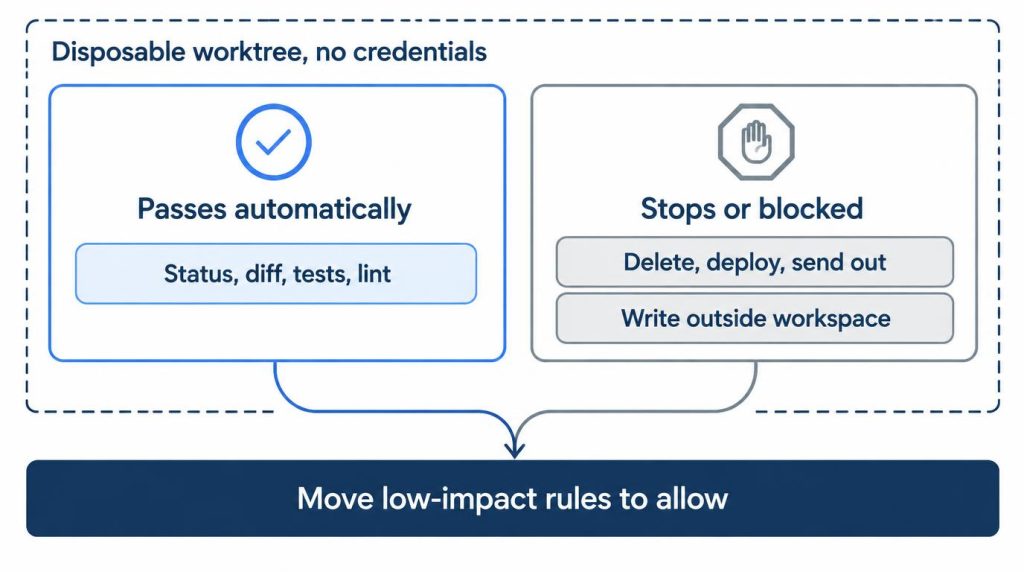
Start in a disposable environment
Use a clean worktree with no credentials and a container you can throw away. Check that status checks, diffs, tests, and lint pass on their own. When you start agy, confirm which permission mode and rules are actually applied.
Check that out-of-scope work actually stops
Next, try deletion, deployment, outbound transfers, and writes outside the workspace. Each should halt at an approval or block point.
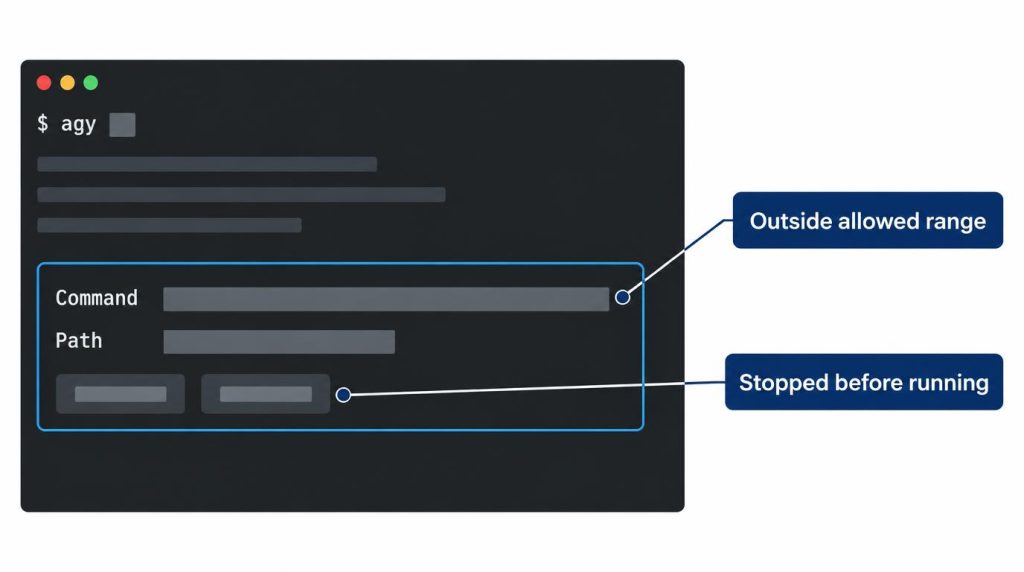
I’d rather keep a screen of a command that really stopped than a masked settings screen. My numbers above come from this test environment only, not a savings rate for every project.
Keep logs and a reference date
In the first week, move low-impact rules from the ask log to allow one at a time. Write down the docs’ reference date and your CLI version; without them, you can’t explain a behavior change later.
Before widening anything, I ask one question: “If this agent made the worst possible choice with the permissions it has right now, could I throw this environment away and start over?” If the answer is no, set the approval boundaries before you touch Always Proceed.
Sources
- Google Antigravity Permissions (CLI tab), checked October 30, 2026: modes,
--dangerously-skip-permissions, Deny > Ask > Allow, word-by-word prefix matching,autoandproceed-in-sandboxversions,unsandboxedaccount limits, CLI defaults, settings file path - Google Codelabs: Antigravity CLI hands-on, checked October 30, 2026: Tool Permission modes,
request-reviewdefault,/config, Artifact Review entry - Antigravity CLI issue #565, GitHub, checked October 30, 2026: allowlisted commands still prompting under
always-proceedon Windows - OWASP LLM06:2025 Excessive Agency: least-privilege basis for limiting agent permissions and autonomy
Related posts
- Codex CLI npm install Fails? It Was the Sandbox, Not npm
- Antigravity CLI Remote Control: I Kept Approvals On
- AI Agent Used git commit –no-verify: Why I Re-Check in CI
- Stop Claude Code, Codex, Antigravity Asking for Permission
I first wrote this in Korean on my blog: https://jjeongil.tistory.com/3552.