The first night after One UI 9, my Galaxy S23 sat warm on the nightstand and lost 9–12% with the screen off, so I blamed my fitness band and spent the evening re-pairing it. The real cause was App optimization, a one-time job Android runs after a system update. By the second night the phone was back to 4–6%, same as before. Drain that lasts past a week is a different problem.
As of November 8, 2026, Samsung has not acknowledged a One UI 9 battery problem. What Korean owners say below comes from Naver blog, cafe, and KnowledgeiN posts I went through and counted on October 25, 2026 (details in Sources), the same way I tracked Korean iPhone 18 Pro owners after iOS 27.2, not from my own experience.
On this page
If your phone runs warm the first night
The back of my S23 felt warm when I picked it up that first night, and my mind went straight to the Galaxy Fit3 on my wrist. Galaxy Wearable already takes about 6% of a normal day, so it looked like the obvious suspect.
I toggled Bluetooth, cleared the Wearable app cache, and re-paired the band. Nothing changed, and I missed notifications while the band was off.
When I finally reopened Settings > Battery, Wearable was at its usual share. App optimization sat at the top.
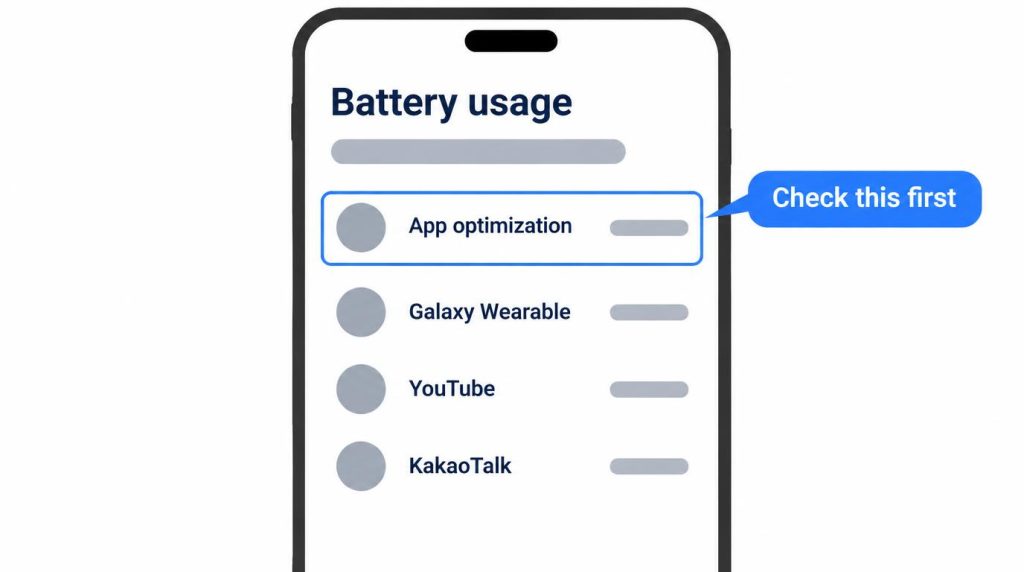
That job is documented. Android’s ART Service notes say that after a system update, the phone recompiles installed apps in the background, and the job runs when the phone is idle and charging. That is exactly when a phone sits on a nightstand, which is why a first-night spike and a warm back are normal on their own.
If it’s still draining on day two or three
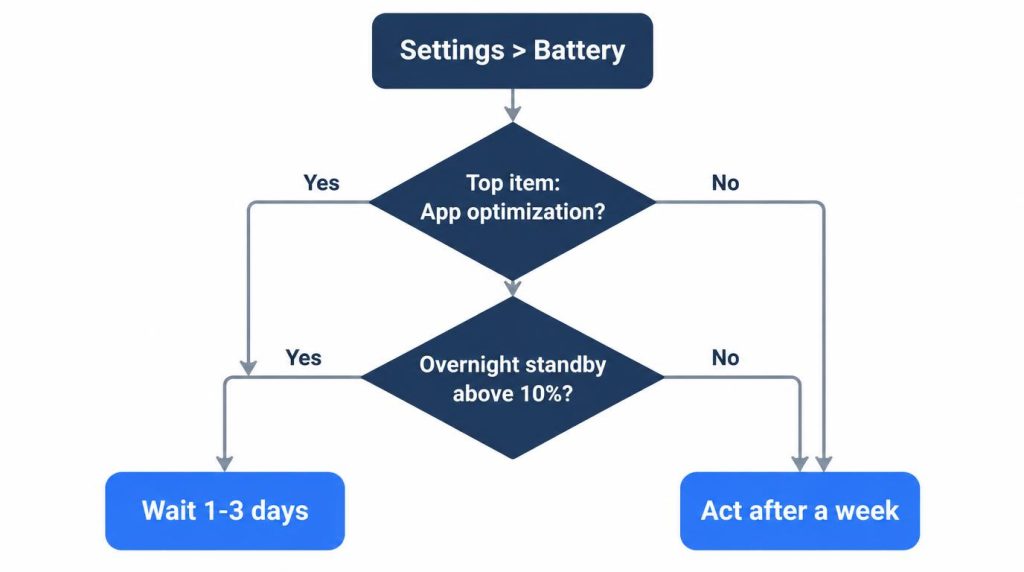
On my S23 the extra drain lasted one night, and Korean posts mostly say one to three days. The cleanest way to tell is overnight standby, not daytime use.
- In the first two days, open Settings > Battery and check what sits at the top since the last full charge. If it is App optimization or another system task, leave the phone on the charger and wait.
- Charge to 100%, leave the screen off for about eight hours, and note the drop. On my S23, about 5% is normal, and above 10% makes me suspicious.
- If a downloaded app takes the top spot on day three, force stop it, put it to sleep under Background usage limits, and switch any app you set to “Unrestricted” back to “Optimized”.
My drain per screen-on hour swings between 22% and 28%, since the Fit3’s Bluetooth link costs a fixed amount whatever the screen does. With the screen off all night, that noise mostly flattens out.
I also never judge from one night. I want three nights pointing the same way before I change anything.
Device care and Galaxy App Booster come up in Korean fix lists. One Samsung Community user said App Booster did not help, and my S23 recovered without either.
If standby is still high on night five
By night five, I’d compare one night in Safe mode, which turns off downloaded apps. Samsung’s steps: open the power menu, touch and hold Power off until the Safe mode icon appears, and tap it. Restart to leave.
About 5% overnight in Safe mode points to an installed app. Above 10% points to the battery or the phone itself. That is my rule for reading the result, not a night I have had to run.
If nothing improves by night seven, check battery health in the Samsung Members app.
Per Samsung’s support page (updated April 15, 2026), open Samsung Members, tap Support, tap Get Started under Phone diagnostics, then tap Battery status when the test ends. The result is Normal, Weak, or Bad, and Samsung suggests a support center for Bad.
A factory reset comes last, after a full backup.
My S23, night by night
My test phone is an unlocked Galaxy S23, updated on the evening of October 25, 2026. The install took about an hour over Wi-Fi. Each night I charged to 100%, left the screen off for about eight hours, and kept Wi-Fi and the Fit3 connected.
| Night (about 8 h) | Standby drain | Note |
|---|---|---|
| 2026-10-24 (One UI 8) | 5–7% | Baseline |
| 2026-10-25, first night | 9–12% | App optimization on top, warm |
| 2026-10-26 | 4–6% | Normal temperature |
| 2026-10-27 | 5% | |
| 2026-10-28 | 5–6% | |
| 2026-10-29 | 4–5% | |
| Nov 1–7, four nights | 4–6% | Two nights skipped (screen on) |
The November nights were November 1–2, 3–4, 5–6, and 6–7. I left out two nights when I turned the screen on to check notifications. No night went past 10%.
Daytime use barely moved. On October 24, still on One UI 8, the phone used 38% over 1 hour 40 minutes of screen time. The Monday after the update used 42% over 1 hour 30 minutes, likely optimization still finishing. The next days ran 36%, 39%, and 31%.
On October 30 I ran the Samsung Members check to record it, and the result was Normal. This S23 is my secondary phone, and One UI 9 is the last of its promised OS upgrades.
What Korean owners reported first
Korea got One UI 9 first, so complaints showed up there first. I found about 27 relevant Korean posts dated May 14 (beta) to October 25, 2026, counting only ones that mention drain or heat after the update. These are snippet counts, so treat them as approximate.
| Model | Posts | Main complaint |
|---|---|---|
| Galaxy S24 / S24 Ultra | ~6 | Drains fast in use |
| Galaxy S25 | ~4 | Shorter battery, same usage |
| Galaxy S26 / S26 Ultra | ~4 | Heat right after update |
| Galaxy S23 / S23+ | ~3 | Should I update? |
| Not specified | ~10 | General guides |
An S24 owner on a Galaxy user cafe (Korean) wrote that standby looked normal but use drained the phone noticeably. In another cafe thread (Korean), S24 and S25 owners said they were charging three or four times a day. A few guides blame background work such as the gallery re-indexing photos. None of these posts confirmed a cause or showed that a fix worked.
The topic is small in Korean search. On October 30, 2026, Naver’s keyword tool showed fewer than 20 monthly searches for “One UI 9 battery” in Korean, against about 550 for “One UI 9” alone.
Outside Korea, Android Authority reported on October 23 that an S24 Ultra owner lost 95% in 3 hours 15 minutes of screen time.
Has Samsung fixed it?
Not as of November 8, 2026. Samsung has not acknowledged a One UI 9 battery problem or shipped a fix for it, and Android Authority said Samsung did not answer its question.
Samsung did contact that S24 Ultra owner to arrange a service appointment, according to the same report. Any fix would arrive in a later 9.x update, and no date has been announced.
My S23 has received nothing since October 25. On the morning of November 8, Settings > Software update said the latest software was installed, with a security patch level of October 1, 2026.
Rollout started in Korea on September 16 with the S26. In the US, Android Authority reported the S25 rollout around October 5 and the S24 from October 12.
Samsung Japan’s roadmap, as reported by Sammy Fans, lists the S23 for early November.
Should you update now or wait?
Update now, then leave the phone on the charger and don’t troubleshoot for two days. The one person I’d tell to wait is someone who needs this phone alone for tomorrow’s alarm, payments, and transit card.
A teammate with an S25 asked me about this over lunch, two days after I updated. He said that lately his phone lost more than 10% overnight and wanted to know if the update was to blame. I told him about my first night, the band I wrongly blamed, and to check what sat at the top of the battery list.
A few days later his nights were back to about 5%. His KakaoTalk still ran high during the day, which never happened on my phone, so I only told him to check for an app update.
Some Korean posts say to hold off for a stabilizing patch. Waiting doesn’t skip the optimization night, so I’d only change my answer if standby stays above 10% past a week.
Sources
- Galaxy S26 stable One UI 9.0 update released, SamMobile, 2026-09-16: Korean stable rollout start
- One UI 9 US rollout for Galaxy S25, Fold 7, Flip 7, Android Authority, 2026-10-05: US S25 rollout
- One UI 9 US rollout for Galaxy S24, Fold 6, Flip 6, Android Authority, 2026-10-12: US S24 rollout
- Samsung launches One UI 9.0 in Japan, drops a release roadmap, Sammy Fans, 2026-10-13: Japan timing
- Galaxy S24 and S25 owners report excess battery drain after One UI 9, Android Authority, 2026-10-23: US reports, Samsung response
Show 7 more sources
- How to check the battery status on your Samsung Galaxy phone, Samsung UK, updated 2026-04-15: Samsung Members steps and results
- Power on your Galaxy phone or tablet in Safe mode, Samsung US (checked 2026-11-08): Safe mode steps
- Sleeping apps on your Galaxy device, Samsung US (checked 2026-11-08): Background usage limits
- ART Service README, Android Open Source Project: background app optimization runs when idle and charging
- Battery drain thread, Samsung US Community: App Booster report
- Galaxy user cafe post, S24/S25 cafe thread, S24/S25 blog summary: Korean owner reports
- Naver searches (2026-10-25; 8 Korean queries on blogs, cafes, KnowledgeiN): Korean user reports and counts; Naver keyword tool monthly searches (2026-10-30)