Pro 500 only pays off when waiting on the model is your real bottleneck. I’m a backend developer and have been on Pro 200 since before the September 2026 plan changes. After Pro 500 launched on September 29, 2026, I upgraded and redid the same repository work on Codex Ultrafast. Exploration and short edits felt clearly faster, but tasks that wait 1–2 minutes on Gradle tests changed little end to end, so I moved back to Pro 200.
ChatGPT Pro 500 is the $500-a-month top tier of ChatGPT Pro and the only Pro plan with Ultrafast. This isn’t a recommendation to subscribe. My experience notes are from October 1, 2026; plan facts below were rechecked on October 30, 2026, the first day of the reduced Pro 200 allowance.
On this page
- Pro 500 vs Pro 200: the differences that matter for Codex
- What does Pro 200 give after October 29?
- The day I hit the Codex limit on Pro 200
- How fast is Ultrafast, and how much usage does it burn?
- My same-repo rerun on Pro 500 Ultrafast
- Why I went back to Pro 200
- Who should pick Pro 500, Pro 200, or Pro 100?
Pro 500 vs Pro 200: the differences that matter for Codex
The price gap is $300 a month. For it you get Ultrafast and, by OpenAI’s reported numbers, two and a half times the Pro 200 allowance.
| Item | Pro 200 | Pro 500 | Source |
|---|---|---|---|
| Price | $200/mo | $500/mo | Official (Codex pricing, Oct 30) |
| Ultrafast | No | Yes | Official (Codex pricing, Oct 30) |
| 5-hour limit | None | None | Official (Codex pricing, Oct 30) |
| Usage vs Plus | 10x from Oct 30 (was 20x) | 25x | OpenAI email to subscribers, via press and forum |
OpenAI’s Codex pricing page lists “Plans at $100, $200, or $500 USD per month” and says “Pro plans currently have no five-hour limit” (checked October 30, 2026). Weekly limits can still apply, and your current limit and reset time show in the Codex usage dashboard.
That page does not print a usage figure for any Pro plan. The 10x and 25x multiples come from OpenAI’s September 30 email to Pro 200 subscribers, as quoted by TechM and by subscribers on the OpenAI community forum. My decision below doesn’t depend on them being exact.
What does Pro 200 give after October 29?
From October 30, 2026, Pro 200 gives 10x the Plus allowance, half the 20x it had before. The Pro tiers help page (checked October 1, 2026) said eligible existing Pro 200 subscribers keep their prior usage until October 29 at the same $200 price, and the subscriber email put the 10x level on October 30.
In practice, a week that used half of your old Pro 200 allowance now uses all of the new one. If your old weeks stayed well under half, nothing changes for you. If they didn’t, you’ll meet the limit message more often, and the choice becomes buying credits, cutting back, or moving up.
If you plan to cancel instead, the help page (checked October 1, 2026) says a cancelled plan stays active until the end of the billing cycle.
Is there a credit for existing Pro 200 subscribers?
Reports say yes, as a one-time grant. TNW put it at $2,500 in value, expiring at the end of 2026, and SmartScope describes it as 62,500 credits granted automatically. I saw a credit notice in my own account too. Check your account notices for your own figure.
The day I hit the Codex limit on Pro 200
That day I gave Codex a multi-file refactor and test fixes in a Java/Spring repository and didn’t send many messages. The agent ran long loops instead: it explored the repo, edited several files, ran tests, read failures, and edited again, until Codex told me I’d reached my current plan’s limit and showed when I could use it again.
That’s when I felt how much the work after a single instruction drives usage. Long sessions like that also fill the context window, which has its own failure mode in Codex.
What I did when the limit was close
I was about to start analyzing a new repository, and I stopped. Instead I checked the failing tests in the Spring code I was already editing, reviewed the remaining changes myself, and finished just that one task.
My rule since then is to finish work whose context is already built and postpone big new tasks. When usage is tight, I don’t start several jobs that make the agent read a whole repository from scratch.
How fast is Ultrafast, and how much usage does it burn?
Ultrafast is a Codex speed mode that generates output much faster than Standard. TNW reported up to 8x faster in Codex, about 300 tokens per second; I found no official speed figure from OpenAI.
The cost side is official. Per the Codex pricing page on October 30, 2026, Ultrafast uses included subscription usage at 8x the Standard rate and purchased credits at 6x. Fast mode uses 2.5x included usage and 2x credits.
Put that next to the reported allowances, assuming they hold, and the trade-off is plain. Pro 500’s 25x Plus allowance spent entirely on Ultrafast works out to about 3x Plus in Standard-mode terms (25 ÷ 8, my calculation). Pro 200’s 10x, spent on Standard, is more raw work than Pro 500 run on Ultrafast all day. You pay $300 more for speed, and the speed eats the extra allowance quickly.
My same-repo rerun on Pro 500 Ultrafast
After upgrading, I redid the kind of repository work I’d done on Pro 200, in the same repository. The result split by task type.
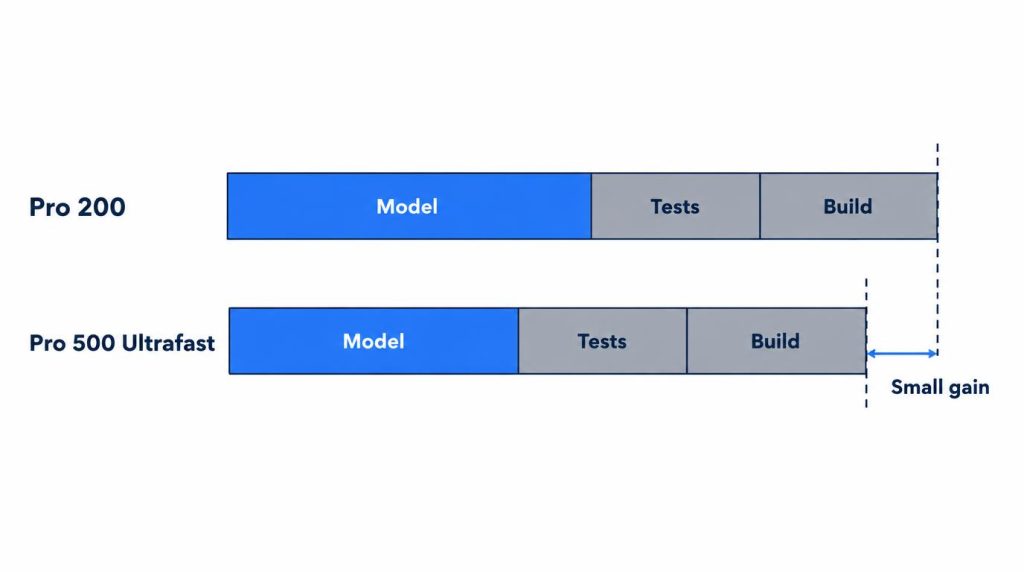
Exploration and short edits felt clearly faster. That’s the stretch where model replies come back to back: finding related code, checking call sites, getting fix candidates explained, and producing small diffs.
Test-bound tasks showed little end-to-end difference. When I edit code, wait 1–2 minutes for Gradle tests, and then read the results, a fast model still sits waiting on the test process. Those 1–2 minutes stay no matter how fast the model gets, so even if the reported 8x is right, that task won’t finish anywhere near 8x sooner.
Why I went back to Pro 200
I did feel the Ultrafast difference, but in my workload model generation wasn’t the usual bottleneck. Gradle tests, Docker builds, and external tool runs meant a lot of waiting outside the model. Across my monthly workflow, model wait time wasn’t dominant enough to keep paying an extra $300.
That’s not a verdict that Pro 500 is bad; my work just gave me a weak reason to keep it. I only found out where my bottleneck sat by trying Pro 500, and your mix of agent turns and test waits may land differently.
Who should pick Pro 500, Pro 200, or Pro 100?
I use three tests before moving up a tier:
- Do I keep using up the included usage? Hitting the limit once or twice isn’t enough.
- Does Ultrafast cut my working time? Only if model waits, not tests or builds, dominate my day.
- Is $300 more a month better spent here? I compare it with the cost of my work being interrupted.
Pro 500 fits someone whose days are mostly short agent turns (exploring, explaining, small diffs) and who keeps running out of usage even after October 30. Pro 200 fits someone like me, whose tasks spend real time in test runs and builds. I apply the same rule to my Claude plan and didn’t move up to Max just because I occasionally hit its limit.
Pro 100 costs $100 a month and, like Pro 200, has no Ultrafast. I haven’t used it.
Subscription or API?
I keep them apart. The subscription is for repeated interactive coding; API keys go to automation pipelines and a routing layer I built myself, and I track that cost separately.
Sources
- Codex pricing: Pro prices, no five-hour limit for Pro, Ultrafast and Fast usage rates, Ultrafast plan availability (official, checked October 30, 2026)
- About ChatGPT Pro tiers: plan lineup, October 29 legacy usage, cancellation (official, checked October 1, 2026)
- TechM: usage multipliers (Korean press report)
- OpenAI community forum: subscriber account of the September 30 email, 20x through October 29 and 10x from October 30 (posted October 11, 2026)
- TNW: $2,500 credit, Ultrafast speed (press report)
- SmartScope: 62,500-credit grant (blog report)
Related posts
- Codex “Ran Out of Room in the Model’s Context Window” Fix
- Codex CLI npm install Fails? It Was the Sandbox, Not npm
- Claude Outage Fallback: Request Failed, Files Still Changed
I first wrote this in Korean on my blog: https://jjeongil.tistory.com/3579.