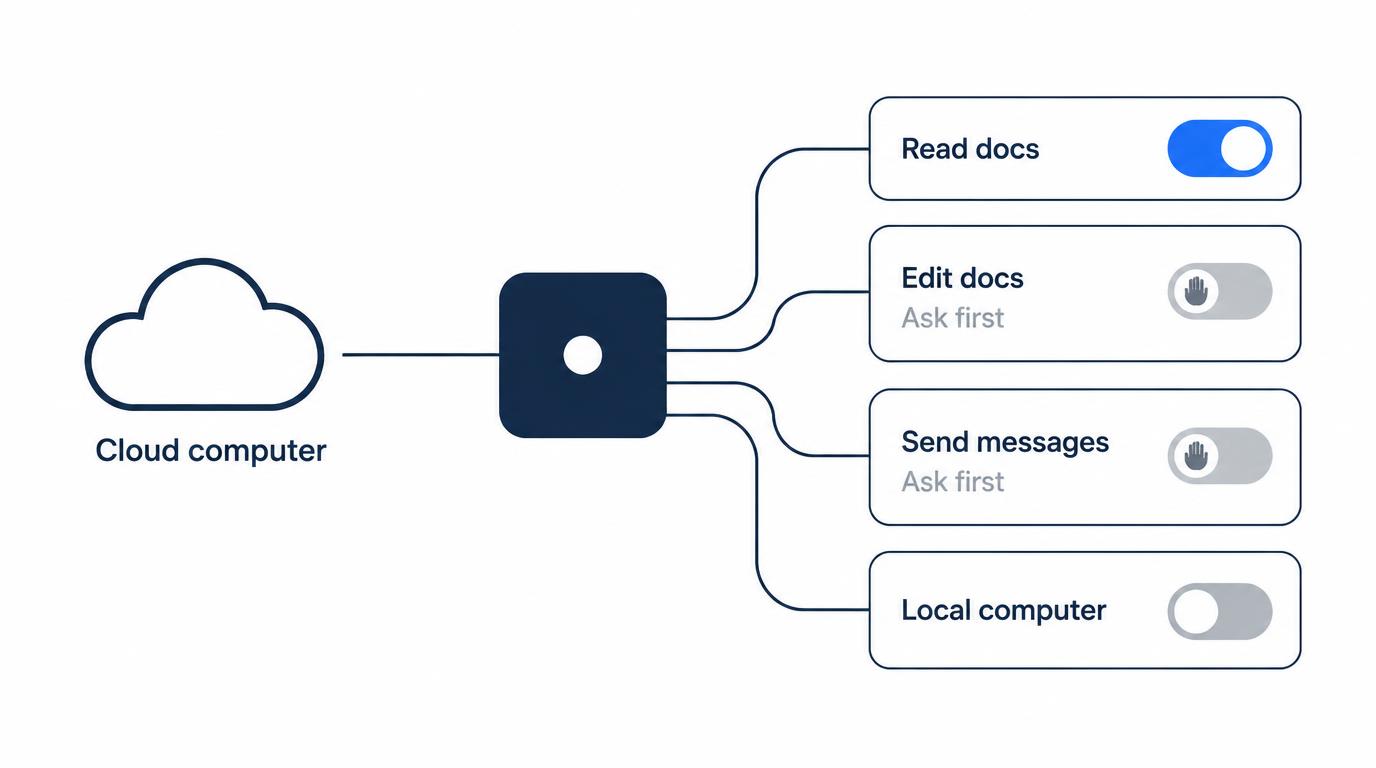
On my first OpenAI dot, I left reading open and put two things behind approval: editing existing docs and sending anything out under my name. Payments, credential changes and access to my local Mac stayed off.
The test for each permission was simple. Can it stay open next week, while I’m not watching?
OpenAI Dots are always-on agents in ChatGPT. Each dot has its own cloud computer and browser, uses connected tools, handles recurring work and follows up with you across ChatGPT, text, email and Slack.
This is an early record from setting up my first dot on a Pro 200 plan in the first few days after launch. It isn’t a performance review, and I didn’t count approvals.
On this page
My starting permission split
Four rows, one test: can the permission stay open next week? Only reading passed, and even that comes with a caveat.
| Action | My setting | Still open next week? |
|---|---|---|
| Read calendar, docs, tasks | Allowed | Yes, with a caveat |
| Edit existing docs | Approval | No, ask each time |
| Send mail or messages | Approval | No, ask each time |
| Payments, credentials | Not delegated | Never opened |
The caveat on reading: it changes nothing outside, but what the dot reads can carry over into other tasks. Sending is asked every time because it goes out under my name.
I connected four kinds of apps: calendar, mail, docs and notes, and task management. I’m not naming the apps.
Docs got split in two. Finding, reading and summarizing content is allowed. Changing an existing doc directly needs my approval.
What I kept off from day one
Four things stayed closed: access to my whole computer, payment actions, credential changes, and independent sending from my main mail account.
I saw the option to connect my local Mac and didn’t turn it on. The dot could already work on its own cloud computer, and I judged a local connection to be a separate step up in access.
OpenAI’s help center describes local computer access the same way: it’s optional and starts turned off. You grant it from the dot’s profile under Computers, and you can revoke it later (checked October 30, 2026).
This is the same call I make with coding agents, where I start in a worktree or sandbox. In Antigravity CLI, an approval step once caught actions that were actually risky. Since then I don’t remove approval steps lightly.
Can a dot send email on your behalf?
Only with approval, on my setup. I connected mail for reading and looking things up, and never gave the dot independent permission to send.
Reading mail as work context and acting under my name are different permissions. The first changes nothing outside. The second leaves my name out there.
The approval step did fire for real. The dot found the information and wrote a draft, then stopped and asked before delivering it to someone outside.
After that, I stopped seeing approval as an error or an interruption. It’s the line between reading and acting.
OpenAI’s dots privacy and safety FAQ says approving one message doesn’t give a dot ongoing permission to contact people for you (checked October 30, 2026).
For messaging apps, I didn’t start by opening send permission broadly.
How Custom Rules fit this list
Custom Rules tell a dot which supported actions it can take on its own, which need your approval, and which it shouldn’t take. The help center lists four behaviors: take action without asking, take action if pre-approved, ask before acting, or hand off to you (checked October 30, 2026).
In my rules, anything that affects the outside world sits on the approval side. That covers doc edits and outgoing messages.
Two limits matter. Custom Rules don’t grant app or computer access, and they don’t override built-in safeguards. So the app connection itself is still the first gate.
I wrote a separate plan for the moment you connect apps in my Meta Muse post (in Korean). The table above only asks whether a permission can stay open as time passes.
How do you check what your dot did while you were away?
Open Activity View first. Per the help center, it shows your dot’s ongoing and delegated tasks with their status, and you can add context, change direction or ask it to stop from there.
That’s where I look first, background work included. When the dot messages me about progress or a decision it needs from me, I read those alerts alongside it.
I don’t stop at the final “task completed” message. I check four things:
- which tasks it started
- how far each one got
- which external actions it tried
- whether it asked for approval anywhere
There’s no fixed weekly or monthly review. I re-check after connecting a new app, after widening the dot’s role, and when a project ends, to drop connections and permissions it no longer needs.
What the system card says about tasks piling up
The GPT-6 Astra system card reports no severe breaches or data exfiltration for dots, but it did observe moderate-severity scope violations.
In one evaluation, each episode had a first task, five or ten related tasks in between, and a final task, all in one persistent environment. The scope of authorization often changed between tasks without the user saying so. The dot had to infer the new boundary from records, earlier decisions and context.
Doubling the in-between tasks from five to ten raised the flagged rate from 8.6% to 19.7% of samples. The card’s examples of moderate violations are carrying information between unrelated tasks and editing a shared document.
The card doesn’t give a production rate for this chained-task test (checked October 30, 2026).
The same chapter has a better result for explicit changes. When a permission was revoked or the scope changed mid-task, dots passed 45 of 49 episodes (91.8%), including all 17 explicit permission-change cases.
Auto-review is a protocol built into Codex: a separate model judges commands that run outside the sandbox and blocks unsafe ones. For dots, OpenAI added dots-specific instructions to the reviewer’s policy.
I don’t think these numbers prove my setup is right. What I took from them is narrower. The evaluation itself assumes a dot must infer permission boundaries between tasks from context.
So my conclusion stays the same: safeguards, even good ones, don’t replace the permissions I want to approve each time.
I’ve also checked a real case of permissions spreading between agents (in Korean).
Dots vs. Codex: a different permission question
In Codex, I ask whether this command can run. With an always-on agent, I ask whether this permission can stay open next week.
| Codex | Always-on dot | |
|---|---|---|
| Question | Run this command? | Keep open next week? |
| Boundary | Fairly clear: directory, worktree | I set it per app |
| Approval moment | I’m there at run time | Work goes on while I’m away |
Giving Codex one repository is not the same problem as leaving mail and calendar connected to an agent that never stops. The first difference I felt wasn’t performance. It was the time axis of permissions.
In Codex I keep workspace-write as the default and use danger-full-access only in environments I can throw away. If your goal is fewer prompts in coding agents instead, I compared what still asks in Claude Code, Codex and Antigravity.
Who can get Dots right now
As of October 1, 2026, my Pro 200 account could create a first dot without paying extra. Back then I couldn’t confirm extra-dot pricing or whether Dots was offered in Korea, where I live.
Here’s what the help center says as of October 30, 2026:
- Plans: Pro users aged 18 and older, Business Premium in supported regions, and an Enterprise beta that admins turn on.
- Regions: Pro access excludes the EEA, Switzerland and the UK. South Korea isn’t on that excluded list.
- More dots: the first dot is included. Adding more dots, or more speed and monthly work per dot, is described as coming in the future, with no price listed.
PC World reported the same at launch: first dot included, extra-dot pricing not announced.
After a few days, dot permissions felt less like a checkbox you set once. They felt more like an operating item to revisit in Activity View whenever I connect a new app or widen the dot’s role.
Sources
- GPT-6 Astra System Card, chapter 12: dots: cloud computer and browser, chained-task evaluation (5 vs. 10 related intervening tasks, 8.6% to 19.7%), no severe breach or exfiltration, 45/49 permission-change episodes, auto-review with dots policy (checked October 30, 2026)
- Getting started with your dot (OpenAI Help Center): local computer access off by default, Custom Rules behaviors, Activity View, plans and regions, future extra dots (checked October 30, 2026)
- Dots privacy, security, and safety FAQs (OpenAI Help Center): one approval does not grant ongoing permission to contact people (checked October 30, 2026)
- OpenAI’s Dots are always-on AI agents for work (PC World): first dot included in plan, extra-dot pricing not announced
Related posts
- Antigravity CLI Always Proceed Still Asks? Permissions Tested
- Codex CLI npm install Fails? It Was the Sandbox, Not npm
- Antigravity CLI Remote Control: I Kept Approvals On
- AI Agent Used git commit –no-verify: Why I Re-Check in CI
I first wrote this in Korean on my blog: https://jjeongil.tistory.com/3582.