Switch the Naver Map app to English, then fall back to Korean when a romanized search fails. On a desktop browser, don’t expect English at all. In my test on October 21, 2026, the web version showed Korean only.
On this page
- Can you use Naver Map in English on your phone and on a desktop browser?
- How do Koreans actually type searches into Naver Map?
- Why isn’t Naver Map showing your location?
- What should you read on the transit directions screen?
- Can you trust opening hours and reviews on Naver Map?
- Naver Map vs Kakao Map vs Google Maps: which does a local use when?
- What changed in 2026: Google Maps approval and passport verification
- FAQ
Can you use Naver Map in English on your phone and on a desktop browser?
Yes on the phone, no on a desktop browser. The Naver Map app has an English setting. In my October 21, 2026 test, both map.naver.com and the mobile web site showed a Korean-only interface with no language menu.
In the app
Naver Map is NAVER’s map and directions app. It supports Korean, English, Japanese and Chinese, according to NAVER’s December 2024 press release.
I did the switch on someone else’s phone and don’t remember the menu labels. NAVER’s help center gives this path (checked October 30, 2026):
- Tap the MY (profile) icon to the right of the search bar.
- Tap the gear icon at the top right.
- Tap 언어 (Language) and pick English.
On an iPhone, step 3 opens the phone’s Settings > NAVER Map > Preferred Language. If that menu isn’t there, NAVER says to add English under Settings > General > Language & Region.
The setting needs Naver Map 5.1.3 or later, and the app installs only on Android 8.0 or iOS 16.0 and up. If your phone is older and you’d replace it here, here’s what to know before buying an iPhone in Korea.
A few years ago, an engineer from a partner company came to our head office for a two-day business trip. I met the engineer at the station to help with the walk to the lodging.
Google Maps on the engineer’s phone showed transit routes only, no walking route, and the engineer assumed the app was broken. I switched Naver Map on that phone to English and searched the same lodging.
Place names, addresses and categories turned romanized, and reviews showed English translations. Some translated sentences were awkward, but the meaning came through.
On a desktop browser
I had Claude Code run a one-off browser test on October 21, 2026. It used headless Chromium 129 with the browser language set to en-US.
map.naver.com loaded entirely in Korean, with menus like 길찾기 (directions) and 저장 (saved). No “English,” “Language” or 언어 option appeared in the page text.
Adding ?lang=en to the URL redirected to the same Korean page. The mobile site, m.map.naver.com, was Korean too, with a “Go to App” button and a banner pushing the app. Plan your routes on the phone.
How do Koreans actually type searches into Naver Map?
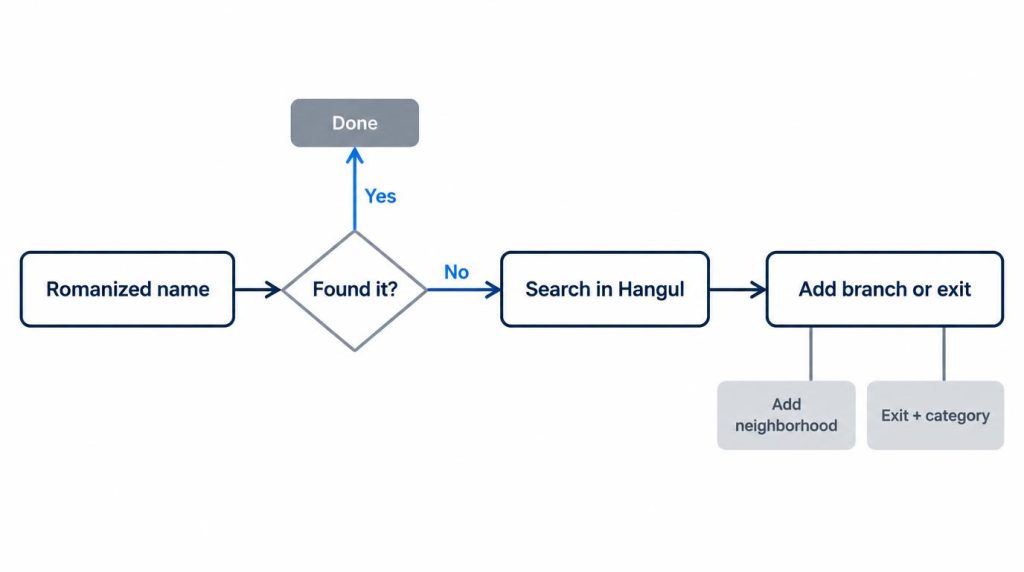
Try the romanized name first, then switch to Hangul. When a bare name isn’t enough, add a branch, a station exit or a neighborhood. In my one-off test, romanized queries found the target first in 6 of 8 cases.
Both misses returned results in Hangul.
| Target | Romanized query | Romanized result | Hangul result |
|---|---|---|---|
| Gyeongbokgung | Gyeongbokgung | Found, 1st | Found, 1st |
| Myeongdong Kyoja | Myeongdong Kyoja | Main branch, 1st | Branch 1 (1호점), 1st |
| Gwangjang Market | Gwangjang Market | Found, 1st | Found, 1st |
| Lotte World Tower | Lotte World Tower | Found, 1st | Found, 1st |
| Hongdae Station Exit 9 | Hongik University Station Exit 9 | No results | Found |
| Incheon Airport T1 | Incheon Airport Terminal 1 | Found, 1st | Found, 1st |
| Starbucks Gangnam Station | Starbucks Gangnam Station | No results | Starbucks list, 강남R점 1st |
| Ikseon-dong | Ikseon-dong | Area page | Same area page |
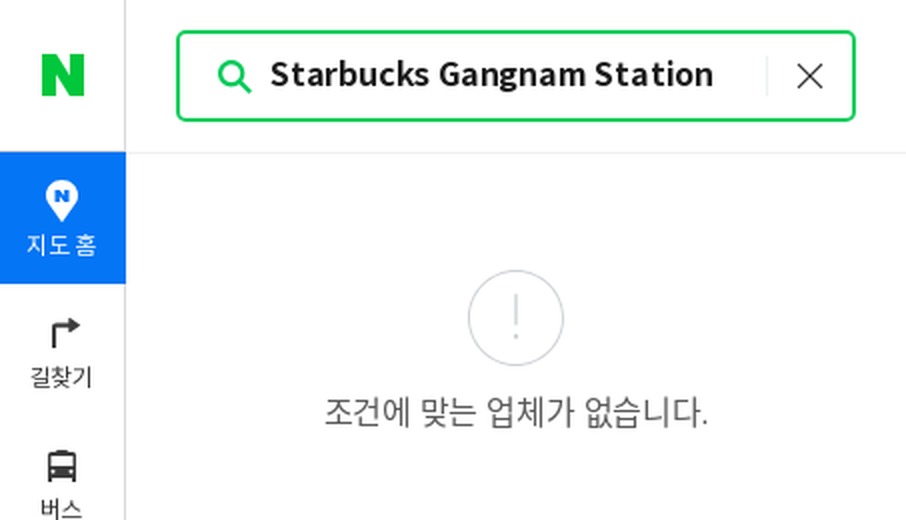
Even when a romanized search worked, the desktop site showed result names in Hangul. If you can’t type Hangul, copy the Korean name from a website or message and paste it into the search box.
The two misses look a lot like how I search. For chains, I always type the branch, as in 스타벅스 판교역점 (Starbucks, Pangyo Station branch).
Without it, branches from all over the country show up, and they don’t always sort by distance from me.
When I’m choosing a meeting spot, I type a station exit plus a category. 성수역 3번 출구 브런치 means “Seongsu Station Exit 3 brunch.” That keeps results to places I can walk to.
If I half-remember a restaurant’s name, I type the neighborhood plus any word I recall from it. I search by phone number only to check whether a far-off shop is open.
Why isn’t Naver Map showing your location?
On the second morning of that business trip, the engineer was about to set off on foot from the lodging. The map was in English, but the blue location dot never appeared, and tapping the location button did nothing.
The app wasn’t broken. On first launch, the engineer had tapped “Don’t allow” on the location prompt, thinking it was some kind of tracking.
I opened the phone’s own settings, found Naver Map and set location to “Allow only while using the app.” Back in the app, the dot showed up right away, and the walking route from the lodging continued.
Now, when I install a map app on a visiting friend’s phone, we check the location permission before looking up any route.
Does Naver Map work offline?
I don’t count on it. Last November, in the evening, I was looking for a meeting spot in the underground shopping arcade of a big transfer station. My LTE signal kept flickering between one bar and none.
The directions screen I had already opened stayed up. A new search just spun. The parts of the map I’d already viewed stayed sharp, but swiping sideways showed blank gray tiles.
The blue dot stayed on screen, but it jumped around underground, so I couldn’t trust its direction. I found a sign with exit numbers, went up to street level and let the app catch up. I lost about 10 minutes by my rough count.
Since then, before I go underground, I screenshot the route screen and save the meeting place to my favorites. At big transfer stations, I also screenshot the transfer-passage directions, since photos open with no signal.
Inside the subway tunnels themselves, I’ve had fewer problems. The arcade was the weak spot.
What should you read on the transit directions screen?
On my weekday subway commutes, I’ve used Naver Map almost every day. The exit number has generally been right, and last-train times have matched the station timetables. A transfer walk at a big station is what made me late.
Last winter, I was heading to a dinner appointment. At a big transfer station, Naver Map gave me about 3 minutes for the transfer walk.
It took 8 to 10 minutes, platform to platform, through stairs and long corridors. I missed the connecting train.
I had left on a tight margin because I trusted the arrival time. I arrived 10 to 15 minutes late.
What I check, and how much I pad
- Exit number. Leaving by the exit the app gives has generally worked for me.
- Transfer walk time. At big transfer stations or during rush hour, I add 5 minutes.
- Arrival time. I treat it as an average and leave a 10-minute buffer when I have plans.
- Transfer car. I check it again on the platform signs, not only in the app.
Can you trust opening hours and reviews on Naver Map?
The posted hours are whatever the owner last entered. In the past year, going by memory, about four of my trips ended at a shop that was closed or on break.
Two were wrong closing days. One shop was open but had a break time the map didn’t list. One had closed temporarily around a major Korean holiday.
Now I sort reviews by newest and look for break times or closures mentioned in the past month. For places far away, I call or message the shop before I go.
Naver Map vs Kakao Map vs Google Maps: which does a local use when?
I don’t use one app for everything. Naver Map handles my walking and transit, and TMAP handles driving.
| Task | App I use | Why |
|---|---|---|
| Walking | Naver Map | Exit-level search, alley shops |
| Transit | Naver Map | Daily commute, transfers |
| Driving | TMAP | Wireless CarPlay, familiar traffic data |
For driving, I open Kakao Navi only to compare arrival times. Kakao Map stays installed, and I open it now and then for Road View.
Korean search habits lean the same way. In Naver’s keyword tool for the month before October 30, 2026, 네이버지도 (Naver Map) drew about 4.6 million searches. 카카오맵 (Kakao Map) drew about 527,000 and 구글지도 (Google Maps) about 443,000.
Those counts come only from searches on Naver itself, so read them as a rough gap, not market share.
Visitors land in a similar place. Of 1,232 visitors surveyed by Korea’s culture ministry and the Korea Tourism Organization, 56.2% used Naver Map for directions. Google Maps was at 33.9%.
The survey ran from October 31 to December 6, 2023, and was published March 5, 2024.
What changed in 2026: Google Maps approval and passport verification
Google Maps. On February 27, 2026, South Korea’s land ministry (MOLIT) conditionally approved Google’s request to export 1:5,000 map data, TechCrunch reported.
In August 2026, Korea Herald reported that Google planned turn-by-turn navigation, with no launch date. I found no launch report as of October 30, 2026.
On my commute home in the last week of October, the walking tab in Google Maps still showed no route. When foreign guests will be walking anywhere, I still tell them to install Naver Map first.
Passport verification. Naver began accepting passport verification on June 4, 2026, and announced it on June 9, Asia Economy reported. Holders of a passport issued outside Korea can use it to book, order and pay in Naver Map without a Korean phone number. The check has you photograph the passport and verify your face, Electronic Times reported.
I have a Korean phone number, so I haven’t used passport verification myself.
FAQ
Can I use Naver Map without a Korean phone number?
For searching and directions, yes. My desktop test searched places without logging in. Bookings, orders and payments need verification, and a foreign passport can cover that.
Other Korean apps are stricter about numbers. If you’re also setting up KakaoTalk, here’s what to check when its verification code doesn’t arrive.
Does Google Maps give walking directions in Korea now?
Not as of October 30, 2026. Korea approved the map-data export in February 2026, and Google’s navigation plans had no launch date.
Sources
- Smart Shortcut to Explore Korea, NAVER Corp., December 30, 2024: Naver Map’s four interface languages
- How to set the map app’s language (지도앱 언어 설정 방법), NAVER Help Center, no date shown, checked October 30, 2026: the menu path, version and iOS notes
- South Korea opens the door to let Google Maps operate fully, TechCrunch, February 27, 2026: conditional approval of the 1:5,000 map data export
- Google confirms plans for turn-by-turn navigation, The Korea Herald, August 2026: Google’s navigation plans, no launch date
- Map bookings and payments without a Korean phone number (Korean), Asia Economy, June 9, 2026: passport verification since June 4 for bookings, orders and payments
Show 3 more sources
- Passport identity verification on Naver (Korean), Electronic Times, June 4, 2026: how passport verification works
- Foreign visitors’ most satisfying travel app is Naver Map (Korean), Dailian, March 5, 2024: culture ministry and Korea Tourism Organization survey of 1,232 visitors
- Naver search ad keyword tool, monthly search counts as of October 30, 2026 (Naver only, PC plus mobile)
Related posts
- Buy an iPhone in Korea: Tax Refund, Price and Shutter Sound
- iPhone 18 Pro Problems: Korean Owner’s Report After iOS 27.2
- iPhone Duo Crease: What 27 Korean Owners Reported in Week 1
The test script, inputs and raw logs for this article are public: loopnotes-lab on GitHub.