iOS 27.0.1 fixed the most reported iPhone 18 Pro problem: restarts after failed Face ID scans. iOS 27.2, out since October 26, 2026, doesn’t list an earpiece fix, yet five of the seven Korean cafe posts I found from owners on 27.2 say it stopped. The burgundy discoloration is still unexplained.
My Silver 18 Pro has been my main phone since September, now on 27.2. My 17 Pro is the spare.
The Korean owner reports below come from Naver blog, cafe, KnowledgeiN and news posts I counted, not from my own phone.
On this page
- Is the iPhone 18 Pro OK to buy now? (Status as of October 30, 2026)
- Did iOS 27.0.1 and 27.2 stop the panic-full restarts?
- Is the earpiece ticking fixed in iOS 27.2?
- How many iPhone 18 Pro problems were reported in Korea?
- Does updating iOS limit exchanges in Korea?
- What else are owners reporting: screen lines, camera, burgundy, heat?
- Should you upgrade from an iPhone 17 Pro, or wait?
- FAQ
Is the iPhone 18 Pro OK to buy now? (Status as of October 30, 2026)
Yes, if your current phone is worn out. If you have a 17 Pro, I still don’t think you need to switch. The Face ID restart bug was fixed in 27.0.1, and the earpiece ticking looks much rarer on 27.2.
| Issue | Korean posts (of 200, Oct 20) | Status (Oct 30) | My 18 Pro |
|---|---|---|---|
| Face ID restart (panic-full) | 127 (all shutdowns) | Fixed in 27.0.1 | 0 logs, through 27.2 |
| Touch freeze, screen lines | 33 (all screen) | One freeze fixed in 27.0.1 | None |
| 2x photo color | 26 (all camera) | Fixed in 27.0.1 | No shift I could see |
| Earpiece ticking | 13 | Not in Apple’s notes; most Korean 27.2 posts say gone | Never |
| Burgundy discoloration | 12 (all exterior) | Cause unconfirmed | N/A (Silver) |
Counts are keyword matches, so they’re approximate, and one post can land in several rows. The fixed freeze is a touch freeze with Notification Center and Control Center open together; screen lines aren’t in the 27.0.1 notes.
If you’re torn between this and Apple’s foldable, Korean owners have their own complaint list there too; I collected it in what Korean owners say about the iPhone Duo crease.
Did iOS 27.0.1 and 27.2 stop the panic-full restarts?
On my phone, yes, and nothing came back on 27.2. Apple released iOS 27.0.1 on September 28, 2026, and its notes fix 18 Pro restarts “when Face ID fails to authenticate.” I installed it the day it came out, and 27.2 on the evening of October 27.
Before 27.0.1, unlocking several times in a row sometimes went wrong: after one or two failed scans, the phone turned briefly unstable. It didn’t happen every time, and at first I blamed the lighting or my angle.
After both updates, I still get the odd failed scan. What stopped is the wobble that followed it. I haven’t measured recognition rate or speed.
I stay off iOS betas on this phone because it carries my work and authentication apps, so I only saw the release builds.
Not every owner saw a clean fix. On October 8, a Korean outlet reported users who said panic-full came back after updating.
What is a panic-full log, and how do I check for one?
A panic-full log is the report iOS saves when the system hits a kernel panic and restarts the whole phone, which is different from one app crashing. To see yours, open Settings > Privacy & Security > Analytics & Improvements > Analytics Data and look for files starting with “panic-full.”
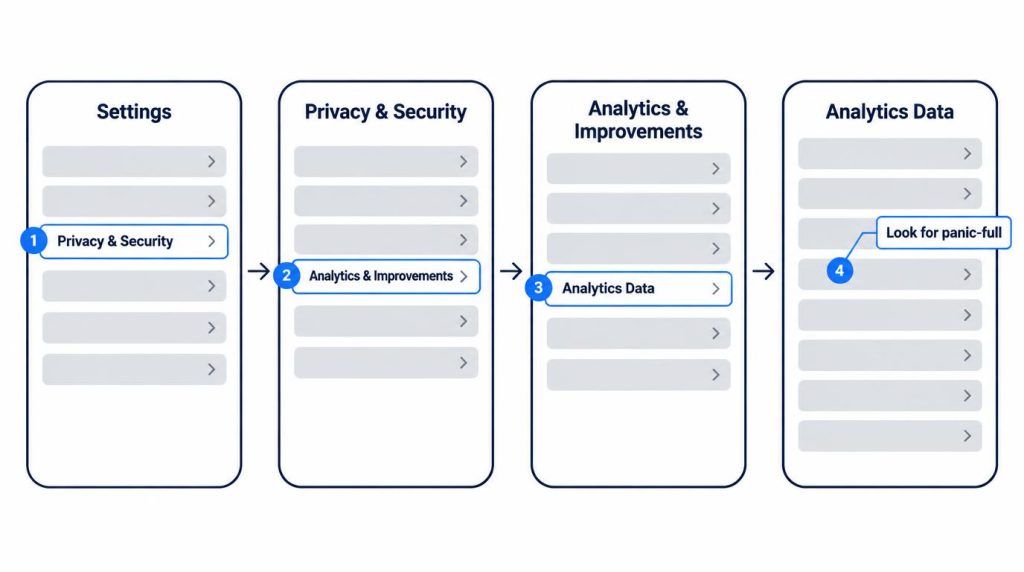
My list had zero on October 20, 2026, and still zero on October 30, after 27.2. Analytics sharing is on, so the list does fill with other diagnostic logs.
As a backend developer, I read that list like a server log: it shows what got written, not everything that happened. Zero is a count for today, not a promise.
Is the earpiece ticking fixed in iOS 27.2?
Not officially, but Korean owners mostly say it’s gone. As of October 28, a running iOS 27 issue tracker noted that the 27.2 release notes don’t mention the crackling and that Apple hadn’t commented.
MacRumors reported the earpiece crackling on September 29, 2026. Korean owners call it “ticking,” and one describes “intermittent ticking during calls, not on speaker.”
On October 30, I went through the top 20 Naver cafe posts for “18 Pro ticking 27.2.” Seven described a phone on a 27.2 build:
- Five said the ticking stopped, including one owner who heard it during Instagram stories and one with two 18-series phones that both went quiet.
- Two said it was better but not gone. One tester ran four hours and heard one tick unrelated to Control Center.
Seven posts is a small, self-selected sample. Still, it fits what Korean owners suspected early on, that this is software: replacement units ticked too. One owner returned a Hong Kong Apple Store unit for ticking and heard it again on the new phone.
Mine never ticked, on any version. Since 27.2, I’ve made two or three calls a day and the earpiece has stayed clean.
How many iPhone 18 Pro problems were reported in Korea?
Korea saw about 1,500 exchanges and about 50 refunds between September 18 and 28, 2026, per figures reported on October 8. Interest has dropped fast since then.
The figures came from the office of a lawmaker on the National Assembly’s Science, ICT, Broadcasting and Communications Committee. Apple said a software bug was the cause, fixed by an update, and called the details confidential. Per Yonhap, Apple also said the issue fell outside defect reporting under Korea’s consumer law, so it didn’t report it to the authorities.
On October 20, 2026, I pulled 200 posts per query from Naver blogs, cafes, KnowledgeiN and news.
| Topic in “18 Pro defects” sample | Posts (of 200) |
|---|---|
| Panic-full, shutdowns | 127 |
| Exchanges, refunds | 67 |
| Screen, under-display camera | 33 |
| Face ID | 29 |
| Camera | 26 |
| Ticking, sound | 13 |
| Exterior (dents, discoloration) | 12 |
| Network | 11 |
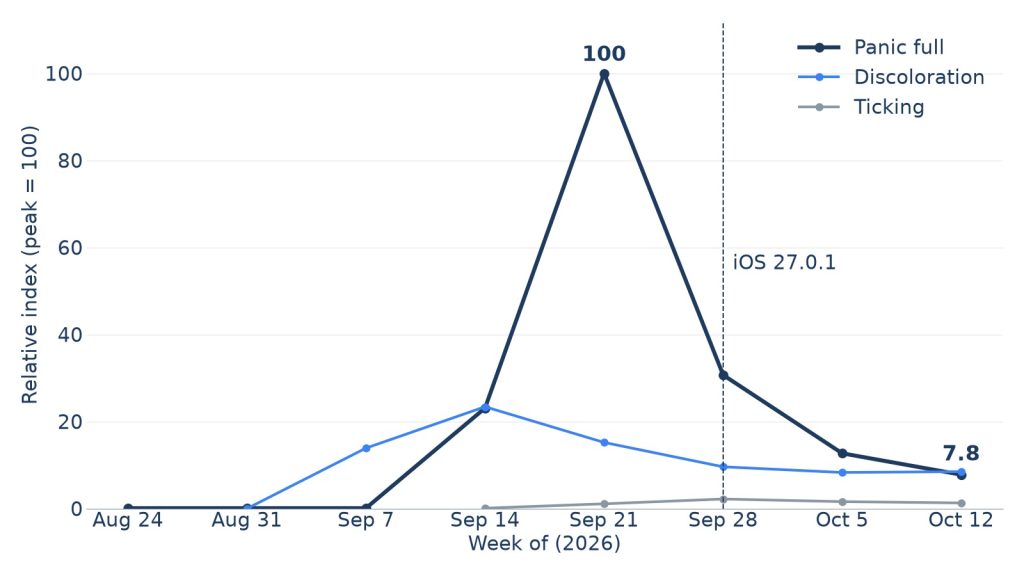
Naver DataLab gives a relative index, not search counts. “Panic full” hit 100 the week of September 21, then fell to 30.7, 12.7 and 7.8 by the week of October 12.
Ticking peaked at 2.2 on the same scale. Discoloration sat at 8.5 in the week of October 12, which also counts people just shopping for Burgundy.
Does updating iOS limit exchanges in Korea?
Possibly. On October 8, the Korea Economic Daily reported complaints that exchange and refund outcomes depended on whether the phone had been updated, not on the defect.
It’s the loudest question about this phone in Korea. Of 200 Naver posts about panic-full, 95 mention exchanges or refunds, and 21 of 50 panic-full questions on KnowledgeiN, Naver’s Q&A board, were about exchanges. One owner asks, “No panic-full at all, so do I really need to update?”
I weighed an exchange myself for one evening, after a failed scan wobbled, and checked that I was still inside the 14-day window. But it didn’t happen every time, and the phone never shut off or restarted. I didn’t think a service center would count that as a defect, so I updated the day 27.0.1 came out.
My reasoning was that an exchange depends on a confirmed hardware fault, not the iOS version. That’s my own understanding; I never asked a service center.
The window depends on where you bought. Apple Korea gives 14 days from the day you receive the product for purchases from Apple, while KnowledgeiN answers cite other terms, such as 30 days for phones Coupang ships itself.
Korean answers also disagree on where to start: one says defect exchanges go through Apple whatever the store, another says start with the seller. How the store you buy from changes this is part of my guide to buying a phone in Korea: unlocked, carrier or seongji.
When something odd doesn’t reproduce now, I note the date and what I was doing. If it repeats, that’s when I’d file.
What else are owners reporting: screen lines, camera, burgundy, heat?
Burgundy discoloration is the one open item with no fix or explanation. Screen lines and camera flicker show up in Korean posts but not in Apple’s notes.
Screen lines and the 2x camera
Korean defect posts mention green or pink lines, camera flicker and grid patterns. The 27.0.1 notes cover only the 2x photo color.
On my phone I’ve had no lines and no touch freezes. After 27.2, I shot the same desk objects at 1x and 2x on the 18 Pro and the 17 Pro and compared them side by side. I couldn’t see a color shift by eye; I didn’t measure it.
The burgundy finish
On October 15, a Korean report said owners had reported Burgundy units turning red. One Black owner on a Naver cafe describes paint marks that tape and alcohol swabs didn’t remove. Apple hasn’t explained either.
Heat and battery
My phone got a little warm the day I moved my data over, and that was it. After about six weeks, Settings > Battery > Battery Health shows 100% Maximum Capacity.
On KnowledgeiN, 48 of 50 results for an 18 Pro heat search were real heat questions, many pairing charging with YouTube or games.
Should you upgrade from an iPhone 17 Pro, or wait?
If you already have a 17 Pro, I don’t think you need to switch, and 27.2 didn’t change that for me. If it’s your first iPhone or your phone is worn out, buying now is fine.
I used my 17 Pro for a year before moving in September. It wasn’t lacking; I wanted a spare and wanted to try the new phone myself. In daily use, the gap wasn’t worth putting up with early bugs.
The buyer I’d steer away is someone happy with their 17 Pro’s battery and storage who’d pay near full price just for the newer model. Korean cafes echo that: at least two posts cite getting burned by the 17 Pro’s cellular issue as a reason to hold off on new models.
FAQ
Will iOS 27.1 fix my iPhone 18 Pro?
No, you won’t get it. Apple’s security releases page lists iOS 27.1 (October 23, 2026) for iPhone Duo only. The 18 Pro went from 27.0.1 to 27.2.
Sources
- Apple releases iOS 27.0.1 for iPhone, here’s what’s new, 9to5Mac, September 28, 2026: iOS 27.0.1 release date and its fixes (Face ID restarts, 2x photo color, touch freeze)
- Apple security releases, Apple, checked October 30, 2026: iOS 27.1 (October 23, iPhone Duo only) and iOS 27.2 (October 26) release dates and devices
- iOS 27 Problems and Fixes, Updated for iOS 27.2, TechBetweenTheLines, updated October 28, 2026: 27.2 release notes don’t mention the earpiece crackling
- iPhone 18 Pro Owners Complain of Speaker Crackling or Popping, MacRumors, September 29, 2026: earpiece crackling reports
- Report on 1,500 exchanges (Korean), YTN, October 8, 2026: exchange and refund counts, lawmaker’s data, Apple’s response
Show 5 more sources
- Korea Economic Daily on update-based exchange decisions (Korean), Korea Economic Daily via Naver News, October 8, 2026: complaints that exchange outcomes depended on updating. Yonhap on defect reporting (Korean), Yonhap via Naver News, October 8, 2026: Apple’s position under consumer law
- Panic-full reports after updating (Korean), News1 via Naver News, October 8, 2026: users reporting panic-full after 27.0.1
- Burgundy units turning red (Korean), News1 via Naver News, October 15, 2026: burgundy discoloration reports
- Returns and Refunds (Korean), Apple Korea, checked October 30, 2026: 14 days from receipt for purchases from Apple
- Naver searches, October 20, 2026 (queries “아이폰18 프로 패닉풀”, “결함”, “발열”; 200 results each from blogs, cafes, KnowledgeiN and news), October 30, 2026 (“18프로 틱소리 27.2”, top 20 cafe posts), and Naver DataLab weekly relative index: post counts and search interest trend