I hit Codex’s context window error during a long Codex CLI session. It’s a different problem from the 5-hour and weekly usage limits. Those are time-based caps set by your plan. This error fires when the tokens piled up inside one session go past what the model can handle.
/compact didn’t always fix it. Below is what I actually did, and how I now choose between four commands: resume, fork, new, and clear.
When does Codex run out of room in the context window?
Codex’s context window error doesn’t show up out of nowhere in a short chat. It builds up over long refactoring sessions that move across several modules, and it piles up toward the end.
The work was cleaning up existing logic in a Java/Spring multi-module repository. It started as a change touching two or three files. Then the scope I had to investigate kept growing, and the files Codex had read and the diffs it produced kept piling up. I ran the loop many times: run tests → check why they failed → fix the code → rerun.
It didn’t fail all at once. Later in the session, I increasingly had to re-confirm things we’d already decided, or tidy up the context. Those warning signs came back a few times before they finally turned into the error.
If this had been a single-file script, I don’t think it would have filled up this fast. Working against several modules and test files at once is what speeds up context consumption.
Don’t confuse it with the 5-hour or weekly usage limit
This error is separate from running out of usage. Usage limits reset after enough time passes. The context window depends on how many tokens have accumulated in one session, so you can hit it even when you still have usage left.
What does /compact actually keep, and what does it drop?
In my sessions, /compact kept the big goal, the main files, and decisions already made. The reasoning behind smaller decisions often had to be restated. I use it to keep a session going. It doesn’t save the full conversation like a checkpoint.
Compacting didn’t solve everything, either. When the session had already gotten very long, or the direction of the work had changed several times, I still had to add explanations back after compacting. These days I don’t keep compacting over and over just to make it to the end. Once I feel the cost of explaining context has grown again, I move to a new session at that point.
Compaction doesn’t always trigger automatically, either. Here’s the error message as reported in a GitHub issue: “Codex ran out of room in the model’s context window. Start a new thread or clear earlier history before retrying.” (GitHub issue #19269, April 24, 2026). A thread on the OpenAI Developer Community reproduces the same message. The OpenAI_Support account only replied asking for the version, model, and logs. There’s no root-cause fix yet.
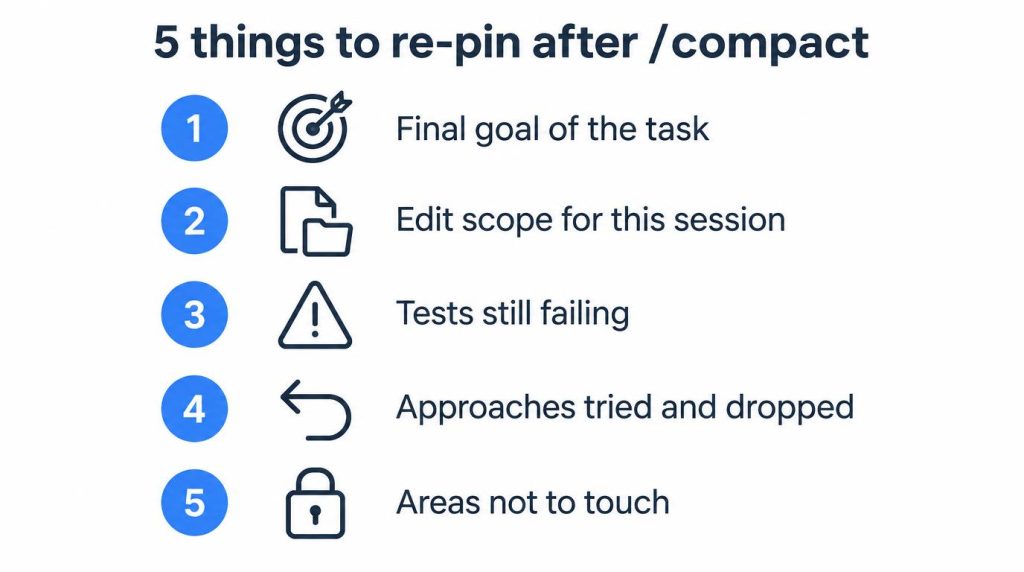
5 things I re-pin after compacting
After I run compact, I add back one sentence for each of these:
- The final goal of the current task
- The edit scope for this session
- Tests that are still failing
- Approaches I tried and dropped
- Areas that must not be touched
Resume vs fork vs new vs clear: which one should you use?
Resume continues the same line of judgment. Fork tests a different approach from the same context. New restarts with only the confirmed facts carried over.
If you use them interchangeably, the context tends to get more tangled. Here’s how I split them by situation:
| Command | What it does | When I use it | What stays, what goes |
|---|---|---|---|
/compact |
Compresses context within the same session | The session is still alive, and the cost of re-explaining context is just starting to climb | The big goal, main files, and decisions stay. You may need to re-explain detailed background |
codex resume --last |
Continues the same session as is | The direction is still right, and I just need to keep going on the details | Earlier history stays. But if the context was already full, the error can come back |
codex fork --last |
Starts a new branch from the same context | I want to keep the context so far but try a different approach | Existing context stays. From there, progress splits by branch |
/new |
Starts a new session | Hypotheses and dropped approaches have piled up, and the context itself is polluted | Earlier detailed context is gone. A person has to feed the confirmed facts back in |
I rarely use /clear, and I don’t have a concrete case for it, so I’ll leave it at that.
When should you switch to a new Codex session?
Move to a new session when re-explaining context starts costing more than compressing and keeping it. A long context by itself isn’t the problem.
I don’t think holding on to a lot of context is always a win. This is especially true for work like refactoring, where decisions keep changing midway. For me, it was more stable to pull out only the confirmed facts at some point and carry them into a new session. Compressing old context and dragging it along worked less well.
The way I judge that moment is simple.
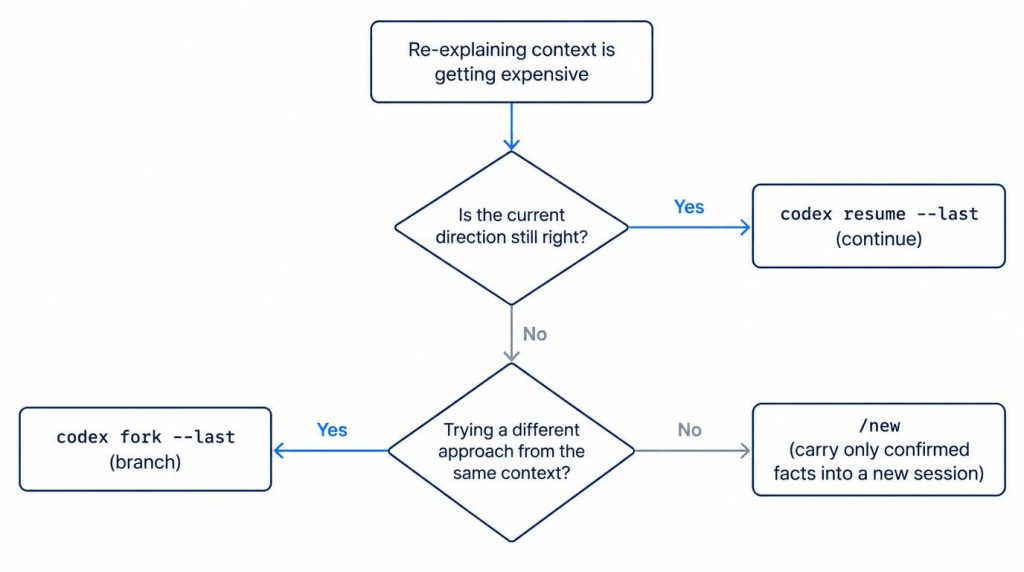
If you’ve compacted and still find yourself adding explanations back more and more often, keeping the session has already started costing more than starting fresh.
Why don’t I fully trust auto-compact? (as of September 2026)
How reliable auto-compaction is has varied by version. If you’re seeing this error, check the GitHub issues first to see whether it’s a known regression.
The auto-compaction threshold isn’t a number from the official docs. It’s internal behavior you can confirm through GitHub issues. According to GitHub issue #11805, starting with v0.100.0, a user-configured compaction threshold is force-capped at 90% of the context window (opened February 14, 2026, now closed as “not planned”). There are also separate reports of auto-compaction not running at all. One issue reports that compact doesn’t run automatically in v0.42.0 when there’s a large change set.
This section reflects things as of when I wrote it (September 2026). Whether it has stabilized since then still needs to be checked.
FAQ
/compact doesn’t clear the context window error. What now?
It may be the regression where auto-compaction doesn’t trigger. In that case, I don’t keep compacting. Moving to a new session is more stable: first write one sentence each for the goal, the edit scope, and the failing tests.
If I switch with codex resume --last or fork --last, is my earlier work still there?
Resume continues the history as is, but if the context was already full, the error can come back. Fork creates a new branch while keeping the existing context. Neither preserves every detail of the context.
Codex has auto-compact. Why step in manually?
There are reports of auto-compaction not triggering in some versions. Check first whether what you’re seeing is a known regression. Make manual handling your default instead of relying on auto-compact.
References
- GitHub issue #19269: primary-source reproduction of the “Codex ran out of room…” error message (2026-04-24, Codex CLI v0.124.0)
- OpenAI Developer Community thread: another reproduction of the same error, with the OpenAI_Support reply (no root-cause fix offered)
- GitHub issue #11805: source for the auto-compaction threshold being capped at 90% of the context window from v0.100.0 (2026-02-14, closed as not planned)
- GitHub issue #4363: regression report that compact doesn’t run automatically in v0.42.0 with a large change set
This article was localized from the Korean original: https://jjeongil.tistory.com/3568.