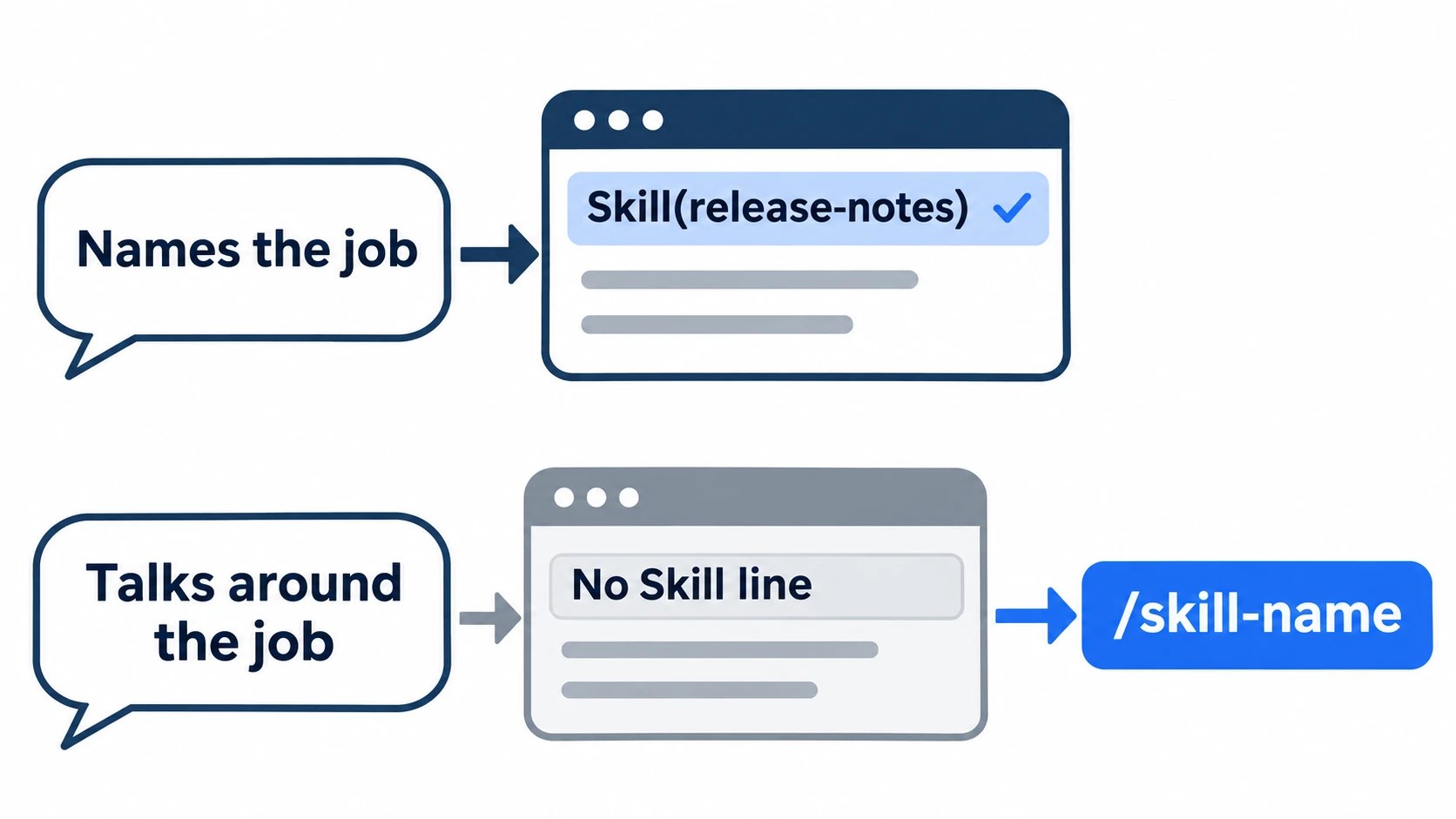
If your skill shows up in /skills but Claude does the job its own way, the file’s path and name are almost certainly fine, and on Claude Code 2.1.317, as long as the description named the job, its exact wording wasn’t the cause either.
I had Claude Code run one test skill on my machine 45 times: three different descriptions, the same 15 requests under each. Requests that named the job, in any words, called the skill in all 30 of their runs. The misses all came from the 15 runs that talked around the job, and 2 of those never called it.
So hold off on rewriting the description or adding a hook. Look for the Skill(...) line above the answer, and if it’s missing, or you phrased the job sideways, or the output format matters, call the skill as /skill-name. In scripts, put the name in the prompt from the start.
On this page
Before editing anything: two look-alikes to rule out
The first time my thumbnail-prompt skill got skipped, I blamed the file. The answer came back without the fixed layout the skill always writes, so I checked the frontmatter indentation and whether name matched the folder name. Both were fine, and the skill had been in the list all along.
If your skill isn’t in /skills at all, or Claude leaves it out when you ask “What skills are available?”, you have a loading problem with the path, the name or the YAML. Where skill files go and how their names work is in my post on moving custom commands to skills.
A skill that sets paths is a special case: it only activates for files inside the current working directory, not for a sibling worktree, even one added with /add-dir.
If it is listed, two other problems look, from the outside, just like a skill that wasn’t matched, and each takes a minute to rule out.
The YAML doesn’t parse
A skill whose frontmatter fails to parse still loads, with empty metadata, so /skill-name works and automatic matching never does.
From your project root, point the validator at the skills folder itself; a plain folder is valid input, no plugin needed:
claude plugin validate .claude/skills
claude plugin validate ~/.claude/skills   # personal skills
A clean folder prints ✔ Validation passed. A broken file is named, followed by YAML frontmatter failed to parse and Validation failed. If your version doesn’t know the command, run claude update first.
claude --debug shows the same thing from inside a session. The log goes to ~/.claude/debug/latest, and a broken skill leaves a line there ending in failed to parse and was ignored.
The skill list is cut short
The skill list Claude reads gets 1% of the model’s context window; when it overflows, Claude keeps every skill’s name but drops the descriptions of the skills you use least.
Run /context and read the Skills row. On my machine, with a 1M-token context window, it read 0.6% with 31 skills, and 1.0%, the cap, once 40 dummy skills were added. The budget is 1% of the window, so on a 200K window the same 31 skills would already overflow it.
If yours sits at about 1%, the listing is full and some descriptions are gone; a --debug log then also carries a line starting Skill listing over budget.
To raise the budget, add "skillListingBudgetFraction": 0.02 to settings.json. The default is 0.01, so that doubles it, at the cost of more context on every turn. The cheaper route is to set skills you rarely need to "name-only" in skillOverrides, which lists them without a description.
Three descriptions, 45 runs: the request’s wording decided it
The test skill, release-notes, formats release notes with a fixed three-line header, a job Claude can do passably without it. I ran it in a fresh repo on Sonnet 5.5 with my usual skills left installed, as yours would be.
I swapped in three descriptions. The first only said what the skill does. The second led with the words someone asking would use: release notes, changelog, “what changed”. The third added “Use when the user asks to summarise changes since a version, even if the request doesn’t say ‘release notes’.”
Each description got the same 15 requests through claude -p, one run each. Five said “release notes”, five named the job in other words (“summarise CHANGES.txt for users”), and five never named it (“what should we tell customers about 1.5?”). Those first ten called the skill in all 30 of their runs, under every description.
All three descriptions named the job, though. A vague one is a different case: when mine read like “help with PR-related tasks”, Claude did skip skills at times, and rewriting them in concrete terms fixed that.
Every miss came from the third kind, and every description had at least one there. Claude often searched the repo with Bash and Read before reaching for the skill, and twice it never did: one run wrote the notes in its own format, and the other found SKILL.md and read it as an ordinary file.
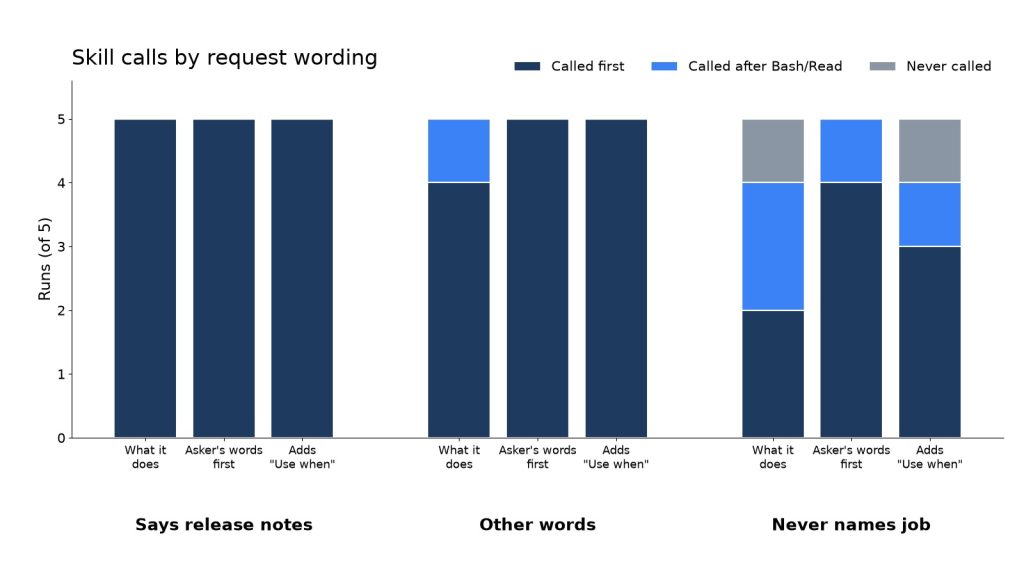
claude -p runs against one test skill; a late call means Claude ran Bash or Read before calling it. Measured November 12, 2026.Think back to the request Claude ignored. If it named the job in any words, the description is unlikely to be your problem.
If it described the result and left the job unsaid, like “write a short blurb about the latest version for our site”, that’s the kind of request Claude answered on its own in my runs.
When the Skill(...) line doesn’t show: call it by name, skip the hook
Look for the line before the format
The fastest check is the terminal. When a skill fires, a line naming it, such as Skill(thumbnail-prompts), appears right after you send the request; if the skill’s first step runs a command, that command’s line follows. In claude -p --output-format stream-json, look for a tool_use block named Skill.
Look at the output format only after that, because in my test the format misled in both directions: one run copied it by reading SKILL.md as a plain file, and one called the skill but ran out of turns before writing anything.
The miss I fixed with /thumbnail-prompts
The miss I remember came when I typed something like “pull a few picture ideas for the top of the post” (I work in Korean; that’s the gist).
No Skill line appeared. Claude handed back three or four lines of scene ideas per post, without the fixed layout the skill always writes, and that was with a CLAUDE.md line already sending featured images to that skill.
I didn’t rephrase with “thumbnail prompts”, because that would have been betting on auto-matching again. I typed /thumbnail-prompts, the Skill line and the skill’s first script showed up right away, and the format came out right. Now when I catch myself saying something like “picture ideas”, I start with the name.
Why no hook
I never added a UserPromptSubmit hook to push the skill. It would run on every prompt I send to rescue one skill that misses now and then, when the fix for a miss is one retyped command. The official docs keep hooks for rules that must hold every time.
In claude -p scripts, put /skill-name in the prompt
Headless mode called the skill as often as an interactive session on the same requests in my test, so the mode isn’t the problem on this version.
Name the skill in the prompt anyway, as in claude -p "/release-notes what changed since v1.4". When a scripted request misses, you get a plain, plausible answer, and nobody is watching for the missing Skill line.
Which skills to leave on auto, and which to call by name
If the way you usually ask names the job and a miss costs one retype you’ll see on screen, leave the skill on auto. If it does something you can’t take back, or you’re about to describe a fixed-format job in roundabout words, call it by name.
Of the four skills I use day to day, the thumbnail-prompt one stays on auto, since asking for thumbnail prompts is enough to fire it.
The one that sends answer drafts out through Gmail I usually start with its slash name, because it sends something off my machine and I don’t want the model switching it on by itself.
None of the four carries disable-model-invocation: true, so that second rule is a habit, not a setting, and the model could still pick the Gmail skill on matching words.
The flag turns the habit into a rule: it stops Claude from loading the skill on its own, while /skill-name keeps working. The day I write a skill that publishes something, it gets that line.
Sources
- Research note: the 45 runs behind this post, with each description, request and per-run result, loopnotes-lab on GitHub, 2026-11-12: also the headless vs interactive runs, the CLAUDE.md and 40-skill side tests, the
/contextreadings and the validate and debug-log outputs - Extend Claude with skills, Claude Code Docs, checked 2026-11-12: malformed YAML and
claude plugin validateon a skills directory, the 1% listing budget and the debug-log warning, hooks for rules that must hold,disable-model-invocation - Settings reference: skillListingBudgetFraction, Claude Code Docs, checked 2026-11-12: default 0.01, example 0.02