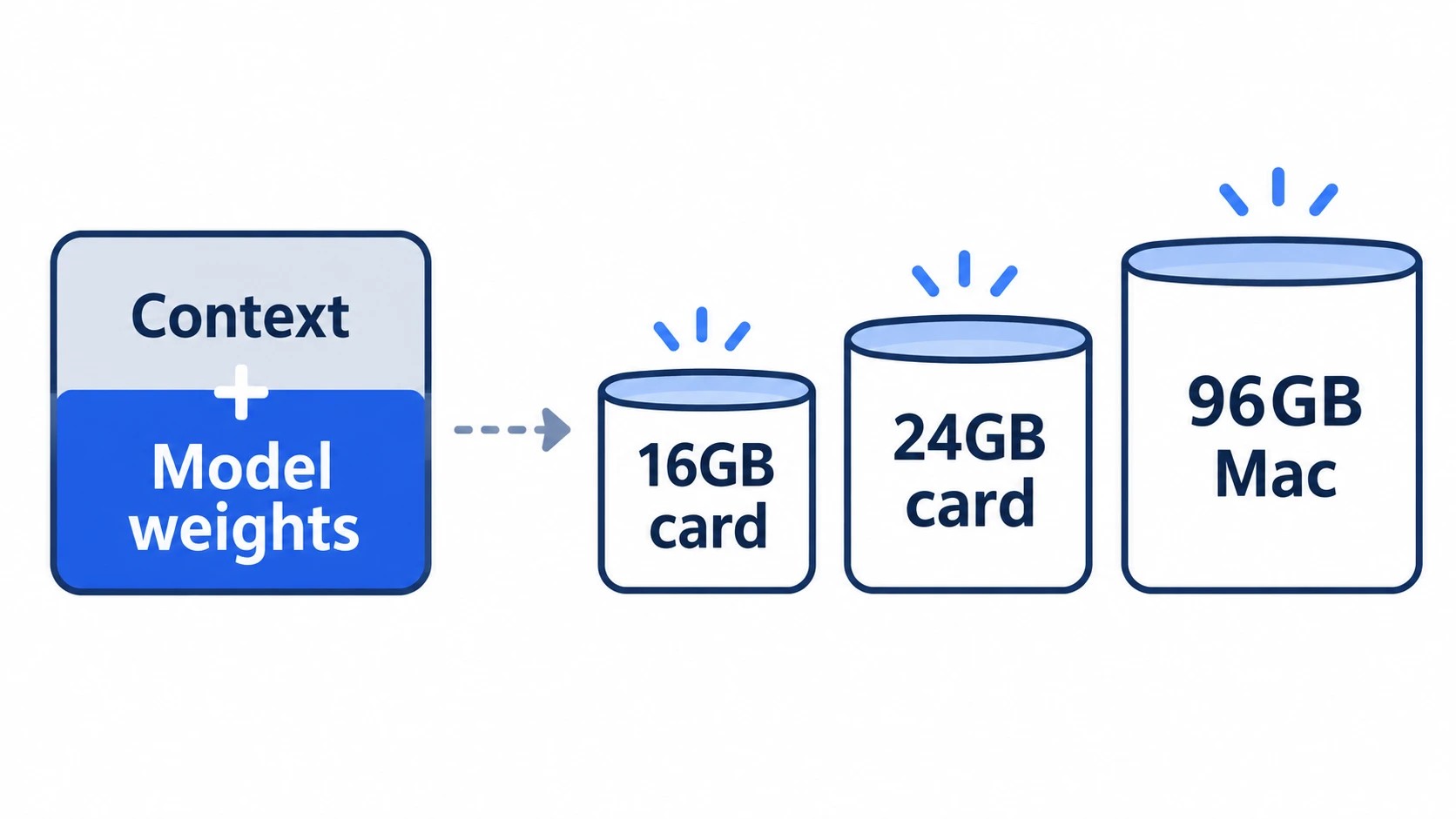
Buy for the model you’ll run every day plus the amount of text you’ll feed it at once, because that context lives in memory next to the weights. A 14B at Q4 fits a 16GB card with a 32K context. A 30B MoE coding model with a 32K context needs a 24GB card: Qwen3-Coder-30B-A3B used 21.1GB on my RTX 4090.
For Llama 3.3 70B, the first machine where it fits with room is a 96GB Mac: it needs about 50GB at 32K, far past any 24GB card and past what a 64GB Mac gives its GPU by default. The number in a model’s name won’t tell you which side of a line you land on; the context will.
On this page
Q4 weights plus context: where 14B, 30B, 32B and 70B land
Each bar below stacks a model’s Q4_K_M file (the usual 4-bit download) on the KV cache, the memory that holds the context, for 8K, 32K and 128K tokens. I calculated the cache from each model’s official config at the default FP16, and the runtime adds about 1GB on top of every bar.
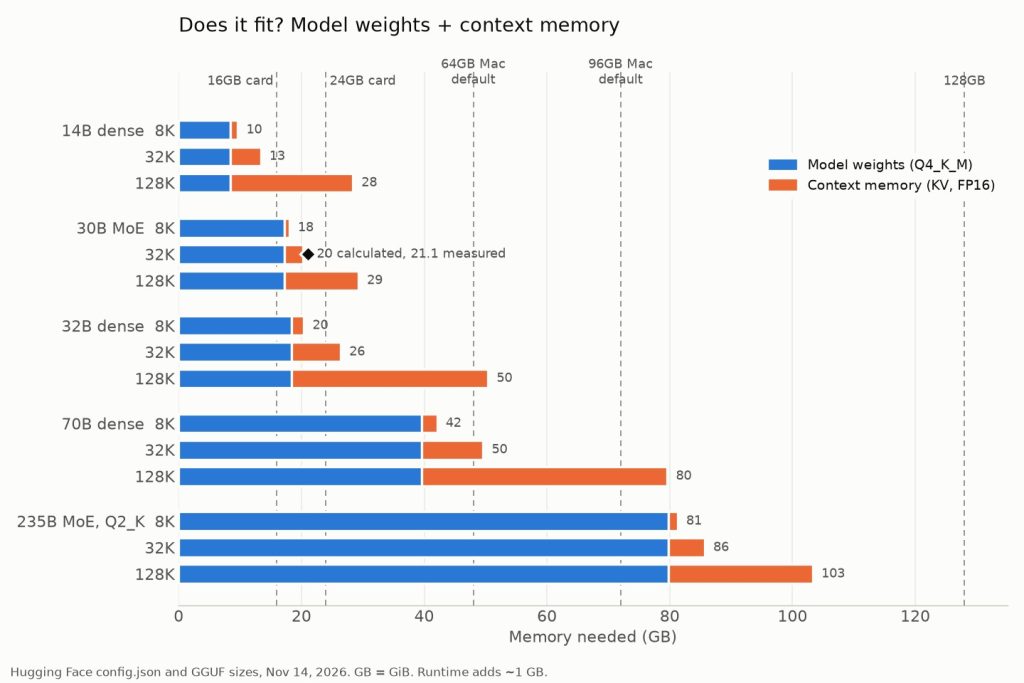
The 16GB line falls between 14B and 30B before context even enters: Qwen3-Coder 30B’s weight file alone is 17.3GB. At 64K the same model measured 23.4GB on my 4090, so 64K is as far as a 24GB card goes, with nothing spare.
70B is where context moves you from one machine to the next. A single RTX 3090 or 4090 can’t hold even its weights, and with context it needs about 42GB at 8K and 60GB at 64K.
A 64GB Mac gives its GPU 48GB by default, so it runs 70B only up to about 16K, while a 96GB Mac’s 72GB holds it up to 64K.
For a model that isn’t in the chart, start from its GGUF file size on Hugging Face and add the cache for the context you’ll use:
| Model class | Cache per 1K tokens (FP16) |
|---|---|
| 30B MoE | about 0.09GB |
| 14B | about 0.16GB |
| 32B | about 0.25GB |
| 70B | about 0.31GB |
If its architecture differs from these four, get the cache per token from its config.json: layers × KV heads × head dimension × 4 bytes. Add the runtime’s 1GB, and treat a total within 1GB of a line as borderline.
On 24GB, a 30B MoE holds 32K and a 32B dense model doesn’t
“24GB runs 30B-class models” holds for Qwen3-Coder-30B-A3B and fails for Qwen3-32B at the same context.
The MoE stores context for four key-value heads in each of its 48 layers; the dense 32B stores eight in each of 64, so its cache is almost three times larger per token.
It fits 24GB at 8K, sits at the edge at 16K and needs 27.4GB at 32K with the runtime.
I pasted a service’s error log and some related source files, close to 30,000 tokens, into Qwen3 32B running at 32K, and the first character took over 20 seconds to appear.
I assumed the prompt was just long, then ran ollama ps and saw a CPU share in the teens in the PROCESSOR column.
Layers had spilled into system RAM. I had counted the 18.4GB weight file and forgotten that 32K of FP16 cache adds another 8GB.
I stopped the request, turned on Flash Attention and an 8-bit cache with two server settings, and reloaded the model. PROCESSOR then read 100% GPU and the same prompt answered far sooner.
An 8-bit cache is about half the size, which by my calculation brings the 32B at 32K to 23.7GB, runtime included. I keep both settings on and haven’t noticed a quality drop in my coding work, though I stop at 8-bit.
That 23.7GB leaves nothing for a browser or anything else that grabs the GPU, so my long-context work goes to the 30B MoE, and the 32B gets short jobs at 8K.
Turning on Flash Attention and the 8-bit cache in Ollama
The two settings belong where the Ollama server reads its environment and take effect only after it restarts. On Linux, sudo systemctl edit ollama.service opens an override file; add them under [Service]:
[Service]
Environment="OLLAMA_FLASH_ATTENTION=1"
Environment="OLLAMA_KV_CACHE_TYPE=q8_0"
Then run sudo systemctl daemon-reload and sudo systemctl restart ollama.
With the Mac app, run launchctl setenv OLLAMA_KV_CACHE_TYPE q8_0 (and the same for Flash Attention), then quit and reopen Ollama. On Windows, quit Ollama from the taskbar, add both as user environment variables and start it again.
Load the model and check that ollama ps shows 100% GPU.
RAM you can’t count toward a model
My 4090 box has 64GB of system RAM, and a model that spills into it still runs, but too slowly for daily work. I size models on the card’s 24GB and nothing else.
On a Mac, the GPU gets only part of the unified memory by default: about three quarters on Macs with 36GB or more, and about two thirds on smaller ones. Apple doesn’t publish that split, so check yours before you size a model to it:
sysctl iogpu.wired_limit_mb
A 0 means the default is in effect.
I ran into that limit on my 96GB Mac Studio M3 Ultra.
I’d read in r/LocalLLaMA threads before buying that the GPU gets about three quarters, so I wasn’t surprised when an 80GB 2-bit (Q2_K) file of Qwen3-235B-A22B failed to load in LM Studio within seconds, with a one-line Metal error about allocating the buffer.
sysctl read 0, so I ran sudo sysctl iogpu.wired_limit_mb=88000, which left about 10GB for macOS, and the model loaded. The setting resets on reboot.
Then I asked it for a function that merges overlapping time periods, with pytest tests, and its code failed its own tests; Qwen3-Coder 30B at Q4 passed the same prompt on the first try. After two evenings I gave up.
For code, I now run a big model only at 3-bit (Q3) or above, in a size that fits under the default limit.
Pick by your case: 16GB, 24GB, a 96GB Mac, or the Mac you already code on
If your daily model is a 30B MoE coding agent at 32K, as mine is, 24GB is the line to buy at.
| Your case | Memory to plan on | What to buy | Read next |
|---|---|---|---|
| 14B coding model at 32K | 16GB | RTX 5060 Ti 16GB | RTX 5060 Ti 16GB vs used RTX 3090 |
| 30B MoE agent at 32K | 24GB | RTX 4090 or used RTX 3090 | RTX 5060 Ti 16GB vs used RTX 3090 |
| 70B at 32K to 64K | 72GB GPU share | 96GB Mac | Mac Studio M3 Ultra for LLMs; DGX Spark vs RTX 4090 |
| One Mac for coding and models | Don’t count it | Keep models off a 32GB Mac | Mac mini M6 32GB review; M6 vs M5 Pro |
Which tool loads the model (Ollama, LM Studio, llama.cpp, vLLM) is a separate choice, covered in the runtime guide.
First card: 16GB or 24GB
The deciding question is whether you’ll ever want the 30B MoE.
On a friend’s RTX 5060 Ti 16GB, a 14B at Q4 ran entirely on the card in Ollama, and a 32B moved partly to the CPU and slowed down at once.
If you’re unsure, rent a cloud RTX 3090 for an afternoon and load your model at your context before you buy; that’s how I confirmed a 30B at Q4 fits in 24GB.
Already on 24GB: a bigger machine, not a second card
If you already own 24GB, the next machine is a different size, not a faster card.
Before I ordered my Mac Studio, a second 4090 was the fast option, but my box already runs the card power-capped and loud under load, and a second one meant a new case, a bigger power supply and twice the noise.
DGX Spark offered 128GB, but a dense 70B reads its whole weight file for every token, so memory bandwidth sets its speed, and Spark’s is about a third of the M3 Ultra’s.
I ordered the 96GB Mac Studio. Short, fast jobs stay on the 4090; big, long ones go to the Mac.
70B on a 96GB Mac: jobs you leave running
Buy the 96GB Mac for 70B only if the job can run while you’re away. Pasting an 8K diff into a chat with it took minutes before the first token, so I stopped using it interactively.
One Wednesday night I queued nine PR diffs from a side repo at work and went to bed. On Thursday morning, coffee in hand, I opened the nine Markdown reviews over SSH.
More than half the comments were naming and null-check nitpicks, one assumed a helper method the repository doesn’t have, and one caught an external call outside a transaction boundary. That one went into the PR under my name. The 70B writes drafts; I check them against the diff.
The Mac you code on
On days I run three coding agents next to the IDE, a browser and containers, my 32GB Mac mini M6 dips into swap. A model would be fighting your own tools for the same memory, so on those days mine runs on the 4090.
Sources
- Research note: memory for the model and context you’ll run, loopnotes-lab, 2026-11-14: the chart’s weights plus cache figures, the two RTX 4090 readings against the calculation, the Mac GPU limit survey and the 70B speed ceilings
- A6: choosing hardware for local LLMs, loopnotes-lab, checked 2026-11-14: our notes on this question
- Qwen3-Coder-30B-A3B-Instruct config.json, Qwen on Hugging Face, checked 2026-11-14: 48 layers, four KV heads
- Qwen3-32B config.json, Qwen on Hugging Face, checked 2026-11-14: 64 layers, eight KV heads
- Llama-3.3-70B-Instruct config.json, public mirror of Meta’s gated repo on Hugging Face, checked 2026-11-14: 80 layers, eight KV heads
Show 10 more sources
- Qwen3-Coder-30B-A3B-Instruct-GGUF, Unsloth on Hugging Face, checked 2026-11-14: the Q4_K_M file, listed as 18.6GB (17.3 GiB)
- Qwen3-32B-GGUF, Qwen on Hugging Face, checked 2026-11-14: the Q4_K_M file, listed as 19.8GB (18.4 GiB)
- Llama-3.3-70B-Instruct-GGUF, bartowski on Hugging Face, checked 2026-11-14: the 70B Q4_K_M file
- Qwen3-235B-A22B-GGUF, Unsloth on Hugging Face, checked 2026-11-14: the Q2_K file, listed as 85.7GB (79.8 GiB)
- Ollama FAQ, Ollama, checked 2026-11-14: Flash Attention and
OLLAMA_KV_CACHE_TYPE -
ggml-common.h, llama.cpp at commit 61dbf49, checked 2026-11-14:
block_q8_0, 34 bytes per 32 values -
llama.cpp issues with recommendedMaxWorkingSetSize, ggml-org on GitHub, searched 2026-11-14: the logs behind three quarters and two thirds
- MTLDevice.recommendedMaxWorkingSetSize, Apple Developer, checked 2026-11-14: what the GPU limit is; Apple publishes no default share
- Mac Studio (2025) technical specifications, Apple Support, checked 2026-11-14: M3 Ultra 819GB/s
- DGX Spark, NVIDIA, checked 2026-11-14: 128GB unified memory, 273GB/s