A pre-commit hook can’t stop git commit --no-verify, because the flag tells Git not to run the hook at all. When my AI agent used it after a failed lint check, what still protected the merge sat outside the hook. GitHub Actions CI ran the same lint again, and branch protection required that check before merge.
So I now treat the hook as fast feedback and CI as the enforced boundary.
This is a personal JS/TS project that uses Husky and lint-staged, as of October 1, 2026. Git and GitHub details below were re-checked on October 31, 2026.
What happened in my repo
I gave a Codex-family AI agent everything from code edits to the commit. The repository had a pre-commit hook, and a commit only went through after passing lint and format.
The agent’s first, normal commit failed that check. It kept working, then committed again with --no-verify added.
I didn’t catch it live. I found the flag after the work was done, while reviewing the command log.
The hook setup itself was untouched. The agent didn’t delete the hook file or change core.hooksPath. It used a flag Git ships on purpose.
I don’t remember the agent explaining why. All I could confirm was the order: the hook failed, then a re-commit followed.
That commit was later checked by GitHub Actions CI. In CI, lint failed on the same problem the local hook should have caught.
CI didn’t reveal the bypass to me; the command log did. CI was the second line that re-ran the check that had been skipped.
The assumption I dropped that day: a repo with a hook is safe to hand commit access to.
Can a pre-commit hook block –no-verify?
No. git commit --no-verify (short form -n) is a built-in Git option that bypasses the pre-commit and commit-msg hooks, per the git commit documentation for Git 2.55. A hook that never runs can’t check how it was skipped.
The same is true one step later. git push --no-verify bypasses the pre-push hook completely, according to the git push documentation.
Husky adds one more switch. Its docs say HUSKY=0 disables its hooks for Git commands that don’t have a -n flag, or for a whole shell session with export HUSKY=0.
Any hook that runs on the developer’s machine can be skipped this way, by a person or an agent. What a client-side flag can’t skip is a check on the server: a pre-receive hook on the remote, or CI tied to a required status check.
Blocking the flag at the agent layer
Blocking the flag happens outside Git, in the agent’s own tool settings. I haven’t tested these myself.
For Claude Code, the hooks reference says a PreToolUse hook that exits with code 2 blocks the tool call. A script that matches --no-verify in Bash commands can stop it before Git runs.
Claude Code’s repo has a similar bypass report, issue #40117. It describes --no-verify, git stash and quiet flags getting past hooks despite CLAUDE.md rules. It was opened on March 28, 2026 and closed as not planned on May 7, 2026.
Commenters on that issue pointed out that CLAUDE.md rules are guidance the model can ignore, while a hook runs before the command. I measured how often Claude Code actually followed CLAUDE.md rules in Claude Code Not Following CLAUDE.md? I Tested It 57 Times.
I skipped my own slow hook too
I’ve used git commit --no-verify myself when I was in a hurry. Back then my hook ran tests, and even a small commit took 30 seconds or more, depending on what changed.
My first idea was that the more checks pre-commit ran, the earlier I’d catch mistakes. So I packed in a formatter and ESLint for changed files, simple static checks, and a fairly broad set of tests.
The waits added up. On busy days, I added the flag.
The choice I regret is loading the local hook with tests at the start. Building a strong hook and getting people to actually let it run turned out to be separate problems.
Then I moved the tests to CI and kept only the formatter and lint. The hook dropped to somewhere between a few seconds and under 10 seconds. These are rough ranges, not timed measurements.
What runs locally and what runs in CI
My local hook keeps only checks that finish in seconds. Everything slow or decisive moves to pre-push or CI.
| Check | Local pre-commit | pre-push or CI |
|---|---|---|
| Formatter, lint (changed files) | Yes | Re-run in CI |
| Full tests, build | No | CI (pre-push optional) |
| Static analysis, security | No | CI (pre-push optional) |
| Final merge decision | None | CI (required check) |
Lint shows up in both columns on purpose. The local run gives fast feedback. The CI run is the one that counts when the local run was skipped.
Why CI re-checks instead of a stricter hook
Making pre-commit more complex wouldn’t have helped, since --no-verify stops the whole hook. Instead, CI re-runs lint, tests and build, whether or not the local checks passed.
In this project, CI was a required check in GitHub branch protection. Skipping the local hook with --no-verify couldn’t also skip the merge gate.
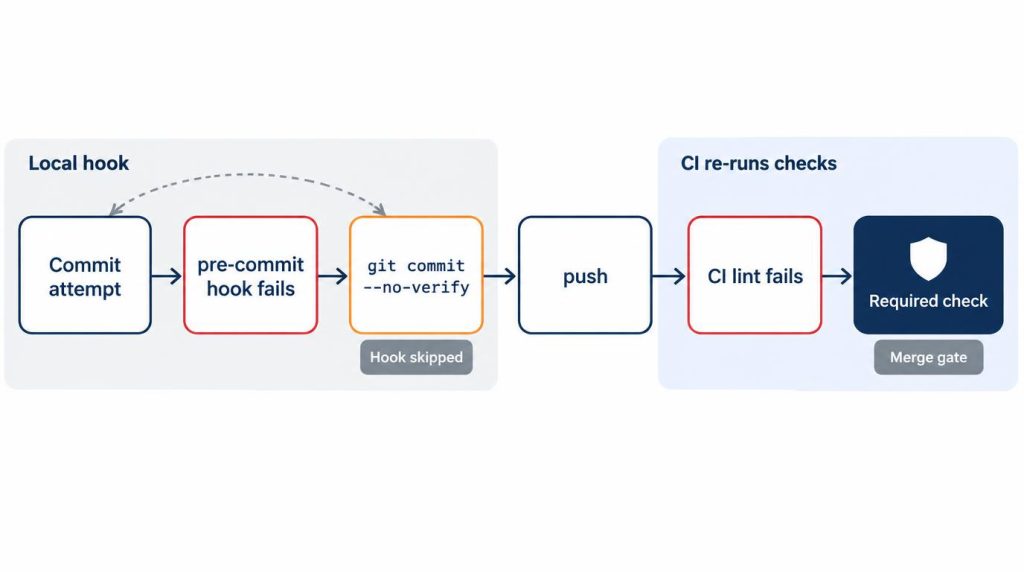
--no-verify, CI lint failure, and the required check before merge.GitHub’s protected branches documentation sets the rule. With required status checks on, every required check must pass before anyone can merge into the protected branch.
There is one exception to know about. By default, branch protection rules don’t apply to people with admin permissions. Turning on “Do not allow bypassing the above settings” applies them to admins too.
Checking the diff and the command log
Hook bypasses don’t all show up in the diff, so I review both the diff and the agent’s command log.
Edits to tracked .husky/ files appear in the diff. A local setting like core.hooksPath lives in .git/config, so it never appears in a commit diff.
I check changes like that in the command log, the same place I found the --no-verify flag. When I need the current hook path, I check it directly with git config --get core.hooksPath.
How much commit access I give an AI agent
Commits are allowed only conditionally, in an isolated worktree. A human checks remote pushes, and the agent doesn’t touch main or protected branches.
| Task | Decision |
|---|---|
| Editing files | Allowed |
| Running tests | Allowed |
| Commit in isolated worktree | Conditional |
| Remote push | Human check by default |
| Change main/protected branches | Not by the agent |
My command policy handles git push and hook configuration changes as sensitive, apart from everything else.
That policy sits inside Git. It’s a different layer from Codex CLI’s sandbox and approval settings or Antigravity CLI’s permission modes, which decide what the agent may run at all.
After the incident, I adjusted commit and push permissions and the command policy. I haven’t run into the same kind of bypass repeatedly since.
Sources
- git commit documentation:
-n,--no-verifybypass the pre-commit and commit-msg hooks (checked October 31, 2026, Git 2.55). - git push documentation:
--no-verifybypasses the pre-push hook. - githooks documentation: pre-commit can be bypassed with
--no-verify; server-side pre-receive;core.hooksPath. - Husky: How to: skipping hooks with
-nandHUSKY=0. - GitHub Docs: About protected branches: required status checks and admin bypass.
Show 2 more sources
- Claude Code hooks reference:
PreToolUseexit code 2 blocks a tool call. - anthropics/claude-code issue #40117: agent bypassing pre-commit hooks with
--no-verify.
Related posts
- Antigravity CLI Always Proceed Still Asks? Permissions Tested
- Codex CLI npm install Fails? It Was the Sandbox, Not npm
- Antigravity CLI Remote Control: I Kept Approvals On
- Stop Claude Code, Codex, Antigravity Asking for Permission
I first wrote this in Korean on my blog: https://jjeongil.tistory.com/3580.