Set Meta Muse permissions by one question: can I undo this action? My plan lets Muse read and draft on its own. Sending email, changing calendar events and paying get approved one action at a time with “Allow once.” Payments never get “Always allow,” because a sent email or a finished payment can’t be taken back.
Meta Muse is Meta’s personal AI agent. It works inside its own cloud computer, Muse Secure VM, and acts in the services you connect, such as email, calendar and checkout.
My scope, up front. I’m a backend developer who runs AI coding agents at work. I opened the muse.ai web app myself, but I have not connected email or a card and let the agent run.
Status, checked October 30, 2026
– Where Muse is available: Meta announced the US launch on September 8, 2026, named the US and Canada in a September 29 post, and added Singapore on October 27. No date has been announced for Korea.
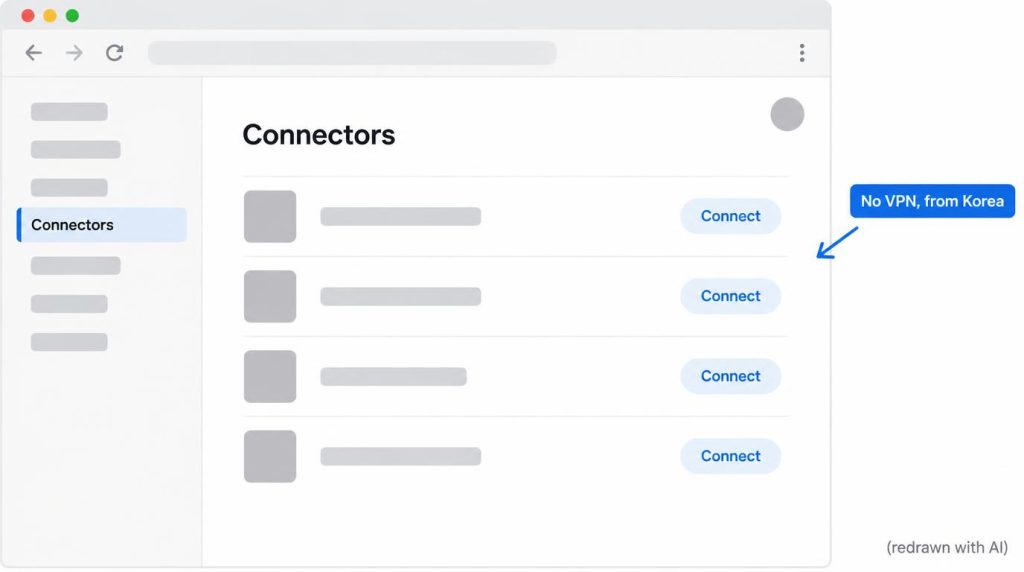
– What I saw from Korea (September 23, 2026): muse.ai opened without a VPN. I read the Secure VM, Connectors and purchase pages. Connectors listed outside services, including Google ones such as mail and calendar. I did not try to log in.
– Payments: Muse checks out with Link by Stripe. Meta’s launch post still lists Shop Pay as “coming soon” and 1Password logins as planned.
– Muse Confidential VM: Meta says it arrives “later this year.” It is not in the product yet.
On this page
- Meta Muse permissions: what I allow and what I approve
- How Muse approvals work, from Allow once to Always allow
- Why I don’t use Always allow for email or payments
- Should Muse only read your email, or send it too?
- How Muse pays, and why I still approve every payment
- Is Meta Muse safe? What Secure VM and Sentinel cover
- Should you connect Muse over a VPN?
- You can delete a worktree, but you can’t git reset an email
Meta Muse permissions: what I allow and what I approve
Allow what changes nothing or can be deleted. Approve each action that leaves your hands. Here is my setting for each action.
| Action | My setting | Undoable? |
|---|---|---|
| Read calendar | Allow | Nothing changes |
| Create/edit events | Approve each | Hard once invites go out |
| Read a test inbox | Allow | Nothing changes |
| Read main inbox | Decide after testing | What was read stays read |
| Draft email | Allow | Delete it |
| Send external email | Approve each | Can’t be recalled |
| Search, compare products | Allow | Nothing changes |
| Add to cart | Can allow | Empty it |
| Pay | Approve each | Refunds depend on the seller |
| Always allow for payments | Never | The prompt is gone |
“Approve each” means Meta’s “Allow once” option. Read access is set when you connect a service. For drafts, search and cart, I found no matching option in Meta’s help docs, so those rows are my own policy.
What I check at each prompt differs. For events and email, I look at recipients, content and attendees. For payments, I check the amount, seller, quantity and shipping address in the purchase details.
How Muse approvals work, from Allow once to Always allow
Muse asks before an action according to your permission settings. Meta’s help page (checked October 30, 2026) lists five answers to an approval prompt.
- Allow once: Muse does this one action.
- Allow for this action type: Muse may do this kind of action without asking again.
- Allow for this site: Muse may do this kind of action on that website without asking.
- Always allow: Muse may do this kind of action on that connector without asking.
- Deny: Muse skips it this time.
The middle two labels are translated from the Korean version of Meta’s help page.
Each connector also has a default. “Ask for some actions” asks before write actions and important read actions. “Always ask” asks before every action.
Read actions, in Meta’s terms, are things like checking your calendar or reading email. Write actions change something: sending a message or buying.
You can cancel a running task in chat, and the activity log shows what Muse did and which permissions you granted. Meta is blunt about the limit: some actions, like sending an email, can’t be reversed.
Why I don’t use Always allow for email or payments
Not for anything that leaves your hands. Auto mode is faster, but fewer approvals is not the goal.
My test was a coding agent, not Muse. I ran the same refactor 5 times in each mode in Antigravity CLI. Approval mode took about 18 minutes with 6–7 approvals. Auto mode took about 12 minutes.
In approval mode, 4 commands or changes stopped at the approval step. In auto mode, they would have just run. Approval is friction, but it wasn’t always waste. It adds a checkpoint before anything runs. The full numbers are in my Antigravity CLI permissions test.
Risk doesn’t only come from dangerous commands. A coding agent in auto mode once widened its edits to make tests pass. I threw the result away and rebuilt the worktree.
No single command was dangerous. A person watching would have stopped and asked, “Why is it touching this?” Instead it spent 20 minutes working diligently in the wrong direction.
So my rule is: “Could I throw this whole environment away?” I turn on auto-approve only in a worktree or Docker container with no credentials, one I can delete if it goes wrong. Personal email, calendar and cards are the opposite.
If you want fewer prompts in coding agents, what still asks in Claude Code, Codex and Antigravity is a different trade-off. With Muse, I keep the prompts. Least Agency in the OWASP Top 10 for Agentic Applications 2026 points the same way.
Should Muse only read your email, or send it too?
Grant reading and sending separately. My plan is to let Muse write drafts, but approve every outgoing email one at a time.
Meta’s security write-up says Muse keeps read and write access apart where the service allows it. It also cuts permissions finer than Gmail OAuth scopes: even with mail read access, you can remove access to Gmail settings.
The email connector filters out one-time codes, password reset links and magic login links. That keeps inbox access from turning into a takeover of your other accounts. How instructions hidden inside an email can hijack an agent’s tools is prompt injection, a separate topic.
Disconnecting a connector stops its future actions. Meta’s help page doesn’t say that disconnecting deletes anything. To wipe stored data, there is a separate Muse reset, which permanently deletes information, chat history, files and active tasks.
My order starts with a test inbox. I’ll decide on my main inbox only after enough testing. That is a plan, not a result.
Work email and calendars are a different problem. Even if I agree, the company owns that data.
How Muse pays, and why I still approve every payment
Muse pays through Link by Stripe. For a merchant you haven’t bought from before, it issues a single-use card number locked to that merchant, a set amount and a short validity window. On sites with a saved payment method, Muse detects the checkout page and asks you to approve the exact purchase every time.
The one-time card stops leaked numbers and overcharges. It doesn’t stop a wrong item, a duplicate order or an unwanted subscription. To the card, those all look like normal transactions.
OWASP calls that gap Excessive Agency in its LLM Top 10. The agent had more freedom than the task needed.
My line is the cart. Up to the cart, you just empty it. After payment, cancellation and refunds depend on the seller, so I make Muse stop before the pay button.
I have never let an AI agent make a real payment. This is my undo rule applied to money. For agents paying APIs on their own, I wrote up the spending limits I set in an x402 proof of concept.
Is Meta Muse safe? What Secure VM and Sentinel cover
Secure VM and Sentinel protect your credentials. They don’t limit the permissions you have already granted.
I think of agent permissions on two axes. Action permission is how far the agent may go: read, write, send or pay. Credential exposure is whether it needs to see the credentials at all to do that.
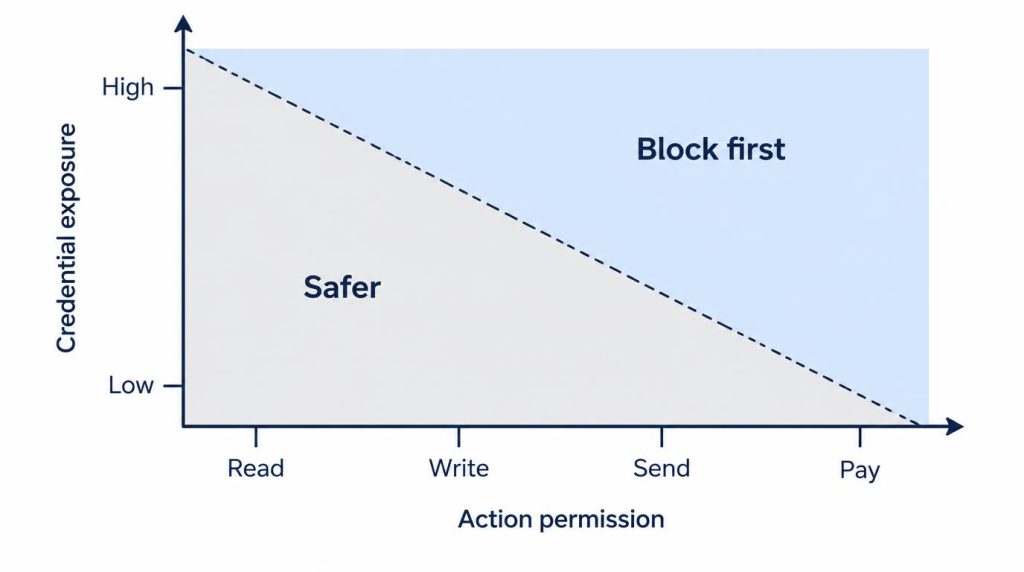
The MCP gateway I run keeps the two apart. My first prototype put tokens in the MCP server process’s environment variables.
Once I used GitHub, Slack and a database in one session, one agent process held several credentials at once. That boundary was too wide. I split credentials per tool behind the gateway, and I now run about 7 servers and more than 40 tools that way.
The agent only knows “I can call this tool.” Allowing a database query doesn’t mean it sees the database password. Allowing a mail lookup tool is no reason to put the mail account’s credentials in its context either.
Sentinel covers this second axis for Muse. Meta describes it as the sole permission authority for connector actions and outbound network traffic. Logins live outside the agent in a service called authd, and a surrogate token is swapped for the real one at the network boundary. In Meta’s words, “The agent never sees real tokens.”
The first axis is still on you. Patrick Wardle disclosed a macOS zero-day in Muse, now patched, that let malware on the Mac use the standing permissions the user had granted. Meta itself writes that “Muse isn’t immune to attack.”
Should you connect Muse over a VPN?
Not with a main account and card. A page loading in your country is a separate question from your account getting agent features.
Tying a main account and card to Muse over a VPN, outside official support, means granting the irreversible permissions first.
You can delete a worktree, but you can’t git reset an email
A coding agent’s worktree can be thrown away. A sent email, a changed event or a completed payment can’t be git reset. That’s why I hold Muse to a stricter standard than coding agents.
The rule is the same. Muse just mostly touches things you can’t throw away.
When I evaluate an agent, I look first at credential isolation, read/write separation and approval before irreversible actions. Not at how many apps it connects, and not at the company name. A well-built security architecture and what I trust the agent to do are separate judgments. Give an agent only the actions it needs, keep credentials out of its reach, and keep an approval step before anything hard to undo.
When Muse launches in Korea, I plan to connect reading first, following the table above, and update this post with real results.
Sources
- Meta Newsroom: Introducing Muse (September 8, 2026): US launch, Secure VM, Link by Stripe, Shop Pay “coming soon,” 1Password and Confidential VM plans
- Meta Newsroom: Muse for Small Business (September 29, 2026, updated October 8): availability in the US and Canada
- Meta Newsroom: Muse is now available in Singapore (October 27, 2026): Singapore launch
- Meta Help: How Muse works with your guidance and approval: approval options, connector defaults, read and write actions, disconnect and reset, actions that can’t be undone, activity log
- Meta research blog: Security and safety for AI agents: single-use cards, checkout approval, Sentinel and authd, email filters, “isn’t immune to attack”
Show 3 more sources
- VentureBeat: Meta patched Muse’s zero-day: the macOS zero-day and standing permissions
- OWASP Top 10 for Agentic Applications 2026: Least Agency
- OWASP LLM06:2025 Excessive Agency: definition of excessive agency
Related posts
- Antigravity CLI Always Proceed Still Asks? Permissions Tested
- Codex CLI npm install Fails? It Was the Sandbox, Not npm
- Antigravity CLI Remote Control: I Kept Approvals On
- AI Agent Used git commit –no-verify: Why I Re-Check in CI
I first wrote this in Korean on my blog: https://jjeongil.tistory.com/3561.