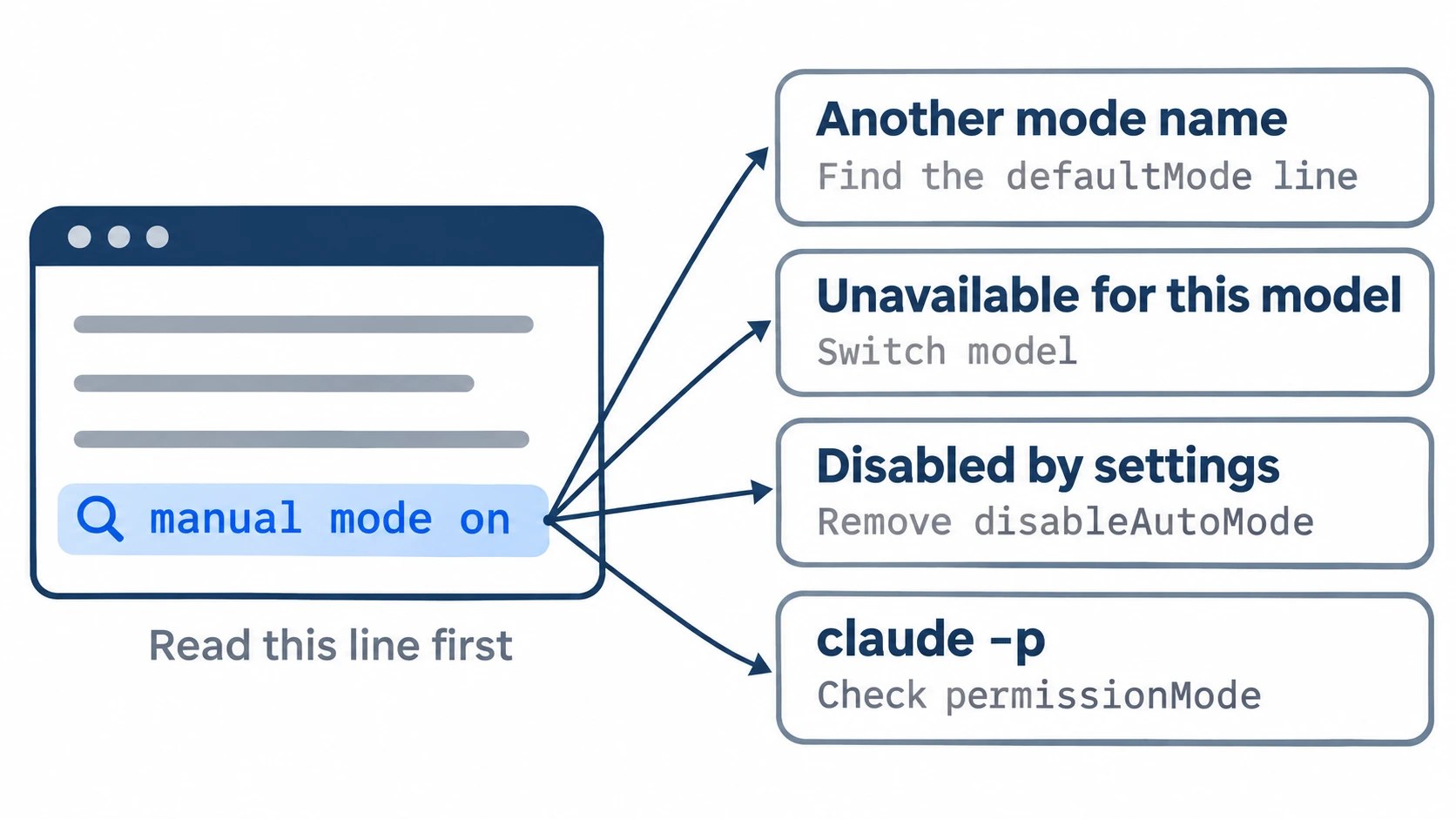
Before you add another setting, read the line under the input box, then press Shift+Tab through one full cycle. If auto comes up but the session started in another mode, manual mode on included, a defaultMode line in one of your settings files is beating auto: delete it, or move it to ~/.claude/settings.json as "auto". If auto never comes up, the text at the right of the input box names the cause, and the table below matches it to a fix. A claude -p run has no screen to read, so check permissionMode in its init event.
On this page
What the line under the input box is telling you
Start Claude Code the way you normally do and read the status line. It names the mode the session actually got, which is not always the one you asked for.
Then press Shift+Tab through one full cycle and watch two things: whether auto mode on ever comes up, and what text appears at the right of the input box. On an unsupported model that text only shows once the cycle passes the spot where auto would sit, so the start screen alone hides it.
| What you see | What it means | Where to go |
|---|---|---|
auto mode on |
Auto is working | Nothing to fix |
Any other mode at start, manual mode on included, and auto still in the cycle |
A defaultMode line wins |
Next section |
auto mode unavailable for this model |
The model can’t run auto | Model fix, below |
auto mode disabled by settings |
A disableAutoMode line |
Settings fix, below |
No text, no auto in the cycle, no defaultMode or disableAutoMode in any file |
Switched off server-side | New session, below |
| Other wording, like “unavailable for your plan” | An older version | claude --version, below |
claude -p, no status line |
The screen can’t tell you | permissionMode, below |
Another mode starts instead of auto: a defaultMode line is winning
Auto is the starting mode only when no settings file sets defaultMode. Any explicit line beats it: a "bypassPermissions" you set long ago, a "default" written before auto became the default (that one starts you at manual mode on), or a team’s committed "plan".
My own sessions never opened in auto for exactly this reason. On my personal machine, the first sign was that no approval question ever came up, and the status line said bypass permissions on, from a line in my ~/.claude/settings.json. The file closest to the project wins, so check them in this order:
.claude/settings.local.json- the project’s
.claude/settings.json ~/.claude/settings.json
To search all three at once, run this from the project root; it also finds a disableAutoMode line:
grep -nsE '"(defaultMode|disableAutoMode)"' .claude/settings.local.json .claude/settings.json ~/.claude/settings.json
If none of them has the line, run /status. When its Setting sources line lists managed settings, your organization’s policy can set defaultMode above all three files, and only your admin can change it.
Delete the line you found, or override a team’s file as below, then open a new session and check for auto mode on.
When the line is in a team’s shared file
A team’s committed file wins the same way. In another team’s repo my first request came back as a plan waiting for approval, with plan mode on below it, though my work default is acceptEdits.
I typed /exit instead of approving a change under rules I didn’t know or cycling past the reason it opened in plan, and found defaultMode: "plan" in the repo’s .claude/settings.json. I left the team’s file alone and put my mode in a one-line .claude/settings.local.json, which beats it; a restart opened at accept edits on.
To do the same for auto:
- Make that file’s one line
{"permissions": {"defaultMode": "auto"}}. - Before you rely on it, run
git check-ignore -v .claude/settings.local.json: it prints the ignore rule that covers the file, and if it prints nothing, add the path to.gitignoreso your line never lands in the team’s repo.
Which file to put auto in
Where you put "auto" decides whether it sticks:
| Where you put auto | Interactive | claude -p |
|---|---|---|
~/.claude/settings.json |
auto mode on |
auto |
Project .claude/settings.json |
auto mode on |
default (Manual) |
.claude/settings.local.json |
auto mode on |
default (Manual) |
--permission-mode auto |
auto mode on |
auto |
The user file is the one place that holds in interactive and claude -p runs alike, so put auto there, or pass the flag to every scripted run. In the VS Code extension, claudeCode.initialPermissionMode can’t be set to auto: leave it empty and pick Auto once from the mode menu.
Manual mode on and auto missing from the Shift+Tab cycle
If Shift+Tab only ever cycles through accept edits, plan and manual, auto has dropped out of the cycle, and one of two texts usually says why.
The model can’t run auto
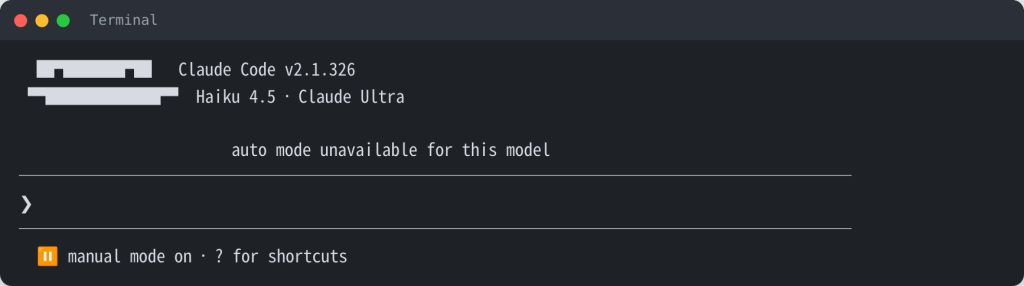
auto mode unavailable for this model means the session’s model can’t run auto. Anthropic lists the models that can:
| Where you run Claude Code | Claude models that can run auto |
|---|---|
| Anthropic API | Opus 4.6 and later, Sonnet 4.6 and later, Haiku 5.5, Fable |
| Bedrock, Foundry and similar providers | Sonnet 5 and later, Opus 4.7 and later, Haiku 5.5, Fable |
| Doesn’t qualify | Sonnet 4.5, Opus 4.5, Haiku 4.5 |
On Haiku 4.5 my session opened at a plain manual mode on, and the text showed up only partway through the cycle. Switch with /model; it also saves that model as your default for new sessions.
A disableAutoMode line
auto mode disabled by settings was on screen from the start. The grep line above finds it; delete the line if it sits in your user or project file. If it comes from managed settings, which Team and Enterprise admins use to turn auto off, only your admin can lift it.
Neither text: the server-side switch
When neither text shows, auto never comes up, and no file sets defaultMode or disableAutoMode, the server-side switch is what’s left. Anthropic can turn auto off for a while or reject it for your account, and a session that got that answer keeps auto off until it ends.
Meanwhile, accept edits is the closest mode left in the cycle: file edits go through, commands still ask. Open a new session at your next break and cycle again; the docs give no time for auto’s return.
The Auto mode server line in /status won’t tell you either, since it read Disabled even in a session of mine that could still cycle into auto.
“Unavailable for your plan” means an old build
“Auto mode is unavailable for your plan” is not a plan limit on a current build. The permission-modes page lists auto for all plans, and on a current build it is the starting mode on every one of them.
Run claude --version. If the number is below 2.1.283, update before you change plans or contact support: claude update for the standard install, brew upgrade claude-code for Homebrew, or npm install -g @anthropic-ai/claude-code@latest for npm. Then start a new session and check the status line again.
Running claude -p in a script or CI: no message, check permissionMode
A headless run prints none of the text above. A project-file auto line, an unsupported model and disableAutoMode all looked the same in my tests: the run went ahead in Manual, finished normally and printed no error.
-p starts in Manual unless a flag or your user settings give it a mode, so a run that should have been auto carries on in Manual without saying so. The real mode is in the init event, which comes after any SessionStart hook events, so filter for it rather than taking the first line:
claude -p "Reply with the single word ok." --output-format stream-json --verbose --max-turns 1 \
  | jq -r 'select(.type=="system" and .subtype=="init") | .permissionMode'
It prints one word, such as auto or default. Without jq, pipe to grep -o '"permissionMode":"[^"]*"' | head -1 instead; in a CI job, run this as a step before the real one and fail the job if the word isn’t auto.
If it prints default
Check the model and disableAutoMode as above, plus one cause that only bites here: defaultMode: "auto" in a project or local file.
Headless runs skip that line and stop using your user-level default too: in my tests, a folder that ran in bypassPermissions without the line ran in Manual with it. Use the user file or the flag instead, as in the claude -p column above.
Auto was on, then Claude Code started asking again
That’s the fallback, not a fault. After 3 blocked actions in a row or 20 in one session, auto goes back to asking; the thresholds can’t be changed, and approving the action it asks about puts you back in auto. Under claude -p it doesn’t stop; it skips the blocked action and keeps going.
One block doesn’t trigger it. In one of my Auto sessions, Claude tried to pipe an install script from curl straight into the shell and got a notice that the command hadn’t run, not an approval question; the mode stayed Auto.
Claude downloaded the script to read instead, and I skimmed it and ran that one install myself.
If the same command keeps getting blocked, don’t move up to bypassPermissions. Look at that command and decide whether it earns a narrow allow rule or an autoMode.allow entry. The rest of the prompt-cutting options are in my guide to stopping coding agent permission prompts.
Sources
- Research note: auto mode cases on Claude Code 2.1.326, loopnotes-lab, November 2026: interactive and headless runs, screens and the per-case table
- Choose a permission mode, Claude Code docs (Anthropic), read November 17, 2026: supported models, plans, starting mode and fallback rules
- Configure permissions, Claude Code docs (Anthropic), read November 16, 2026: settings file precedence and managed settings
- Advanced setup, Claude Code docs (Anthropic), read November 17, 2026:
claude update, Homebrew and npm update commands - Issue #41077, anthropics/claude-code, March 30, 2026: another user’s “unavailable for your plan” report on v2.1.86
- Issue #87534, anthropics/claude-code, August 18, 2026: the same message on 2.1.141, gone after updating