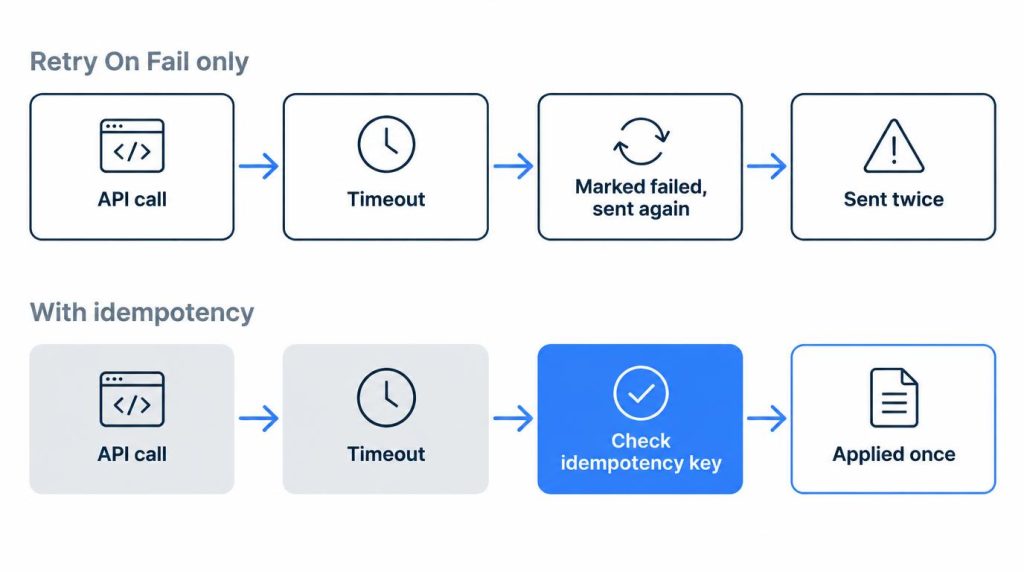
n8n’s Retry On Fail can send the same request twice. If the first call succeeds on the other system but the response times out, n8n marks the node as failed and runs it again. That happened to me with a notification workflow, and the same notification went out twice.
The fix isn’t turning retries off everywhere. Send one item per call, give each call an idempotency key the API can recognize, and for calls that can’t be made safe, replace the built-in retry with your own error branch.
The behavior below comes from n8n’s docs and source code as of n8n 2.45.7, the latest stable release (published October 30, 2026).
On this page
- Why does n8n Retry On Fail send a request twice?
- Three ways the same request runs twice in n8n
- Fix 1: send one item per call with Loop Over Items
- Fix 2: add an Idempotency-Key header in the HTTP Request node
- Fix 3: when the API has no idempotency key
- When a retry is safe, and when it isn’t
- The other four incidents from eight months of self-hosting
- FAQ
Why does n8n Retry On Fail send a request twice?
Because a timeout doesn’t tell n8n whether the first request failed. n8n only sees that no response came back in time, so it treats the call as failed and runs the same node again.
Retry On Fail is a node setting that re-runs a node when its execution fails. n8n’s node docs describe it in one line: “When an execution fails, the node reruns until it succeeds.” In the node’s Settings you also see Max Tries and Wait Between Tries (ms).
None of those fields know what the other system already did. If the request was applied there and only the response got lost, the retry is a second request, not a repair.
n8n’s blog post on API idempotency (published September 3, 2026) walks through the payment version: the charge succeeds, the connection times out before the response arrives, and a retry creates a second charge unless the API can recognize the repeat.
What a retry actually re-runs
The whole node runs again, with all of its input items, not just the item that failed. In n8n’s execution engine (workflow-execute.ts in 2.45.7), the retry loop calls the same node run with the same input data each time.
That has two consequences:
- If 20 items go into one HTTP Request node and item 15 fails, the retry sends items 1 to 14 again too.
- With
Retry On Failon, n8n makes 3 tries by default. The same code clampsMax Triesto between 2 and 5 andWait Between Triesto between 0 and 5,000 ms (default 1,000 ms).
The HTTP Request node has no timeout field until you add one under Options > Timeout. Once added, it starts at 10,000 ms, and n8n aborts the request if the server hasn’t sent response headers by then. A slow API can easily go past 10 seconds while still finishing the work. If the timeout came from a proxy or gateway in front of the API instead, find which layer cut the request off before you tune n8n.
My duplicate notification
The workflow sent notifications to an external service. One external API call ended in a timeout, and n8n marked it as failed. Retry On Fail was on, so n8n sent the same request again on its own.
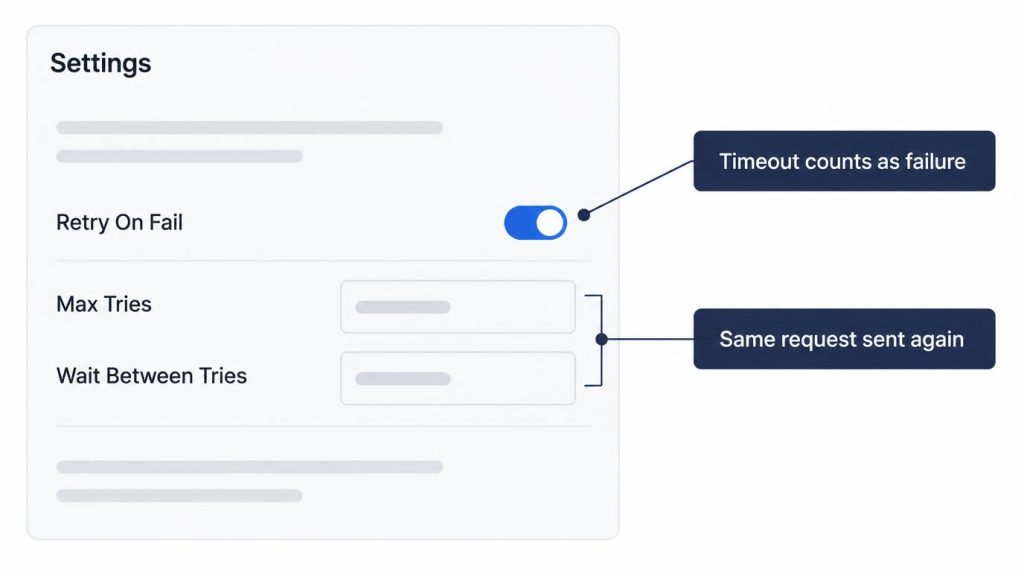
The external service had already finished the first request. The same notification went out twice.
It wasn’t a big incident. The recipients were a small, almost test-like group, so I could confirm it quickly.
It still changed how I read a retry setting. Before I used n8n, I saw Retry On Fail as just a handy option. Now I don’t stop at “retry on a 5xx or a timeout.” I first ask: for this timeout, can I prove the first request actually failed?
That workflow now carries both a business ID and an idempotency key. For work that’s hard to undo, like payments, I don’t leave duplicate prevention to the n8n node’s retry alone.
Three ways the same request runs twice in n8n
Node retry is the one that bit me, but it isn’t the only path.
Retry On Failon the node. Covered above: a timeout looks like a failure, and the whole node runs again.- Retrying a failed execution by hand. On the Executions list,
Retry with currently saved workflowandRetry with original workflowboth resume from the saved state. Nodes that finished keep their results, and the failed node runs again with its saved input. If that node had already sent part of its items, those go out again. - The sender redelivers to your Webhook trigger. Many services deliver webhooks at least once and resend when your response is slow. n8n then starts a second execution for the same event.
The fixes below work for all three, because they make the call itself safe to repeat.
Fix 1: send one item per call with Loop Over Items
Put the HTTP Request node inside a Loop Over Items (Split in Batches) node with Batch Size set to 1. Each loop pass runs the HTTP Request node with a single item, so a retry resends only that item instead of the whole list.
This only shrinks the blast radius. If that one item timed out after the server applied it, a retry still sends it twice. Treat it as a first step, then add Fix 2 or Fix 3 for writes.
Fix 2: add an Idempotency-Key header in the HTTP Request node
An idempotency key is a value you send with a request so the server can recognize a repeat and apply it only once. In the HTTP Request node:
- Turn on
Send Headersand chooseUsing Fields Below. - Set Name to
Idempotency-Key. - Set Value to an expression built from the item’s own data, for example
{{ 'notify-' + $json.eventId }}or{{ $json.orderId }}.
The key must stay the same on every retry of the same item. n8n’s idempotency post recommends building it from input data, such as an order ID, rather than from $execution.id. A manual retry of a failed execution starts a new execution with a new ID, and $now or a random value changes on every try. Either one makes each retry look like a new request.
The header only helps if the receiving API supports it. Payment APIs such as Stripe document an Idempotency-Key header, but not every API supports one. Check the API’s docs before you count on it.
Fix 3: when the API has no idempotency key
Then the safety has to live in your workflow. At work, on message queues and post-payment processing, I handled this with four things. I stored a business identifier (eventId) with the data and put a unique constraint in the DB. A processing-history table was checked first to see whether a request was already handled. When the external payment API supported one, I also used an idempotency key. That last one is Fix 2. In n8n, the same ideas can take these forms:
- A ledger table with a unique constraint. Before the HTTP Request node, a Postgres or MySQL node inserts the event’s business ID into a table whose ID column is unique. If the insert hits the constraint, the event was already handled, and an IF node stops that item before the send.
- A lookup before re-sending. If the API can search by your business ID, a GET first tells you whether the earlier call landed. A server that is still processing may not show it yet, so give it time before trusting an empty result.
- The Remove Duplicates node. Its
Remove Items Processed in Previous Executionsoperation drops items whoseValue to Dedupe Onwas seen in earlier executions, keeping up to 10,000 values by default.
For a write with no safe repeat at all, turn Retry On Fail off on that node and build the retry by hand:
- In the node’s Settings, set
On ErrortoContinue (using error output). Failed items now leave through a separate error output instead of stopping the workflow. - On the error branch, split by error type. A connection refused means the request never reached the server, so a Wait node plus a second try is fine there.
- Send timeouts to a check (the lookup or ledger above) or to a person, not straight back to the API.
When a retry is safe, and when it isn’t
A retry is safe when running the node again changes nothing. Running a read again is fine. Some workflows, though, must not re-run something that has already happened in the world, like a sent message or a charge. That property, where the same request applied twice has the result of applying it once, is called idempotency.
| Call | Built-in Retry On Fail |
|---|---|
| GET, or any read | Fine |
| POST with an idempotency key the API honors | Fine |
| POST without a key, failed with connection refused | Usually fine (the request never reached the server) |
| POST without a key, failed with a timeout or 5xx | Don’t auto-retry; check first |
Paid API calls follow the same rule with money at stake: my HTTP 402 and x402 post compares retrying a 402 with retrying a 429.
The other four incidents from eight months of self-hosting
The duplicate was one of five incidents in about eight months of self-hosting n8n. The setup was for personal automation, not a large system at work. It ran on a small 2 vCPU/4GB VPS with Docker Compose, with around 20 active workflows and hundreds of executions a day. The other four, briefly:
- The container came back to the setup screen. My early test compose file didn’t persist n8n’s data, so recreating the container wiped the SQLite DB and settings. Now a named volume sits on
/home/node/.n8n, the layout n8n’s Docker docs use, and I kept it after moving to PostgreSQL because that folder still holds the encryption key. - A PostgreSQL dump alone didn’t restore credentials. The workflows came back, but the credentials didn’t work, because the dump holds encrypted values, not the key. n8n’s backup and restore page says a restored database can’t be decrypted without the original key (
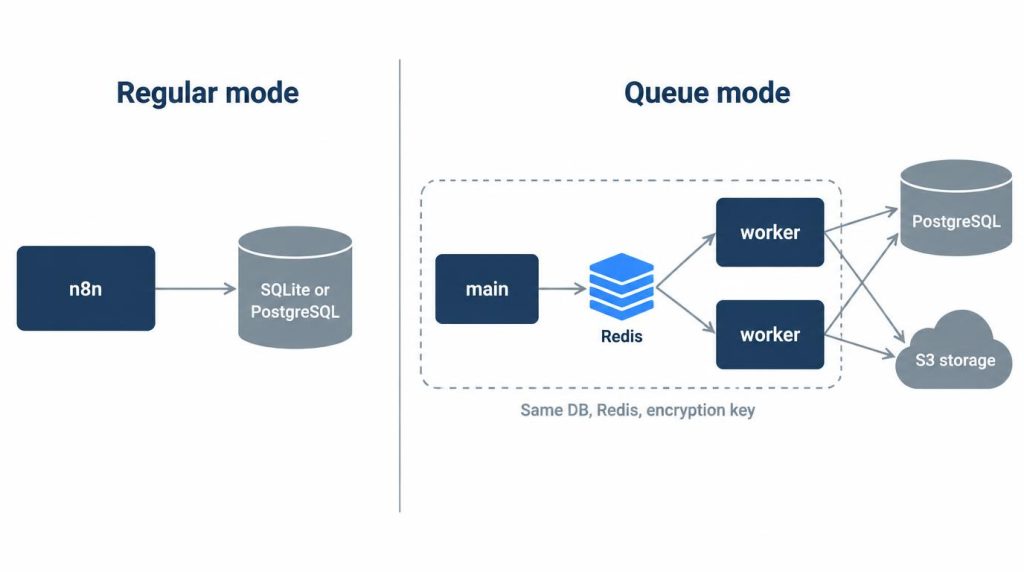
N8N_ENCRYPTION_KEY). My backup now covers the DB, the encryption key and config, and the compose and env settings. - Queue mode needed more than workers. Main and workers had to share the same DB, Redis, and encryption settings, and filesystem binary data isn’t supported there. For workflows at hundreds of runs a day, where one instance is enough, I’d rather not add those moving parts.
- The webhook URL showed the wrong address behind a reverse proxy. n8n builds that URL from its own host and port settings, so it needs
N8N_WEBHOOK_URL(plusN8N_PROXY_HOPS=1and forwarded headers, per the reverse proxy guide). The oldWEBHOOK_URLname I used is deprecated since 2.35.0.
If I set it up again, I’d use PostgreSQL from the start, put the .n8n directory and the encryption key in the backup, and design nodes with side effects for idempotency before relying on retry.
FAQ
Does Retry On Fail retry only the failed item?
The whole node runs again with all of its input items, so items that already went out are sent again. To limit a retry to one item, put the node inside Loop Over Items with Batch Size 1.
Does “Retry execution” re-run nodes that already succeeded?
No. It resumes from the saved state and runs the failed node again with its saved input. That node itself may resend items it had already sent before it failed. The exception is an Execute Sub-workflow node, which reruns the whole sub-workflow.
Is it an n8n bug when a webhook runs the same request twice?
Often it’s less an n8n bug than the sending service’s at-least-once redelivery. The sender may have redelivered only because the response was slow. Handling idempotency in the workflow is the safer way to block the duplicate.
References (n8n docs checked November 2, 2026)
- Nodes | n8n Docs: Retry On Fail, On Error options
- workflow-execute.ts | n8n GitHub: retry loop re-runs the node with the same input; Max Tries 2 to 5 (default 3), Wait Between Tries 0 to 5,000 ms (default 1,000)
- HTTP Request node | n8n Docs and its V3 description source: Send Headers, Batching, Timeout (default 10,000 ms)
- Loop Over Items (Split in Batches) | n8n Docs: Batch Size, loop and done outputs
- Remove Duplicates | n8n Docs: Remove Items Processed in Previous Executions, History Size 10,000
- All executions | n8n Docs: Retry with currently saved or original workflow, resumes from saved state
- Build Reliable Workflows With API Idempotency | n8n Blog: timeout and retry duplicates,
Idempotency-Keyheader, key from input data rather thanexecution.id(published September 3, 2026) - Idempotent requests | Stripe API: an API that honors
Idempotency-Key - Docker installation | n8n Docs and Backup and restore | n8n Docs:
/home/node/.n8nvolume, encryption key - Configuring queue mode | n8n Docs, Configure webhook URLs with reverse proxy | n8n Docs, Endpoints environment variables | n8n Docs: queue mode requirements,
N8N_WEBHOOK_URL,WEBHOOK_URLdeprecated from 2.35.0 - n8n releases | GitHub: latest stable 2.45.7, October 30, 2026
Related posts
- Mini PC Home Server Checklist: 5 Checks Before Buying
- TigerVNC Black Screen on Ubuntu: Check xstartup First
- 504 Gateway Timeout but No App Errors? Find Who Cut It Off
I first wrote this in Korean on my blog: https://jjeongil.tistory.com/3572.