I keep a Mac Studio M3 Ultra with 96GB as an always-on LLM box, next to an RTX 4090 workstation. The Studio runs Llama 3.3 70B at Q4 and takes the long-context jobs the 4090 can’t.
It is not the faster machine. When a job fits in the 4090’s 24GB, the 4090 answers first.
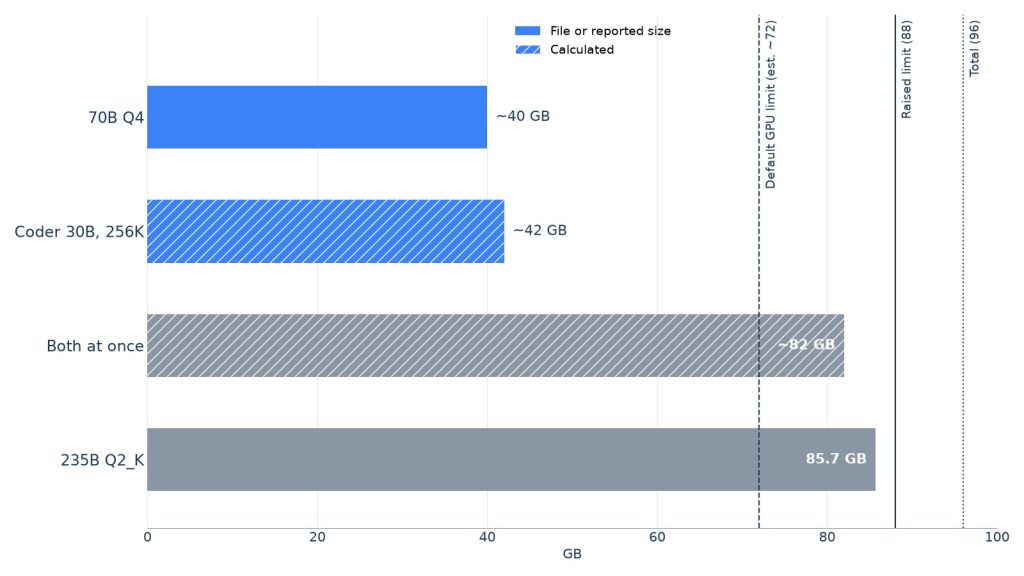
- Fits: 70B Q4 (about 40GB), or Qwen3-Coder 30B at 256K (about 42GB by my math). One at a time.
- Failed: Qwen3-235B. Q4 doesn’t fit, and Q2 broke code answers.
- Speed: my estimate for 70B is mid-teens tok/s, not a benchmark.
On this page
What fits in 96GB of unified memory?
Llama 3.3 70B at Q4 (about 40GB) fits. Qwen3-Coder 30B with its full 256K context comes to about 42GB by my math. Both together don’t fit under macOS’s default GPU limit, so I load them one at a time.
Unified memory is a single pool of RAM shared by the CPU and GPU. The GPU only gets part of it by default. Using the common three-quarters rule, I put that at roughly 72GB on a 96GB Mac. My local LLM hardware and runtime guide compares this pool with dedicated VRAM on other boxes.
That line matters more than the 96 on the box. I saw it bite when an 85.7GB model wouldn’t load until I raised the limit.
| Model | Quant / context | Memory | Basis |
|---|---|---|---|
| Llama 3.3 70B | Q4 | ~40GB | weights |
| Qwen3-Coder 30B | Q4, 32K | ~21GB | measured on 4090 |
| Qwen3-Coder 30B | Q4, 256K | ~42GB | calculated |
| Qwen3-235B-A22B | Q4 | 140GB+ | calculated |
The 42GB is mostly KV cache. Qwen3-Coder 30B has 48 layers, 4 KV heads, and a head size of 128.
At fp16 that’s about 96KB per token, or about 24GiB at 262,144 tokens. Add roughly 17GB of Q4 weights.
I’ve never actually filled 256K. With long contexts, I watch Memory Used and the memory pressure graph in Activity Monitor. I back off when it starts turning yellow.
Can you keep 70B and a coding model loaded at once?
Not by default. 40GB plus 42GB is about 82GB, over my roughly 72GB estimate of the GPU limit, so the second load would fail.
sudo sysctl iogpu.wired_limit_mb=88000 raises the limit, and then 82GB fits on paper. That leaves only about 6GB of headroom inside the 88GB limit, and I won’t risk swap for that.
How fast is 70B on an M3 Ultra?
My estimate is mid-teens tokens per second. I haven’t measured it.
The math: Apple’s over 800GB/s divided by about 40GB of weights gives a ceiling near 20 tok/s. I assume about 70% of that in practice.
You’ll see 25–30 tok/s quoted for 70B Q4 on this chip. Each generated token reads all the weights once. So without speculative decoding, that figure is above what the bandwidth allows.
Why are long prompts slow on the M3 Ultra?
Generation is bound by bandwidth, but prompt processing (prefill) is bound by compute. That’s where the M3 Ultra trails a 4090.
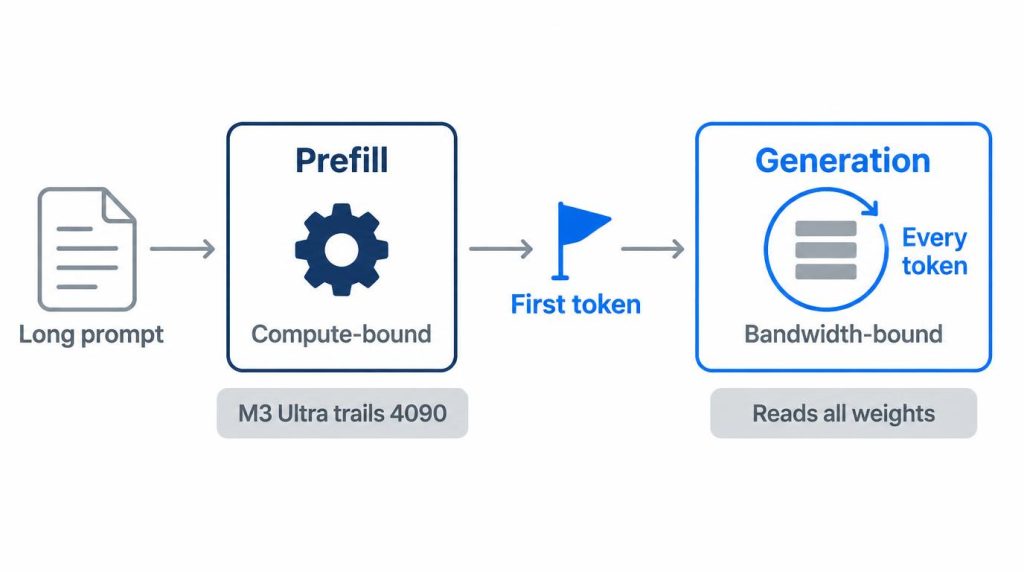
By my rough math, 70B Q4 prefills about 100 tokens per second. An 8K prompt would take near a minute, and 32K would take 5 to 8 minutes.
Qwen3-Coder 30B has only about 3B active parameters, so it reads far faster. At 100K, I’d guess 100 to 170 seconds to first token, assuming 600 to 1,000 tok/s of prefill at that length.
What didn’t work: Qwen3-235B in 96GB
Qwen3-235B-A22B doesn’t fit at Q4, and the Q2 build I forced in broke a simple coding task. I dropped it after two evenings, about 5 to 6 hours in total.
Q4 weights come to over 140GB by my math, so I never downloaded them. I took Unsloth’s Q2_K GGUF instead: two parts, 85.7GB. I skipped UD-Q2_K_XL at 88GB because it would have left no room for context.
Loading failed first. Under the default limit, the 85.7GB allocation didn’t go through.
sudo sysctl iogpu.wired_limit_mb=88000 got it in, for that day only; the setting resets on reboot. With about 8GB left for macOS, I kept context at 8K.
Speed wasn’t the problem. With 22B active parameters, it didn’t feel slower than 70B dense.
Quality was the problem. I asked for an interval-merge function plus pytest tests. It looped without sorting by start time first.
It also treated touching intervals differently in the function and the tests. Its own tests failed against its own code.
Qwen3-Coder 30B Q4 got the same prompt right on the first try. (Why a 30B coder can beat bigger or smaller models on this kind of task is the subject of my 8B vs 30B test.) My test for a quant is whether it keeps the constraints to the end, not whether it can chat.
For coding, I now only consider big models at sizes where Q3 or better fits.
How I split jobs between the Studio and an RTX 4090
Short, fast jobs go to the RTX 4090; big models and long contexts go to the Mac Studio. The 4090 answers long prompts faster, but its 24GB of VRAM can’t hold 70B and runs out past 64K context.
| Job | Machine | Why |
|---|---|---|
| Agent coding, under 32K | RTX 4090 | Fast first reply |
| 70B anything | Mac Studio | Too big for 24GB |
| Over 64K context | Mac Studio | 4090 spills to RAM |
The 4090 numbers are my own readings in LM Studio, not a controlled benchmark. Qwen3-Coder 30B Q4 used about 21.1GB at 32K and 23.4GB at 64K.
At 128K it spilled into system RAM, and the first response took over 10 seconds. Dropping to 32K brought it to about 2.8 seconds.
Over the weekend of October 17–18, 2026, I ran a half-day refactor on the 4090 that way, through Cline. First replies came in around 3 seconds.
On Monday, October 19, the Studio got the slow job: about a dozen PR diffs from a side repo at work, queued for 70B review drafts. I SSH’d in that evening and pulled the results.
My dev machine is a 32GB Mac mini M6. When three agents are running on it, I send local model calls to the 4090 instead.
The Studio is far quieter. With 70B running, I have to stand next to the shelf to hear it. The 4090 box, power-limited to 350W, is audible across the room under load.
Apple lists the top M3 Ultra Mac Studio configuration at 9W idle and 270W maximum. I estimate 100–200W during 70B generation, against 450–550W at the wall for the 4090 box.
How do you run it headless?
It has no monitor, never sleeps, and is reachable only through an SSH tunnel. Sleep is off with sudo pmset -a sleep 0 disksleep 0 womp 1 autorestart 1.
When my study’s breaker tripped once, it was back up before I SSH’d in.
LM Studio runs without the GUI via lms daemon up and lms server start --port 1234. JIT loading is on, with a one-hour idle TTL for 70B.
I reach it through ssh -N -L 1234:localhost:1234 studio. I set ServerAliveInterval 30 after a tunnel died overnight.
Should you still buy an M3 Ultra 96GB after M5 Ultra?
I’m keeping mine, but buying today I’d get an M5 Ultra with more than 96GB. My limit was capacity, not speed, and a 96GB M5 Ultra doesn’t fix capacity.
Apple announced the M5 Ultra Mac Studio on August 25, 2026, and it shipped September 22. As of October 2026, it starts at $5,499 in the US with 1.2TB/s of bandwidth.
The 512GB option went on sale on Apple’s online store on October 28, 2026, as a $15,500 upgrade on the top M5 Ultra chip, about $22,299 before storage. Apple also claims LLM prompt processing up to 4x faster than the M3 Ultra.
I bought mine in late November 2025 for 70B always-on plus Coder 30B with long context. The 256GB upgrade was $1,600 more in the US.
I’d rather pay for capacity I knew I’d use. During the 235B attempt, I wished I had it.
A refurbished or used M3 Ultra 96GB makes sense only at roughly half the price of a new M5 Ultra or less. It also has to be for someone who’ll stay at 30B and below.
I wouldn’t recommend it if you need CUDA, plan to serve many concurrent users, or care most about first-token time on long prompts.
It’s overkill for 7B–13B models or a small API bill.
If you need 70B now and then, I’d still rent a cloud GPU. If you need it daily, a Mac Studio is the box.
FAQ
Does Llama 3.3 70B Q8 fit in 96GB?
The Q8_0 GGUF file alone is 74.98GB. That’s already over my roughly 72GB estimate of the default GPU limit, before any context.
What else runs well on a 96GB M3 Ultra?
gpt-oss-120b. Its MXFP4 file is in the mid-60GB range, inside the default GPU limit, and with context it takes about 70GB, so it’s the only model I keep loaded when I use it. With about 5B active parameters it is clearly faster than 70B; I haven’t measured tok/s. I use it for code review drafts and document summaries, and keep Qwen3-Coder 30B for long code generation.
Is MLX or llama.cpp faster on an M3 Ultra?
I can’t answer from my own runs. I use LM Studio, headless through an SSH tunnel, and haven’t compared it with MLX or llama.cpp on this machine.
Sources
- Apple introduces new Mac Studio with M5 Max and M5 Ultra, Apple Newsroom, August 25, 2026: M5 Ultra announcement, US starting price, 1.2TB/s bandwidth, ship date, prompt-processing claim
- Mac Studio Technical Specifications, Apple, checked October 21, 2026: M5 Ultra 96GB base memory
- Apple unveils new Mac Studio, the most powerful Mac ever, Apple Newsroom, March 5, 2025: M3 Ultra memory bandwidth (over 800GB/s)
- Mac Studio power consumption and thermal output (BTU) information, Apple Support, checked October 21, 2026: M3 Ultra idle and maximum power
- Apple no longer offers M3 Ultra Mac Studio with original highest RAM configuration, 9to5Mac, March 5, 2026: 256GB upgrade price
Show 3 more sources
- Qwen3-Coder-30B-A3B-Instruct, Qwen on Hugging Face, checked October 21, 2026: layer and KV head counts, 256K context
- Apple’s Mac Studio with M5 Ultra now available with 512GB RAM, MacRumors, October 28, 2026: 512GB availability and upgrade price
- Llama-3.3-70B-Instruct-GGUF, bartowski on Hugging Face, checked October 21, 2026: Q4_K_M and Q8_0 file sizes